
Troubleshooting & Workflows
Prevent AI Face Drift in Seedance 2.5: Dual First & Last Frame Keyframing for Consistent Characters
Stop face melting, clothing shifts, and identity distortion in AI video shots. Learn how to anchor character geometry using first and last frame reference nodes in Say Action.
On this page
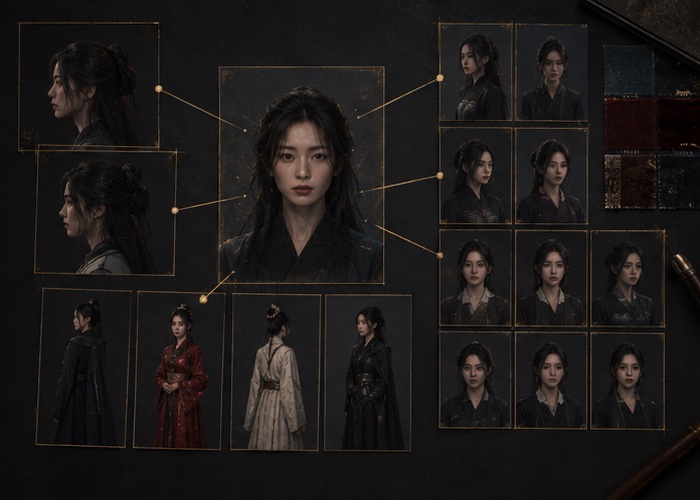
Why do characters suffer from facial drift when turning their heads?
In standard text-to-video or single-image-to-video diffusion pipelines, the model lacks strict geometric constraints across later frames. When camera or head motion exceeds a certain threshold, facial keypoints dissolve during progressive denoising, making the character look like a completely different person.
Relying solely on text prompts such as 'high resolution, consistent face' cannot resolve latent space divergence. Physical, pixel-level geometric anchors must be supplied at both the beginning and the end of the video generation window.
How does first and last frame anchoring enforce dual geometric constraints?
On the Say Action node canvas, drag two character keyframe poses from your asset library: connect one to Seedance 2.5's First Frame slot and the other to the Last Frame slot.
Connect character references to the reference or first/last-frame inputs supported by the selected model, then confirm resolution and duration. Capabilities depend on the model and provider; reference images do not guarantee perfect consistency.
How do you control iteration and parameter trial costs?
Checkout is in USD. Displayed prices follow your selected language and include a reference currency conversion. Planning estimate using the model-credit presets shown below, not a live quote. All examples spend the same shared credits; video and image counts are alternatives, not extra allowances. Actual models, supported parameters and charges follow your channel settings.
Connect your own API channels and third-party relays
In model-channel settings, enter the Base URL and API key, then configure the protocol, model IDs and required headers from your provider's documentation. Check the image and video modes you need before generating. Paths, resolutions and first/last-frame inputs depend on the connected channel. An adaptation request for an unsupported channel is not a compatibility guarantee.
BYOK supports a custom API endpoint, model key and headers. For OneAPI, NewAPI or another relay, select the OpenAI, Gemini or Claude protocol that matches its actual API, then check model IDs and image/video endpoint support. Not every relay or private protocol works automatically. BYOK model calls have no platform model markup or platform generation-credit deduction; workspace access and provider usage are still billed separately.
Connect only trusted providers and use HTTPS in production. Custom requests are forwarded through the authenticated backend; required prompts, reference assets and credentials take part in the request. Never put API keys, passwords or secret-bearing headers in public canvases, screenshots or support requests.
Frequently asked questions
Must the first and last frames use the exact same image?
No. First and last frames should be different poses or angles of the same character (e.g., front-facing and 45-degree profile); the model smoothly interpolates the transition between them.
Do failed video generations consume compute credits?
When the upstream explicitly reports failure, reserved credits are refunded; tasks with unclear network status stay pending review to avoid double settlement.
What motion strength value is recommended for natural turns without face distortion?
Connect character references to the reference or first/last-frame inputs supported by the selected model, then confirm resolution and duration. Capabilities depend on the model and provider; reference images do not guarantee perfect consistency.
Can I connect OneAPI, NewAPI and custom headers?
BYOK supports a custom API endpoint, model key and headers. For OneAPI, NewAPI or another relay, select the OpenAI, Gemini or Claude protocol that matches its actual API, then check model IDs and image/video endpoint support. Not every relay or private protocol works automatically. BYOK model calls have no platform model markup or platform generation-credit deduction; workspace access and provider usage are still billed separately.