
萬聖節 AI 提示詞:扮裝相片、店舖海報與 5 秒短片實用指南

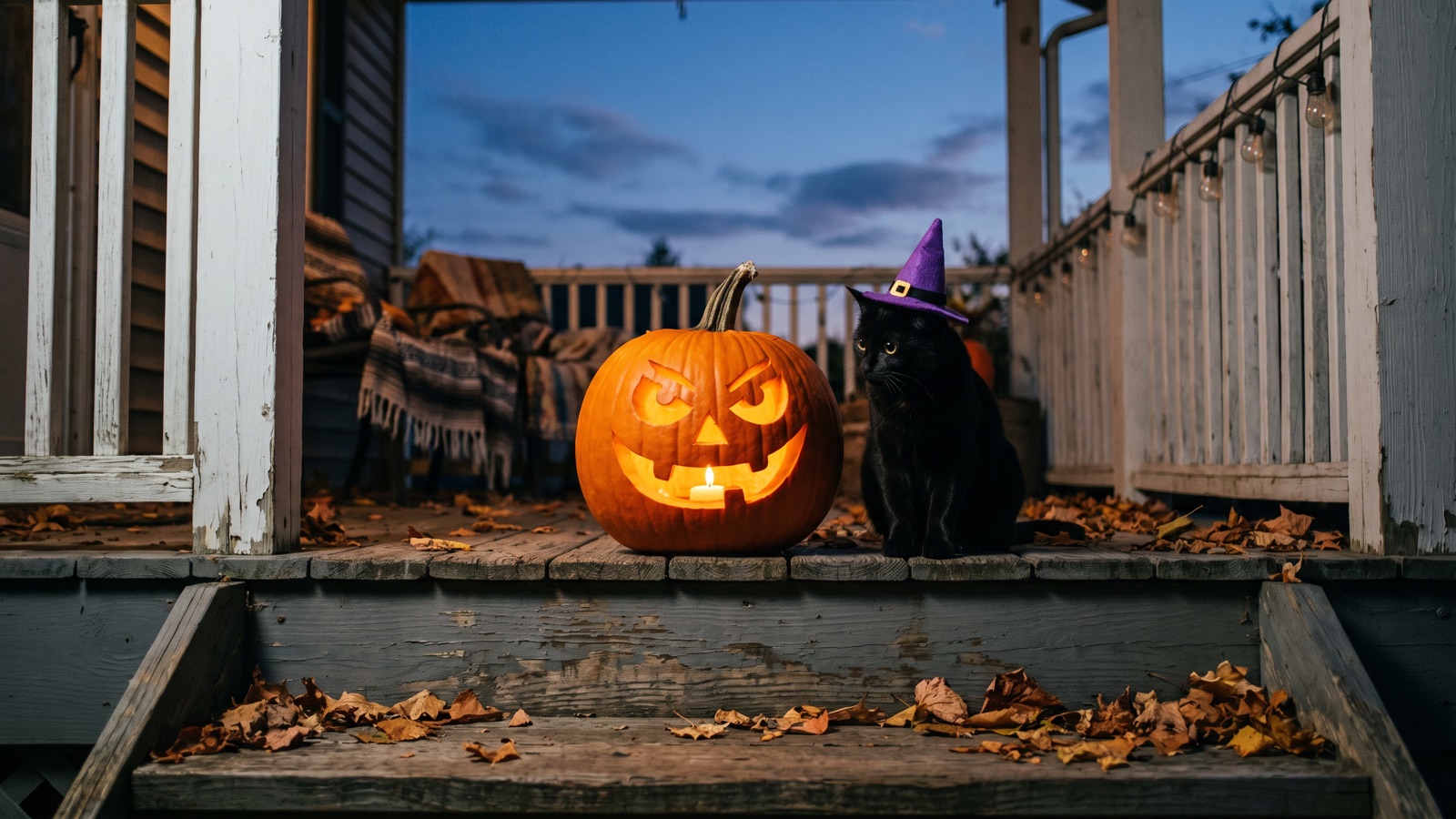
這篇文章給你 16 組可以直接複製的萬聖節提示詞:扮裝頭像、寵物合照、店舖海報,還有 5 秒左右的短片。每組都寫明怎樣在畫布上使用、哪幾個詞可以替換。讀完約需 14 分鐘。
怎樣用 AI 製作萬聖節扮裝與趣味生活相片?
想看更多頭像靈感,可參閱 萬聖節頭像創意指南。
想用自己的相片做扮裝,先在畫布底欄點擊「添加節點」,新建「圖片」節點並上載正臉相片。接着新建第二個「圖片」節點填入下方提示詞,並從第一個節點的輸出錨點拖曳連線至第二個節點的輸入錨點。模型會以連入的相片為準,換上你指定的節日服飾與光影。
1. 個人扮裝寫真(白色面具與皮褸風格)
適合用途:社交平台扮裝頭像、個人寫真或派對電子海報。
Use the connected photo as the face reference and keep the same face. A 35mm flash photo of a person wearing a plain white ceramic mask and an oversized black leather jacket, standing against a dark wood wall. Crisp on-camera direct flash, sharp cast shadow behind the subject, saturated colors, grainy disposable camera snapshot.想換風格,改這幾個詞就行:把白色陶瓷面具 white ceramic mask 改為尖頂黑色女巫帽 pointed black witch hat,把黑色皮褸換成暗黑天鵝絨連帽斗篷 dark velvet hooded cloak。
2. 寵物萬聖節扮裝
適合用途:為家中的貓狗製作節日搞怪手機牆紙,並在社交平台分享。
Use the connected photo of my pet and keep its fur color and markings. Eye-level studio portrait of a golden retriever wearing small felt black bat wings and an orange collar, sitting next to a hollowed carved pumpkin. Warm soft key light from the front, subtle dark purple studio backdrop, crisp fur texture, clean indoor lighting.想換風格,改這幾個詞就行:把金毛尋回犬 golden retriever 換成黑貓 black cat,把小蝙蝠翅膀 small felt black bat wings 換成迷你針織女巫帽 tiny knitted witch hat。
3. 雙人與家庭節日合照
適合用途:情侶、朋友或家庭製作節日紀念卡與秋日合照。
Use the connected photo as the face reference and keep the same face. A cozy medium shot of two people sitting on a rustic wooden porch covered in carved glowing pumpkins and dried corn stalks at dusk. Both wearing knitted vintage Halloween sweaters with pumpkin patterns, holding mugs of warm cider. Warm amber porch light, dim navy blue sky in the background, soft outdoor depth of field.想換風格,改這幾個詞就行:把兩位好友 two people 換成一家三口 a family of three,把木門廊 rustic wooden porch 換成秋季南瓜農場草堆 hay bales in a pumpkin patch。
4. 搞笑趣味相片
適合用途:節日幽默表情圖,以及社交平台的搞怪互動圖。
A humorous candid photo of a life-sized skeleton dressed in a gray office cardigan and reading glasses, sitting at a cafe table typing on a laptop next to a pumpkin spice latte. Daytime window sunlight, realistic cafe interior, depth of field, casual smartphone snapshot aesthetic.想換風格,改這幾個詞就行:把骷髏 life-sized skeleton 換成頭戴大南瓜的人 a person wearing a giant carved pumpkin over their head,把咖啡店換成辦公桌 cluttered modern office cubicle。
小店與商戶怎樣用 AI 製作節日宣傳海報與產品主圖?
海報排版與更多宣傳圖提示詞,可參閱 萬聖節海報與宣傳單張提示詞指南。
商業宣傳圖的核心,是在構圖中主動留出空白排版區域。模型生成乾淨的底圖後,店名、折扣和活動文案再用設計軟件加上。目前多數圖像模型很難準確拼寫文字,直接在提示詞裏要求模型畫字,容易出現錯字。
5. 咖啡店萬聖節促銷海報底圖
適合用途:咖啡店或烘焙小店製作特飲促銷海報,頂部留白,方便之後加上店名、標語與折扣。
Commercial poster background for a coffee shop, featuring a rustic wooden counter decorated with small pumpkins, cinnamon sticks, and dried autumn leaves along the bottom edge. Warm directional side lighting, soft steam rising, dark slate wall in the upper half leaving clean negative copy space for text, high detail commercial photography.想換風格,改這幾個詞就行:把枱面上的南瓜與肉桂條換成萬聖節紙杯蛋糕 halloween cupcakes with ghost icing,把深色石板牆換成暖白磚牆 warm white brick wall。
6. 派對與活動邀請函底圖
適合用途:酒吧、書店、美甲店或社區主辦方製作萬聖節活動門票與電子邀請函。
Vertical invitation flyer background featuring a spooky Victorian doorway framed by glowing jack-o'-lanterns, spiderwebs, and twisted bare tree branches along the borders. Center area is an empty dark fog zone reserved for text layout, cold cyan rim light, warm amber lanterns at the sides, atmospheric holiday composition.想換風格,改這幾個詞就行:把維多利亞式大門 spooky Victorian doorway 換成復古劇場拱門 vintage theater archway,把冷青色輪廓光 cold cyan rim light 換成深紫色背光 deep violet backlight。
7. 社交平台橫向封面
適合用途:網店、個人專頁或品牌社交平台帳號更換萬聖節橫向橫幅(例如 16:9)。
A wide horizontal panoramic banner of an autumn table flat lay, with dark purple velvet cloth, scattered miniature pumpkins, black tapered candles, and dried twigs along the edges. Wide open empty central area with soft overhead studio lighting, moody festive atmosphere, clean top-down flat lay photography.想換風格,改這幾個詞就行:把深紫天鵝絨 dark purple velvet cloth 換成粗亞麻布 rough linen runner,把黑色蠟燭換成金色糖果罐 small brass candy jars。
8. 產品節日陳列主圖
適合用途:香薰蠟燭、手工皂、飾物或美妝小店展示節日新品的主圖底圖。
Commercial product display podium on a dark granite surface, surrounded by subtle dried moss, tiny black pumpkins, and delicate spiderwebs on one side. Soft spotlight on the empty podium surface, right side has clean dark space for product information, refined studio lighting, sharp focus.想換風格,改這幾個詞就行:把深色花崗岩枱面 dark granite surface 換成淺色天然原木底座 light natural wood pedestal,把乾苔蘚換成散落的糖果包裝紙 scattered foil-wrapped holiday candies。
怎樣在畫布上把萬聖節圖片做成 5 秒短片?
在畫布上,你可以將圖片節點生成的關鍵幀直接連入影片節點,做成 5 秒的直向短片。
具體步驟如下:
生成首幀圖片
在畫布底欄點擊「添加節點」,在「創作節點」中選擇「圖片」。貼上上方任意一組靜態提示詞,選擇 Nano Banana 2 或 GPT Image 2.5,點擊提示詞面板右下角的向上箭頭生成圖片。
連接影片節點
在底欄點擊「添加節點」,在「創作節點」中選擇「影片」。從圖片節點右側的輸出錨點按住滑鼠,拖曳連線至影片節點左側的輸入錨點後放開。
設定模型、首幀與比例
選取影片節點,模型選 Seedance 2.5 或 Kling 3.0,再展開「參數」面板,在「首幀」下拉選單中選擇連入的圖片,將比例設為
9:16,時長設為5秒。輸入運鏡提示詞並提交
在影片節點提示詞框中貼上下方的慢速運鏡提示詞,點擊面板右下角的向上箭頭提交生成。
9. 5 秒直向慢速懸疑運鏡
適合用途:將上述任一靜態圖片轉為 5 秒直向動態短片,用於社交平台動態或手機直向牆紙。
Slow forward camera push-in, gentle flickering of the pumpkin candlelight creating drifting soft shadows, faint mist swirling slowly across the bottom edge, steady 9:16 vertical motion, smooth movement, static main subject.想換風格,改這幾個詞就行:把鏡頭慢速推進 slow forward camera push-in 換成緩慢向右橫移 slow horizontal pan to the right,把地面霧氣流動換成空氣中漂浮的微光塵埃 subtle floating dust particles in ambient light。
怎樣用 Seedance 2.5、Kling 3.0、MiniMax H3 與 Veo 3.1 製作萬聖節趣味短片?
不同影片模型擅長的鏡頭動作各不相同。
Seedance 2.5:帶環境音效的南瓜燈短片
這個模型適合製作帶有環境音效的氛圍短片。它支援 480p、720p 與 1080p 解像度,支援匯入首幀圖片,並且支援音畫同步生成;選擇 Seedance 2.5 後,在「參數」面板確認可選時長。如果想深入了解運鏡控制,可以參閱 Seedance 2.0 與 2.5 實用指南。
首幀圖片提示詞:
A carved glowing jack-o'-lantern sitting on a dark wooden porch step at twilight, warm orange candle glowing inside through carved eyes and mouth, damp autumn leaves scattered around, sharp focus, 35mm film still.影片動態提示詞:
Slow camera push-in toward the pumpkin, internal candle flame suddenly flares brighter as the carved pumpkin eyes subtly wink once, gentle night wind rustling leaves, synchronized eerie ambient night sound.節點設定:將圖片節點連入影片節點,選取影片節點並展開「參數」面板,首幀選擇連入的圖片,模型選 Seedance 2.5,比例選 9:16,時長設為 5 秒,開啟「生成聲音」。
想換風格,改這幾個詞就行:把木門廊 dark wooden porch step 換成老石窗台 weathered stone windowsill,把南瓜眨眼 pumpkin eyes subtly wink once 換成南瓜嘴巴吐出一縷輕煙 thin white smoke slowly drifting from the carved mouth。
Kling 3.0:黑貓機警回頭的突發動作短片
這個模型適合製作動作幅度較大、節奏明快的突發動作短片。它支援 720p、1080p 與最高 2160p(4K)解像度,支援單張首幀圖片輸入;選擇 Kling 3.0 後,在「參數」面板確認可選時長。
首幀圖片提示詞:
Medium eye-level shot of a sleek black cat wearing a tiny pointed purple witch hat, sitting quietly next to a glowing carved pumpkin on a wooden floor, soft warm rim light, dark room background.影片動態提示詞:
The black cat suddenly turns its head fast toward the camera with wide alert glowing eyes, whiskers twitching slightly, steady camera frame, sharp foreground motion, smooth body movement.節點設定:將圖片節點連入影片節點,展開「參數」面板並在「首幀」下拉選單中選取該圖片,模型選 Kling 3.0,比例選 9:16,時長設為 5 秒。
想換風格,改這幾個詞就行:把黑貓 sleek black cat 換成小柴犬 shiba inu,把突然轉頭 suddenly turns its head fast toward the camera 換成伸出貓爪輕拍南瓜 playfully pats the glowing pumpkin with one paw。
MiniMax H3:細膩表情與吸血鬼微表情短片
這個模型適合製作人物特寫與細膩微表情短片。它支援 768p 解像度,時長固定 4 秒,比例只支援 16:9,最多支援 2 張參考圖,不支援生成聲音。它不適合上面 5 秒直向的做法;要直向,請改用 Kling 3.0 或 Seedance 2.5。想要更長的片段,可以試 MiniMax H3 Max(768p/2K,4–15 秒)。
人像圖提示詞:
A 16:9 landscape close-up portrait of a person wearing subtle vampire makeup with pale skin and dark plum lips, dimly lit by warm side candlelight, dark moody background, soft shadow transitions, high facial detail.影片動態提示詞:
Subtle facial motion, the person slowly raises an eyebrow and turns a faint sly smile toward the viewer, gentle slow breathing, eyes shifting slightly, perfectly stable facial structure.節點設定:先準備一張 16:9 橫向構圖的肖像圖。將圖片節點連入影片節點,展開「參數」面板,把肖像圖作為參考圖片,模型選 MiniMax H3,時長固定 4 秒。
想換風格,改這幾個詞就行:把吸血鬼妝容 subtle vampire makeup 換成喪屍輕微傷痕妝 pale skin with subtle stitch marks,把挑眉微笑 slowly raises an eyebrow and turns a faint sly smile 換成吹滅指尖微光 gently blows out a tiny spark on fingertips。
Veo 3.1:走廊壁燈熄滅的懸疑光影短片
Veo 3.1 不能接首幀,請跳過圖片節點。這個模型適合製作光影漸變、推拉運鏡與冷調懸疑空鏡。它只能用文字生成影片,支援 720p 與 1080p,不支援參考圖,也不支援生成聲音。時長在「參數」面板裏選 4、6 或 8 秒。
影片提示詞:
Wide shot of a dim vintage hotel hallway with patterned wallpaper and antique sconce lamps along both walls, faint blue fog drifting near the floor. Slow camera dolly forward down the corridor as wall sconce lights flicker and shut off one by one from far to near, shadows creeping forward along the walls, smooth steady movement.節點設定:在畫布底欄點擊「添加節點」,在「創作節點」中選擇「影片」。選取影片節點,模型選 Veo 3.1,比例選 9:16,在「參數」面板中選擇時長(可選 4、6 或 8 秒),在提示詞框中貼上上方提示詞,點擊右下角向上箭頭提交生成。
想換風格,改這幾個詞就行:把昏暗復古走廊 dim vintage hotel hallway 換成廢棄老屋樓梯間 creaky wooden staircase in an abandoned house,把壁燈逐一熄滅換成窗外閃電驟然掠過、打亮陰影 distant lightning flash outside the arched window casting sharp moving shadows。
萬聖節有哪些常用畫面元素可以自由搭配?
萬聖節畫面的視覺效果主要由五個部分組成:道具、場景、服飾、色彩與燈光。你可以根據實際用途自由組合。
下表整理了常用的節日元素與搭配建議:
| 分類 | 常用元素 | 搭配建議 | 注意事項 |
|---|---|---|---|
| 道具 | 南瓜燈 (carved jack-o'-lanterns)、糖果籃 (woven candy baskets)、骷髏 (decorative skeletons)、仿真蜘蛛網 (artificial cobwebs)、魔藥瓶 (glass potion vials) | 擺放在畫面邊緣或角落作為點綴,烘托氣氛之餘亦不會遮擋主體。 | 寫明南瓜內部透出燭光,否則南瓜容易是實心、不發光的。 |
| 場景 | 門廊階梯 (Victorian porch steps)、夜霧森林 (misty autumn woods)、咖啡店吧枱 (cozy cafe counter)、產品陳列台 (clean product podium) | 商戶海報建議選用單一牆面或枱面構圖,留出文字區域。 | 避免塞入過多元素的複雜全景,容易導致主體模糊。 |
| 服飾與裝扮 | 白色陶瓷面具配黑色皮褸 (white ceramic mask, oversized black leather jacket)、吸血鬼斗篷 (vampire high-collar cape)、女巫尖頂帽 (pointed black witch hat)、輕微喪屍妝 (subtle zombie makeup) | 頭像或寫真著重描述領口、肩線與面具物料細節。 | 不要直接寫受保護的影視角色名,改用具體的服飾材質描述。 |
| 色彩搭配 | 南瓜橙配午夜黑 (pumpkin orange and midnight black)、深紫配炭黑 (deep purple and charcoal black)、毒蘋果綠配冷藍 (toxic apple green and cold blue) | 主色調選 1 種深暗背景色,再配 1 種高飽和亮色作點綴。 | 避免同時堆砌超過 3 種高飽和螢光色,否則畫面容易顯得雜亂。 |
| 燈光氛圍 | 暖橙燭光 (warm flickering candlelight)、機頂閃光燈直打 (on-camera direct flash)、冷青色輪廓光 (cold cyan rim light)、淡綠色地面霧氣 (pale green ground fog) | 機頂閃光燈直打適合復古菲林抓拍,側向燭光適合靜物海報。 | 寫閃光燈時註明背後牆上有清晰的硬陰影,菲林質感更真。 |
你可以使用下方的簡易公式自由組合新場景:
[主體與用途] + [服飾或核心產品] + [場景與留白要求] + [燈光與配色] + [相機媒介與質感]製作萬聖節圖片和海報有哪些常見誤區?
寫提示詞時最容易犯的錯,是直接讓模型寫文字、使用受保護的影視角色名,以及用抽象情緒詞代替具體物理光線。
下表對比了常見場景的寫法差異:
| 創作場景 | 推薦寫法(明確物理屬性與留白) | 常見錯誤寫法(抽象或違規) | 為甚麼這樣寫 |
|---|---|---|---|
| 店舖促銷海報 | 深色石板牆、頂部留白、暖光側打 | 「萬聖節狂歡大減價海報,寫着全場半價」 | 圖像模型拼寫文字不可靠,容易生成錯字或亂碼;要先留白,之後再加字。 |
| 個人扮裝相片 | 白色陶瓷面具、大碼黑色皮褸、機頂閃光燈直打、背後有清晰的硬陰影 | 「經典殺手變裝、超級恐怖惡魔造型」 | 影視角色名容易觸發審核攔截;抽象形容詞缺乏幾何細節,無法控制衣料質感。 |
| 5 秒短片 | 鏡頭緩慢前推、燭光輕微搖曳、主體保持靜止 | 「激烈奔跑打鬥、大範圍運鏡大變身」 | 大幅度的快動作對影片模型來說更難處理;輕微緩慢的動作更容易做穩。 |
這套萬聖節提示詞有哪些局限?
生成效果會因提示詞細節與模型差異而有所不同,建議先生成單張圖片確認滿意後再製作影片。這套提示詞主要針對單幀靜態畫面、帶留白的宣傳底圖與短而平穩的小動作,不適合快節奏打鬥動作或複雜劇情的長片。如需製作連貫的短劇故事,建議使用分鏡腳本節點拆解鏡頭。
若提示詞觸發了敏感詞攔截,可將帶恐怖歧義的詞換成純粹的中性服飾與燈光詞彙。
常見問題
我可以用自己的相片製作萬聖節扮裝頭像嗎?
可以。在畫布底欄點擊「添加節點」,選擇「圖片」節點並上載你的清晰正臉相片作為參考圖,連接到另一個「圖片」節點,再在該節點輸入扮裝提示詞。切勿未經授權使用他人相片。
宣傳海報上的產品折扣與活動標語可以直接讓 AI 寫在圖中嗎?
不建議。目前的圖像生成模型在處理文字排版時容易拼錯字詞或出現亂碼,最穩妥的方法是在提示詞中預留排版空白,生成底圖後再用設計軟件加字。
連接影片節點後,生成的畫面為甚麼靜止不動?
先看影片提示詞裏是否有具體的動態指令。提示詞中需要寫入如「鏡頭緩慢前推」或「黑貓回頭」等明確動態描述,否則模型可能會預設畫面保持靜止。
生成的人物扮裝相片如果手部或面容細節變形該怎樣修復?
先點圖片卡片懸浮工具列中的「局部重繪」。用畫筆塗抹出現瑕疵的區域,在修改要求中用簡短語句說明修正目標後重新提交。 **下一步**:在畫布底欄點擊「添加節點」,新建「圖片」節點,複製上方任意一組提示詞生成你的第一張萬聖節圖片;需要串聯多鏡頭短劇時,可閱讀 無限畫布入門教學。