
聖誕節 AI 提示詞:趣味變裝照片、店家宣傳海報與 5 秒短影片實作指南

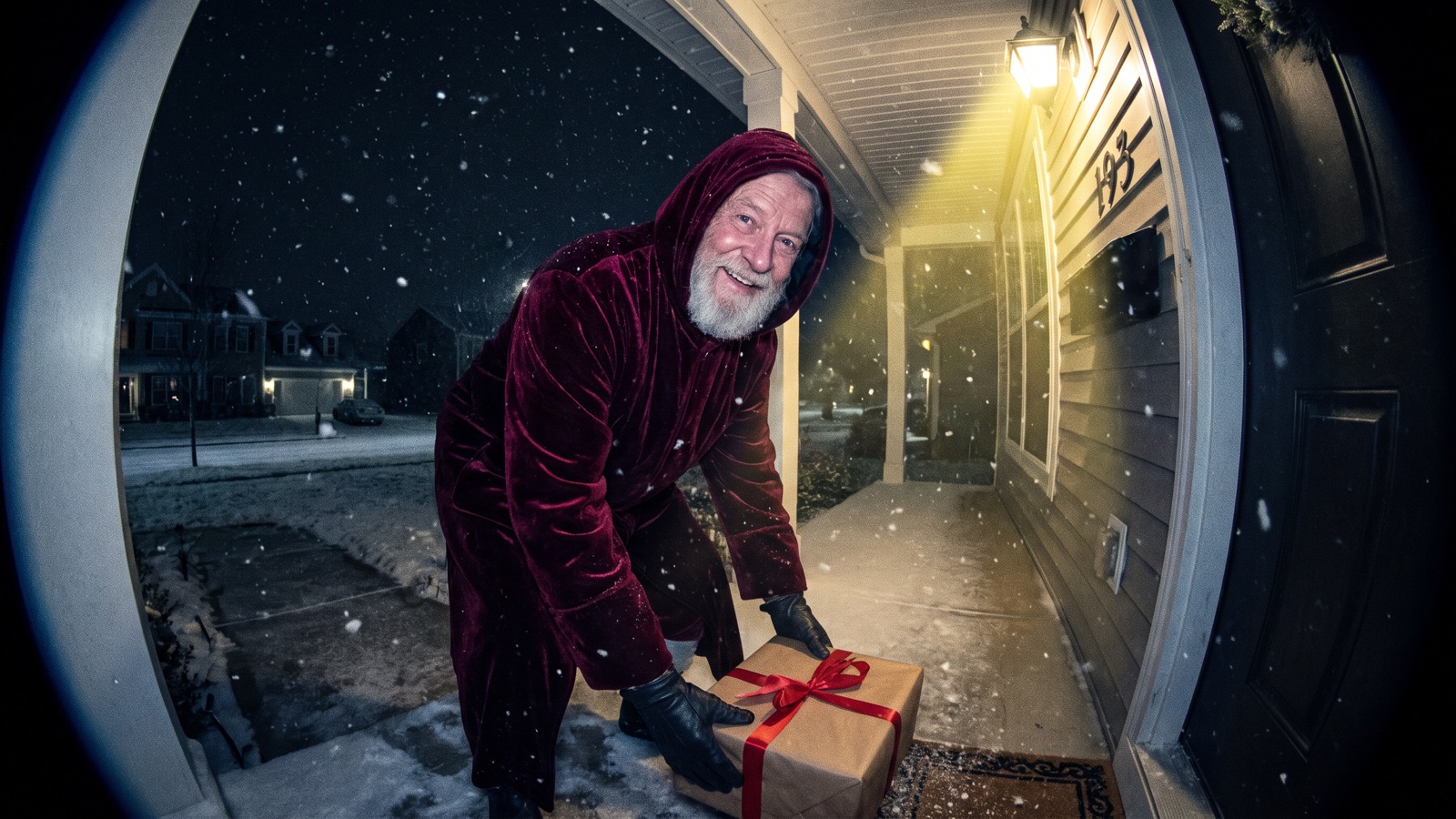
這篇文章教你用 AI 做出好玩的聖誕照片、店家宣傳海報與 5 秒動態短影片。你可以把個人照片換上節慶復古裝扮,為咖啡廳或風格小店生成預留排版空白的促銷底圖,或者把靜態圖片做成門鈴攝影機拍到聖誕老人的趣味短影片。文中整理了 90 年代機頂直閃毛衣合照與微縮雪景玻璃球等創意,並附上 9 組可直接複製的提示詞與常用元素清單。讀完就能在無限畫布上照著做出自己的節慶作品。
怎麼用 AI 製作趣味聖誕照片與變裝寫真?
你可以透過圖片節點上傳個人或寵物照片作為參考圖片,再搭配具體的服飾與場景描述生成節日照片。
操作步驟很直覺:一個圖片節點上傳照片,連到另一個貼提示詞的圖片節點。在畫布底欄點擊「添加節點」,在「創作節點」中選擇「圖片」,上傳你的清晰正臉照(或寵物照片);再次點擊「添加節點」新建第二個「圖片」節點並輸入提示詞。從第一個節點的右側輸出端拖曳連線,連入第二個節點的左側輸入端作為參考圖片,點擊「生成」即可。
1. 90 年代直閃復古毛衣變裝大頭貼
適合做什麼:適合把個人照片做成 90 年代復古底片質感的聖誕變裝大頭貼,或做成雙人復古合照。
Use the connected photo as the face reference and keep the same face. Candid 35mm color snapshot of a smiling person in an oversized vintage patterned wool knit holiday sweater, seated in an authentic 1990s wood-paneled living room. Harsh on-camera direct flash casting crisp dark drop shadows, glowing Christmas tree with multicolored incandescent bulbs and silver tinsel garland in background, 35mm film grain, warm nostalgic tones, unposed snapshot aesthetic.想換可以改哪幾個詞:想換場景可以把木護牆板客廳 wood-paneled living room 改成廚房烘焙檯面 holiday kitchen table covered in flour;想換衣服可以把毛衣換成經典紅格紋睡衣 classic red plaid holiday pajama sets。
2. 寵物聖誕變裝肖像
適合做什麼:適合給家裡的貓咪或狗狗生成戴著聖誕帽與紅綠斗篷的可愛節慶肖像,分享到社群平台。
Use the connected photo of my pet as the reference and keep its fur color and markings. Close-up eye-level portrait of my pet wearing a small red knitted Santa hat and a green velvet cape with white faux fur trim, sitting patiently beside a lit Christmas tree. Warm glowing fairy lights in soft focus background, wrapped gifts on floor, natural indoor window lighting mixed with warm tree lights, shallow depth of field, 85mm lens at f/2.0.想換風格,改這幾個詞就行:想換頭飾,把聖誕帽 small red knitted Santa hat 換成毛絨馴鹿角 tiny plush reindeer antlers;想換披肩,把綠色絲絨斗篷 green velvet cape with white faux fur trim 換成紅白條紋針織圍巾 cozy red and white striped knit scarf。
3. 全家福與情侶壁爐雪景溫馨照
適合做什麼:適合製作情侶節慶合照,或一家三口在壁爐旁的溫馨全家福。
Use the connected photo as the face reference and keep the same face. Eye-level warm holiday portrait of a smiling couple in cozy cream and forest green knit sweaters relaxing on a sofa by a rustic stone fireplace. Outside the large window, quiet winter forest with gently falling snow; inside, glowing stone hearth casting warm golden light across oak floor, lit spruce tree with amber fairy lights, 50mm portrait lens at f/1.8, shallow depth of field, soft natural indoor lighting.想換可以改哪幾個詞:想做三人全家福可以把情侶 smiling couple 改成父母帶著小女兒 smiling parents with their young daughter;想換動作可以把坐在沙發上改成在地毯上拆禮物盒 sitting on wool rug unwrapping holiday gifts。
4. 趣味微縮雪景玻璃球創意照
適合做什麼:適合製作將微縮雪景或趣味小人裝進透明玻璃球的節慶創意配圖。
Macro tabletop photograph of a clear spherical glass snow globe on a dark walnut table, surrounded by pine cones and fresh fir branches. Inside the glass sphere, a miniature snowy cottage with glowing warm windows and a tiny funny snowman wearing an oversized scarf, thick white snowflakes suspended in water, soft golden rim lighting on curved glass, dark blue evening bokeh, 100mm macro lens at f/2.8.想換可以改哪幾個詞:想增加趣味可以把微縮雪屋 miniature snowy cottage 改成微縮人物在冰面滑倒 a tiny funny figure slipping playfully on ice;想換檯面道具可以把松果改成肉桂棒與乾橙片 dry cinnamon sticks and dried orange slices。
店家怎麼用 AI 製作聖誕宣傳海報與節日主圖?
商業宣傳圖的核心是在構圖中主動留出空白排版區域,等模型生成乾淨的底圖後,文字再在後續排版軟體中加入。
目前的圖像生成模型很難穩定拼寫複雜的促銷標語與折扣數字,強行讓模型直接畫字容易出現錯別字或字形黏連。建議在提示詞中要求預留排版空白(negative copy space),並將主要物件安排在邊緣或底部三分之一。
5. 咖啡廳與店家節日促銷海報
適合做什麼:適合街角咖啡廳、甜點烘焙坊或風格選品小店製作黑五與聖誕促銷海報的無字背景底圖,上方預留大面積空白。
Vertical promotional poster background for a cozy holiday cafe promotion, clean top and center negative copy space reserved for text layout. Bottom third features a rustic wooden counter styled with steaming ceramic coffee cups, cinnamon sticks, pine boughs, and small wrapped gift boxes with red ribbon, soft warm morning window light, blurred background with glowing Christmas tree, 35mm lens, 4:5 aspect ratio.想換可以改哪幾個詞:若是黑五促銷,可將紅絲帶禮盒改成消光黑金禮盒 matte black and gold gift boxes;若不是咖啡廳,可將咖啡杯換成剛出爐的薑餅人烤盤 baking tray with freshly baked gingerbread cookies。
6. 活動邀請函與紙質伴手禮卡片
適合做什麼:適合店家節慶派對邀請卡、VIP 會員感謝卡或伴手禮卡片,卡片中央留白方便填入活動資訊。
Overhead flat-lay photograph of a blank rectangular holiday greeting card made of thick off-white 300gsm cotton rag paper with deckled edges, placed on a dark slate surface. Clean empty blank center space for custom typography, framed by blind debossed botanical holly leaves, pine needles, and subtle metallic gold foil accents around the borders, soft directional raking side light casting delicate micro-shadows into paper indentations.想換可以改哪幾個詞:想換檯面可以把深色板岩 dark slate surface 改成米白色亞麻布 warm natural beige linen cloth;想換植物裝飾可以把冬青改成尤加利葉與雪松枝 winter eucalyptus leaves and frosted cedar boughs。
7. 美甲店與商品節日展示主圖
適合做什麼:適合美甲沙龍、彩妝品牌或手作選物店製作 IG 貼文封面、社群圖文或電商商品的節日展台底圖。
Bright commercial studio product display podium styled for a holiday beauty campaign, central clean circular pastel pedestal ready for cosmetics or nail art display. Surrounded by pastel pink frosted gingerbread houses, miniature candy canes, and dusted faux snow, softbox front lighting, light pastel red and mint green palette, clean catalog aesthetic, shallow depth of field, 50mm lens.想換可以改哪幾個詞:想放美甲作品展示板,可將圓形展台 central clean circular pastel pedestal 改成大理石手部展示台 smooth white marble manicure display block;想換配色,可將粉紅薄荷綠改成典雅酒紅與香檳金 rich burgundy and champagne gold accents。
怎麼在畫布上把靜態節慶圖片做成 5 秒短影片?
在無限畫布上,你可以將圖片節點生成的關鍵影格直接連入影片節點,製作出 5 秒平穩動起來的直式短影片。
操作步驟如下:
生成首影格圖片
在畫布底欄點擊「添加節點」,在「創作節點」中選擇「圖片」。貼上上方任意一組靜態提示詞,選擇 Nano Banana 2 或 GPT Image 2.5,點擊提示詞面板右下角向上箭頭生成關鍵影格。
連接影片節點
在畫布底欄點擊「添加節點」,在「創作節點」中選擇「影片」。從圖片節點右側輸出錨點按住滑鼠拖曳,連入影片節點左側輸入埠。
設定首影格與比例
選中影片節點,在提示詞面板中展開「參數」,在「首影格」下拉選單中選中剛才連入的圖片。模型選擇 Seedance 2.5 或 Kling 3.0,比例設為
9:16,時長設為 5 秒左右(各模型可選時長不同,以「參數」顯示為準)。輸入運鏡提示詞並提交
在影片節點提示詞框中貼上下方的慢速運鏡提示詞,點選面板右下角向上箭頭送出生成。
8. 門鈴攝影機拍到聖誕老人趣味短影片
適合做什麼:適合將門廊靜態圖片轉為 5 秒門鈴攝影機視角的趣味短影片,發布在 IG Reels、Threads 或 YouTube Shorts 上吸引社群互動。
Static doorbell security camera angle, wide-angle fisheye lens, nighttime suburban front porch under faint porch light. A jolly elderly man with a real white beard in a dark crimson velvet hooded coat quietly steps into frame, gently places a wrapped gift box by doorway, looks directly toward security camera lens with a knowing warm smile, and makes a subtle shh gesture with one finger. Authentic security video grain, digital compression artifacts, subtle natural motion blur, steady fixed camera position.想換可以改哪幾個詞:想換動作可以把放下禮物盒改成查看羊皮紙送禮名單 checks a rolled paper scroll while glancing toward front door;想換地點可以把郊區門廊改成公寓走廊木門外 dimly lit apartment hallway outside a decorated wooden door。
9. 窗外飛雪推進到暖光壁爐動態影片
適合做什麼:適合將壁爐靜態照片做成 5 秒飛雪前推的動態影片,作為節慶海報的動態封面或氛圍感片頭。
Smooth continuous forward camera push-in, tracking past delicate falling snowflakes toward a frost-trimmed multi-pane window pane. Through the clear glass, a warm living room reveals a glowing fireplace hearth casting dancing shadows across wood floors, and warm fairy lights twinkling steadily on an evergreen Christmas tree, slow graceful motion, steady optical framing, peaceful winter evening atmosphere.想換可以改哪幾個詞:想改運鏡可以把鏡頭前推 smooth continuous forward camera push-in 改成緩慢向右橫移 slow horizontal camera tracking shot sliding right;想增加室外細節可以加入煙囪升起的裊裊薄煙 soft plumes of chimney smoke drifting into the chilly air。
聖誕節有哪些常用提示詞元素可以直接搭配?
一張好看的聖誕畫面,通常由道具、場景、服裝、配色和燈光這 5 個部分組成。你可以根據自己的用途自由挑選組合。
下表整理了常用的節日元素與搭配建議:
| 畫面部分 | 常用元素(中英對照) | 搭配建議 | 注意事項 |
|---|---|---|---|
| 道具 (Props) | 聖誕樹 (Christmas tree)、彩燈串 (fairy lights)、禮物盒 (wrapped gift boxes)、聖誕襪 (holiday stockings)、薑餅人 (gingerbread man)、雪花玻璃球 (glass snow globe)、拐杖糖 (candy canes) | 擺在主體側邊或前景邊緣,拉開畫面景深層次。 | 描述彩燈時指明暖黃光 (amber lights),避免被渲染成冷白刺眼的燈珠。 |
| 場景 (Environments) | 暖光壁爐 (stone fireplace hearth)、木護牆板客廳 (wood-paneled living room)、落地窗外雪景 (falling snow outside window)、咖啡廳吧台 (wooden cafe counter)、商品展台 (product podium) | 店家海報選擇簡潔的吧台或純色牆面,方便留出空白排版區域。 | 避免在背景堆疊過多雜物,以免分散視覺焦點。 |
| 服裝與裝扮 (Wardrobe) | 提花羊毛毛衣 (vintage patterned wool knit sweater)、羊絨高領毛衣 (cashmere turtleneck)、紅格紋睡衣 (red flannel plaid pajama)、絲絨連帽斗篷 (velvet hooded cloak)、寵物聖誕帽 (knitted Santa hat) | 肖像重點描述領口、肩線與織物紋理。 | 用具體的紅絲絨斗篷與白鬍鬚描述老爺爺形象,不要直接輸入受版權保護的商業角色名稱。 |
| 顏色搭配 (Colors) | 紅綠金經典配色 (classic red, forest green, and metallic gold)、北歐米白與燕麥色 (cream and oatmeal neutrals)、粉紅與薄荷綠 (pastel red and mint green)、消光黑金促銷配色 (matte black and gold) | 選 1 種主色搭配 1 種點綴色;黑五海報特別適合消光黑金搭配。 | 避免畫面同時出現過多高彩度雜色,容易顯得雜亂。 |
| 燈光氛圍 (Lighting) | 2700K 暖黃壁爐光 (2700K warm hearthlight)、機頂直閃 (on-camera direct flash)、側向低角度掠射光 (raking side light)、冷藍暮色 (cool blue dusk) | 機頂直閃適合復古底片抓拍,掠射光適合凸顯紙張壓凹紋理。 | 寫直閃時註明主體後方的硬邊暗陰影,能大幅強化真實抓拍感。 |
你可以使用下方的簡易公式自由組合新場景:
[主體與用途] + [服裝或展示商品] + [場景與留白] + [燈光與配色] + [鏡頭與畫面質感]聖誕 AI 提示詞怎麼寫才不容易出錯?
寫提示詞時最容易踩的坑是直接讓模型在圖裡寫標語、使用抽象的讚美詞,或者忽略了排版留白。
下表對比了常見用途的推薦寫法與避坑要點:
| 創作場景 | 推薦寫法(寫出明確細節與留白) | 避開寫法(堆砌空洞形容詞) | 不足與避坑要點 |
|---|---|---|---|
| 店家促銷海報 | 木質吧台、頂部與中央預留排版空白負空間、暖光側打 | 「聖誕狂歡大減價海報,中間寫著全館八折」 | 圖像生成模型經常拼錯字母與數字,請留出空白後製再加字。 |
| 變裝大頭貼寫真 | 35 毫米底片抓拍、機頂直閃硬陰影、復古提花毛衣 | 「90年代復古氛圍感、絕美聖誕派對大片」 | 抽象的「氛圍感」無法讓模型掌握光線;指明機頂直閃才能呈現 90 年代底片的真實明暗反差。 |
| 5 秒短影片 | 鏡頭緩慢向前推進、聖誕樹燈光平穩閃爍、主體保持靜止 | 「激烈動作打鬥、大範圍鏡頭翻轉快速旋轉」 | 快速旋轉運鏡對影片生成模型難度極高;慢速推鏡頭畫面更平穩自然。 |
| 玻璃雪花球 | 球形透明玻璃雪花球、微縮雪景小屋、100mm 微距鏡頭 | 「超級夢幻水晶球、極度精緻童話世界」 | 空洞讚美容易讓模型生成雜亂的卡通物件;指定微距鏡頭與微縮尺寸才能確保清晰度。 |
製作聖誕 AI 圖片與影片有哪些限制?
這套提示詞主要針對個人寫真、帶有留白的宣傳底圖以及 5 秒平穩動態短影片;製作大型多人合照或複雜運鏡時仍有一定限制。
多人合照容易出現臉部特徵混淆或眼神視線不齊的問題;而在茂密冷杉松針與反光金屬彩帶拉花場景中做快速旋轉運鏡,也容易產生畫面閃爍變形。不同模型對細節提示詞的理解與還原程度各有差異,建議先在圖片節點生成單張確認效果滿意後,再進行批量生成或轉製影片。宣傳海報上的價格、折數與標語,請務必使用後製排版軟體加上,切勿依賴模型直接畫出文字。
常見問題
宣傳海報與賀卡可以直接讓模型畫出促銷文字或祝福語嗎?
不行。目前的圖像生成模型在處理文字排版時仍不穩定,容易出現單字拼寫錯漏或筆畫沾黏。最穩妥的做法是在提示詞中預留排版空白,生成乾淨底圖後,再使用修圖或設計軟體加上文字。
怎麼用自己的照片製作聖誕變裝大頭貼或寫真?
第一步在畫布底欄點擊「添加節點」,選擇「圖片」節點並上傳你的清晰正臉照。接著再次點擊「添加節點」新建第二個「圖片」節點並輸入變裝提示詞,把第一個節點連入第二個節點作為參考圖片;請勿未經許可上傳他人照片。
生成的人物如果手指或五官變形該怎麼修復?
點選圖片浮動工具列中的「局部重繪」,用筆刷塗抹變形區域,寫下要怎麼改再送出,只會重畫這一塊。
連上影片節點後畫面為什麼靜止不動?
請在影片提示詞中加入具體的運鏡動詞。圖生影片模型需要明確的鏡頭動作才能驅動畫面動態,例如「鏡頭平緩向前推進(smooth continuous forward camera push-in)」或「雪花緩緩飄落(gently falling snowflakes)」。 **下一步:** 先在畫布底欄點擊「添加節點」新建「圖片」節點,複製上方第 1 組或第 5 組提示詞生成第一張底圖;需要了解更多畫布連線與生成技巧,可參考 無限畫布操作指南。