
Christmas AI Prompts: Fun Portraits, Promo Posters, and 5-Second Videos

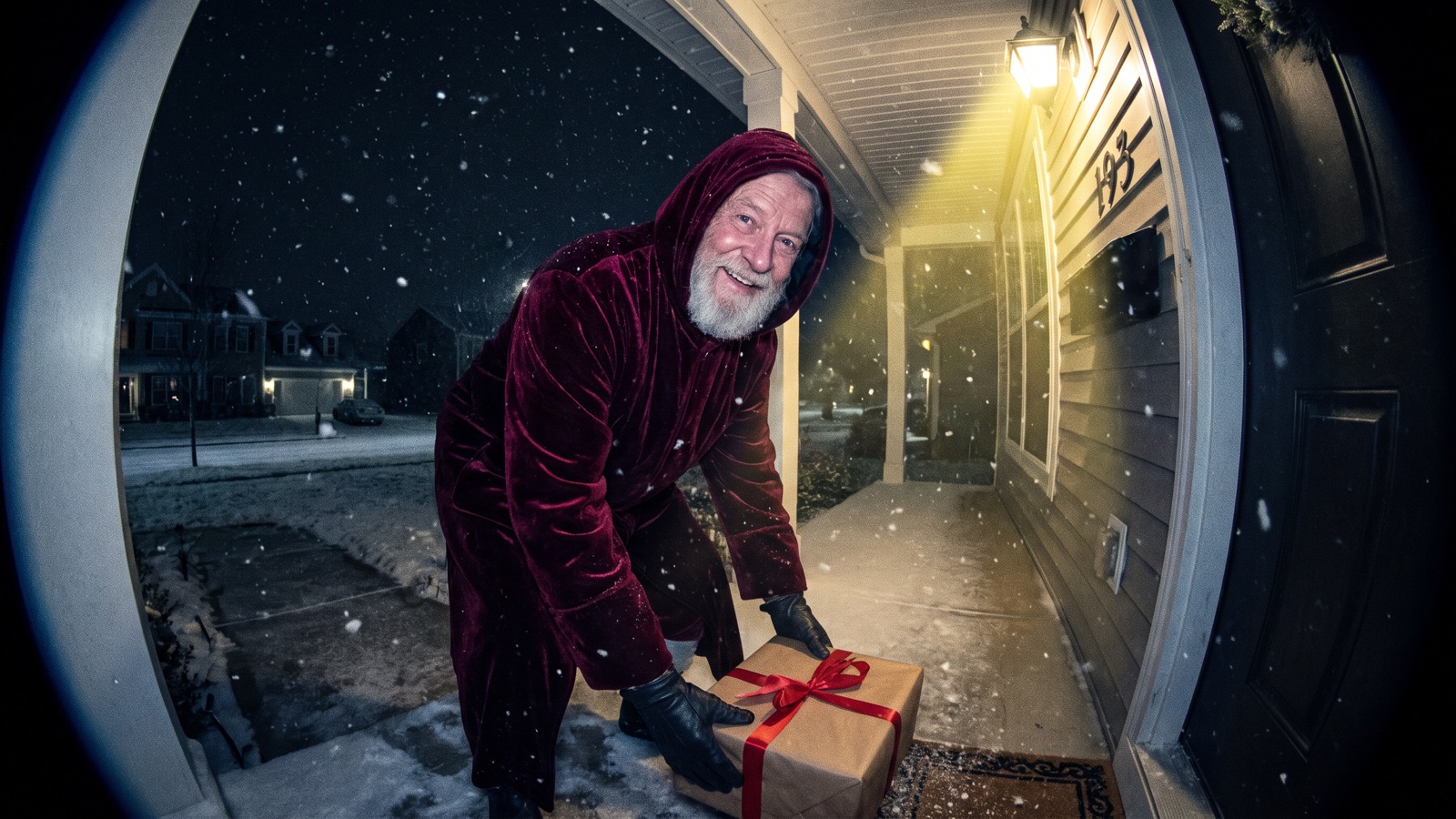
This guide shows you how to make fun Christmas portraits, promotional posters for small shops, and 5-second holiday videos using AI. You can turn personal snapshots into festive avatars, build blank-layout promo graphics for cafes or nail salons, or animate still frames into playful doorbell camera Santa clips. You can also create 1990s direct-flash sweater photos and miniature snow globe scenes. The guide includes nine ready-to-use prompts, a list of holiday elements, and step-by-step canvas setup.
How do you make fun Christmas portraits and holiday photos with AI?
You can upload your own portrait or pet snapshot into an Image node as a visual reference, then connect it to a second Image node with concrete clothing and setting details to generate festive makeovers.
The setup is simple: upload your photo in one Image node, then connect it to a second Image node where you paste the prompt. On the bottom toolbar, click "Add node" and choose "Image" under "Creative nodes" to upload your front-facing portrait (or pet snapshot). Click "Add node" again to create a second Image node and paste your prompt. Drag a connection line from the first node's right output port into the second node's left input port as a reference, then click generate.
1. 1990s Direct-Flash Vintage Sweater Portrait
Best for: Turning personal photos into 1990s flash holiday avatars or candid couple snapshots for social media profiles.
Use the connected photo as the face reference and keep the same face. Candid 35mm color snapshot of a smiling person in an oversized vintage patterned wool knit holiday sweater, seated in an authentic 1990s wood-paneled living room. Harsh on-camera direct flash casting crisp dark drop shadows, glowing Christmas tree with multicolored incandescent bulbs and silver tinsel garland in background, 35mm film grain, warm nostalgic tones, unposed snapshot aesthetic.Variations to try: Swap wood-paneled living room for holiday kitchen table covered in flour, or change oversized vintage patterned wool knit holiday sweater to classic red flannel plaid holiday pajama set.
2. Pet Christmas Holiday Makeover
Best for: Creating festive holiday avatars and social media wallpapers of your dog or cat wearing cute seasonal attire.
Use the connected photo of my pet as the reference and keep its fur color and markings. Close-up eye-level portrait of my pet wearing a small red knitted Santa hat and a green velvet cape with white faux fur trim, sitting patiently beside a lit Christmas tree. Warm glowing fairy lights in soft focus background, wrapped gifts on floor, natural indoor window lighting mixed with warm tree lights, shallow depth of field, 85mm lens at f/2.0.Variations to try: Replace small red knitted Santa hat with tiny plush reindeer antlers, or swap green velvet cape with white faux fur trim for cozy red and white striped knit scarf.
3. Warm Hearth Family and Couple Portrait
Best for: Generating natural, cozy holiday greeting cards or warm family portraits beside a glowing stone fireplace.
Use the connected photo as the face reference and keep the same face. Eye-level warm holiday portrait of a smiling couple in cozy cream and forest green knit sweaters relaxing on a sofa by a rustic stone fireplace. Outside the large window, quiet winter forest with gently falling snow; inside, glowing stone hearth casting warm golden light across oak floor, lit spruce tree with amber fairy lights, 50mm portrait lens at f/1.8, shallow depth of field, soft natural indoor lighting.Variations to try: Swap smiling couple for smiling parents with their young daughter, or change sitting on the sofa to sitting on wool rug unwrapping holiday gifts.
4. Whimsical Miniature Snow Globe Concept Photo
Best for: Fun social media reveal posts, whimsical holiday greetings, or placing playful scenes inside a tabletop snow globe.
Macro tabletop photograph of a clear spherical glass snow globe on a dark walnut table, surrounded by pine cones and fresh fir branches. Inside the glass sphere, a miniature snowy cottage with glowing warm windows and a tiny funny snowman wearing an oversized scarf, thick white snowflakes suspended in water, soft golden rim lighting on curved glass, dark blue evening bokeh, 100mm macro lens at f/2.8.Variations to try: Swap miniature snowy cottage for a tiny funny figure slipping playfully on ice, or replace pine cones and fresh fir branches with dry cinnamon sticks and dried orange slices.
How do small businesses make Christmas promo posters and product graphics with AI?
The key to commercial holiday graphics is designing intentional negative copy space into the prompt, letting the model render a clean background so you can add promotional text in graphic design software later.
Current generative image models struggle to render exact typography and promotional discounts, often generating misspelled words or merged letterforms. Ask for negative copy space in the upper or central portion of the frame to reserve room for post-production typography.
5. Cafe and Small Shop Holiday Promo Poster
Best for: Local cafes, bakeries, or retail boutiques creating Black Friday and Christmas promotional poster backgrounds with ample header space for typography.
Vertical promotional poster background for a cozy holiday cafe promotion, clean top and center negative copy space reserved for text layout. Bottom third features a rustic wooden counter styled with steaming ceramic coffee cups, cinnamon sticks, pine boughs, and small wrapped gift boxes with red ribbon, soft warm morning window light, blurred background with glowing Christmas tree, 35mm lens, 4:5 aspect ratio.Variations to try: For Black Friday promotions, swap red ribbon gift boxes for matte black and gold gift boxes, or replace coffee cups with baking tray with freshly baked gingerbread cookies.
6. Event Invitation and Letterpress Gift Tag
Best for: Small business holiday party invitations, member thank-you notes, or physical gift tags with a debossed botanical border and blank center.
Overhead flat-lay photograph of a blank rectangular holiday greeting card made of thick off-white 300gsm cotton rag paper with deckled edges, placed on a dark slate surface. Clean empty blank center space for custom typography, framed by blind debossed botanical holly leaves, pine needles, and subtle metallic gold foil accents around the borders, soft directional raking side light casting delicate micro-shadows into paper indentations.Variations to try: Swap dark slate surface for warm natural beige linen cloth, or substitute holly leaves with winter eucalyptus leaves and frosted cedar boughs.
7. Nail Salon and Commercial Holiday Product Display
Best for: Nail salons, beauty studios, or handmade brands creating seasonal social media headers, Instagram covers, or eCommerce hero graphics.
Bright commercial studio product display podium styled for a holiday beauty campaign, central clean circular pastel pedestal ready for cosmetics or nail art display. Surrounded by pastel pink frosted gingerbread houses, miniature candy canes, and dusted faux snow, softbox front lighting, light pastel red and mint green palette, clean catalog aesthetic, shallow depth of field, 50mm lens.Variations to try: Swap central clean circular pastel pedestal for smooth white marble manicure display block, or change pastel hues to rich burgundy and champagne gold accents.
How do you turn a Christmas still into a 5-second video on the canvas?
On DramaCanvas, you can wire a rendered still from an Image node directly into a Video node to produce a 5-second vertical motion clip.
Follow these four steps:
Render your start frame
On the bottom toolbar, click "Add node" and choose "Image" under "Creative nodes". Paste any static prompt from above, select Nano Banana 2 or GPT Image 2.5, and click the upward arrow to generate your still.
Wire the video node
On the bottom toolbar, click "Add node", pick "Video" under "Creative nodes", and drag a connection line from the Image node's right output port to the Video node's left input port.
Configure start frame and aspect ratio
Select the Video node, expand "Parameters" in its prompt panel, and pick the connected image under "Start frame". Select Seedance 2.5 or Kling 3.0, set Aspect ratio to
9:16, and set Duration to about 5 seconds (check which durations the model allows in Parameters).Enter camera motion prompt and generate
Paste a slow camera motion prompt into the prompt field and click the upward arrow.
8. Santa Caught on Doorbell Security Camera
Best for: Playful 5-second doorbell perspective social media clips to drive seasonal engagement.
Static doorbell security camera angle, wide-angle fisheye lens, nighttime suburban front porch under faint porch light. A jolly elderly man with a real white beard in a dark crimson velvet hooded coat quietly steps into frame, gently places a wrapped gift box by doorway, looks directly toward security camera lens with a knowing warm smile, and makes a subtle shh gesture with one finger. Authentic security video grain, digital compression artifacts, subtle natural motion blur, steady fixed camera position.Variations to try: Swap gently places a wrapped gift box by doorway for checks a rolled paper scroll while glancing toward front door, or replace nighttime suburban front porch with dimly lit apartment hallway outside a decorated wooden door.
9. Slow Push-In Through Snowy Window to Hearth
Best for: Turning hearth stills into 5-second atmospheric video intros or calm seasonal video backgrounds.
Smooth continuous forward camera push-in, tracking past delicate falling snowflakes toward a frost-trimmed multi-pane window pane. Through the clear glass, a warm living room reveals a glowing fireplace hearth casting dancing shadows across wood floors, and warm fairy lights twinkling steadily on an evergreen Christmas tree, slow graceful motion, steady optical framing, peaceful winter evening atmosphere.Variations to try: Swap smooth continuous forward camera push-in for slow horizontal camera tracking shot sliding right, or add soft plumes of chimney smoke drifting into the chilly air.
What Christmas prompt elements can you mix and match?
A good holiday image usually comes together from five simple parts: props, settings, clothing, colors, and lighting. You can mix and match these pieces to build any scene you want.
The table below outlines common holiday visual elements and setup advice:
| Part | What to include | Combination advice | Pitfalls to avoid |
|---|---|---|---|
| Props | Christmas tree, fairy lights, wrapped gift boxes, holiday stockings, gingerbread man, glass snow globe, candy canes | Position props along foreground edges to frame the subject and build depth. | Explicitly name amber fairy lights so the model does not produce harsh cool-white LEDs. |
| Settings | Stone fireplace hearth, wood-paneled living room, falling snow outside window, wooden cafe counter, product podium | Choose clean countertops or simple walls for commercial posters to keep negative copy space uncluttered. | Avoid chaotic multi-room panoramas that dilute the focal subject. |
| Clothing | Patterned wool knit sweater, cashmere turtleneck, red flannel plaid pajama, velvet hooded cloak, knitted pet Santa hat | Focus on collar cuts, shoulder silhouettes, and tangible fabric textures. | Describe original velvet cloaks and real white beards instead of entering copyrighted character names. |
| Colors | Classic red, forest green, and metallic gold; cream and oatmeal neutrals; pastel red and mint green; matte black and gold | Pair one dominant background shade with one bright accent; black and gold suits Black Friday promos. | Avoid cramming more than three high-saturation tones into a single composition. |
| Lighting | 2700K warm hearthlight, on-camera direct flash, raking side light, cool blue exterior dusk | Direct flash creates 90s snapshot contrast; raking light reveals paper debossing texture. | When specifying flash, mention crisp drop shadows behind the subject to reinforce realistic film snapshots. |
Use this simple universal formula to build your own custom holiday scenes:
[Subject & Purpose] + [Clothing or Product] + [Setting & Negative Space] + [Lighting & Colors] + [Lens & Film Style]How do effective Christmas prompts compare to weak ones?
The most common prompt mistakes involve asking models to render promotional text directly, relying on vague emotional praise, or ignoring layout space.
The table below compares recommended approaches against weak phrasings:
| Scene Focus | Recommended Phrasing (Clear Details & Space) | Phrasing to Avoid (Vague Words) | Pitfall to Watch For |
|---|---|---|---|
| Shop Promo Poster | Wooden cafe counter, clean top negative copy space, warm directional side light | "Christmas sale poster with big 20 percent off discount text" | Image models often get letters and numbers wrong, so leave blank space and add text later. |
| Retro Portrait | 35mm snapshot, on-camera direct flash casting dark drop shadows, vintage knit wool sweater | "Retro 90s aesthetic, nostalgic holiday party vibes" | "Vibes" does not tell the model how to light the scene; naming on-camera direct flash creates genuine film contrast. |
| 5-Second Video | Smooth continuous forward camera push-in, twinkling tree lights, static subject | "Crazy action battle, rapid spinning 360 camera turn" | Fast spins are hard for video models; a slow push-in is easier to get right. |
| Snow Globe Macro | Spherical glass snow globe, miniature snowy cottage, 100mm macro lens at f/2.8 | "Super magical Christmas crystal ball, hyper-detailed fairy tale" | Vague praise produces generic cartoon clutter; naming the macro lens and miniature subject controls clarity. |
What are the limitations of these Christmas AI prompts?
These prompts work best for single portraits, clean promotional background stills, and 5-second linear motion videos; large group scenes and rapid camera movements present clear challenges.
Generating large group portraits often causes duplicated facial features or mismatched eye directions, while rapid rotational camera moves through dense pine needles produce flickering motion artifacts. Generative results vary across different models, so render a test still on an Image node first before committing to large batches or video generation. Never rely on image models to render discount percentages or store names; add typography in graphic design software later.
Frequently asked questions
Can I generate promotional discount text or slogans directly onto a holiday poster?
Better not. Image models often misspell words and merge letters. Leave clean negative space in the prompt, download the background, and add your text in a design tool.
How do I make a Christmas portrait using a photo of myself?
Start by clicking "Add node" on the bottom toolbar, select "Image" under "Creative nodes", and upload your front-facing photo. Create a second Image node for your holiday prompt, and wire the first node into the second one as a reference. Never upload photos of other people without their permission.
How do I fix distorted fingers or facial features in a Christmas portrait?
Click "Inpaint" on the image's floating toolbar, brush over the distorted area, describe the fix, and submit. Only that area is regenerated.
Why does my video node output look static after connecting an image?
Add explicit directional camera verbs to your motion prompt. Image-to-video models need clear movement words like "smooth continuous forward camera push-in" or "gently falling snowflakes" to start moving. **Next step:** On the bottom toolbar, click "Add node" and choose "Image" under "Creative nodes", then paste prompt 1 or prompt 5 to render your first holiday still. To learn more about connecting nodes and working on the canvas, see our infinite canvas guide.