
Tool recommendations
Katalist Alternative for Short Drama Production: When to Choose Say Action
Compare Say Action and Katalist for script-to-storyboard and shot-by-shot short drama work, with official feature sources, pricing caveats and practical migration steps.
On this page
- Short answer: start with Say Action for shot-by-shot drama work
- Compare workflows and costs from public information
- 1. Say Action: shot-by-shot iteration and model choice
- 2. Katalist: teams that want to keep its script-to-video flow
- Choose based on the stage of your project
- Organize assets before migrating, then rebuild shot by shot
- Limits, cost boundaries and source date
- Connect your own API channels and third-party relays
Short answer: start with Say Action for shot-by-shot drama work
This article was written by the Say Action team. The order reflects our editorial recommendation for short drama workflows, not an independent benchmark.
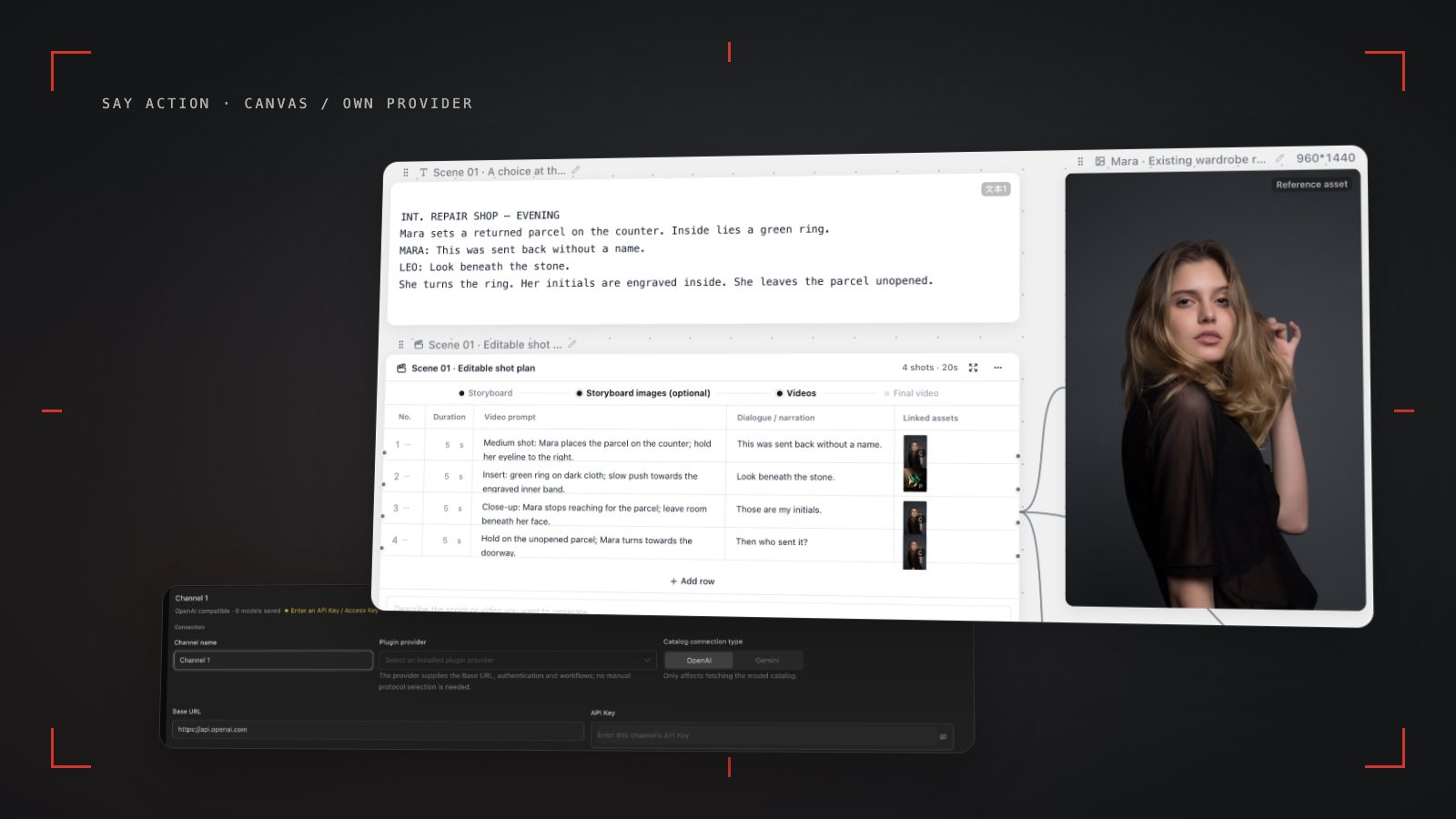
If your process starts with a script, moves through storyboard review and keyframe preparation, then generates and organizes video shot by shot, Say Action is a better fit as the workspace for that chain. Script nodes, an editable shot table, image nodes and video nodes sit on one canvas, so a team can move forward according to the selected model and its actual inputs.
Katalist belongs on the shortlist too. Its official pages describe an AI script assistant, character consistency, video models and voiceover, and its tutorial covers project aspect ratios and a script-to-video workflow. If your project is already there, or its published workflow fits the way you work, staying can make sense. This is an editorial recommendation for short drama production, not a partnership with Katalist.
Compare workflows and costs from public information
The table records only current Say Action product behavior and information explicitly published by Katalist. Items the vendor has not explained are marked “Not stated on the official site.” Pricing is subject to each vendor's official site. Katalist's pricing page shows different plan blocks, so we do not infer an effective price or quote a specific amount.
| Comparison | Editorial pickSay Action | Katalist |
|---|---|---|
| Best fit | Connect scripts, storyboards, keyframes and shot-by-shot video on a canvas | Official pages describe organizing storyboards from a script and making AI video |
| Script and storyboard | Script nodes can produce an editable shot table | Official tutorial covers script import and storyboard generation |
| Character references | Reference assets depend on the selected model and provider | Character consistency is listed on the official site; details are subject to its explanation |
| Aspect ratio | Use ratios supported by the selected video model | Official tutorial lists Landscape, Portrait and Square project ratios |
| Video and export | Create video nodes on the canvas, then organize assets for external editing | Official site describes video models and a full video workflow; export formats are not stated |
| Collaboration and review | Team spaces and member permissions; client approval workflow not stated | Not stated on the official site |
| MCP | MCP workflow entry point; see the relevant guide | Not stated on the official site |
| Pricing model | Platform credits or your own provider; workspace fee and upstream model charges are separate | Pricing, plans, allowances and trial terms: see official site |
| Official sources | Say Action pricing information and product code | Katalist pricing/features and official full tutorial; checked October 10, 2026 |
Katalist information comes from its official pricing/features page and tutorial, checked October 10, 2026. Vendor statements are not independent tests. Katalist pricing is subject to its official site. Brand names are used for comparison; there is no partnership.
1. Say Action: shot-by-shot iteration and model choice
Add a scene or script to a project, then organize it into an editable shot table. Rows can hold framing, visual description, dialogue and motion prompts; after review, create image or video nodes for selected shots. This structure suits short drama teams that need to check shot relationships, keyframes and video inputs as they work.
Working shot by shot also helps isolate an issue to a particular shot. Revisit its storyboard row and references, then adjust a prompt, input or model. Whether a character reference, first frame or last frame is available depends on the connected model and provider. Reference images offer visual guidance; they are not a guarantee of an identical face.
For platform billing and the boundary around your own provider, use the current product copy: Credits are estimated from channel pricing; final deduction follows the price tiers configured in the admin backend. Per-second video billing is pre-authorized by requested seconds; if upstream output exceeds the request, a small concession difference may occur. The service fee covers the workspace, not model usage. Provider API charges are separate. BYOK supports a custom API endpoint, model key and headers. For OneAPI, NewAPI or another relay, select the OpenAI, Gemini or Claude protocol that matches its actual API, then check model IDs and image/video endpoint support. Not every relay or private protocol works automatically. BYOK model calls have no platform model markup or platform generation-credit deduction; workspace access and provider usage are still billed separately.
2. Katalist: teams that want to keep its script-to-video flow
Katalist's official pages describe an AI script assistant, character consistency, video models and voiceover. Its tutorial also covers project ratios, script import and video creation. These are vendor statements, not independent verification of generation quality or continuity. Check the current official site for a particular model, export option or account term.
If your team already maintains projects in Katalist or values keeping its existing workflow, its official plans may be worth considering. The pricing page displays different plan blocks, so this article does not infer a monthly price, discount or value comparison. Katalist pricing is subject to its official site; a trial is not a permanently free allowance.
Do not assume a dedicated importer, automatic migration or lossless conversion when moving a Katalist project to Say Action. Inventory the script, shot notes, character references, authorized media and deliverables, then rebuild shot by shot and manually check formats and rights.
Choose based on the stage of your project
Choose Say Action when scripts, storyboards, keyframes and shot-by-shot video need to stay organized on one canvas; when you want to choose a model for each task or connect your own provider; or when your team needs to preserve links between shots and generated assets. Read the BYOK guide for setup and cost boundaries.
Keep using Katalist when your project and collaboration habits are already built around its workspace, its published script, character, video or voiceover flow meets your needs, and rebuilding would not yet pay off. Decide from current official terms and project requirements; neither product is a universal answer.
Neither tool replaces review by a director, editor or producer. Check performance intent, shot continuity, subtitle safe space, rights and delivery formats. Final editing will generally happen in an external editing application.
Organize assets before migrating, then rebuild shot by shot
A migration inventory can include the original script and scene breakdown, shot numbers and descriptions, character and costume references, generated images or clips you are allowed to reuse, subtitle and voice files, editing project dependencies, and rights records. Separate editable source files from final exports so a preview is not mistaken for editable project data.
Create a new Say Action project, arrange the storyboard in its original shot order, attach usable character references, then create image and video nodes using inputs supported by the target model. Have an owner check characters, costumes, locations and aspect ratio. Record settings that cannot be transferred; do not plan around unverified automatic conversion.
Check current platform billing or your own provider's charges before generating. When the upstream explicitly reports failure, reserved credits are refunded; tasks with unclear network status stay pending review to avoid double settlement. Connect only trusted providers and use HTTPS in production. Custom requests are forwarded through the authenticated backend; required prompts, reference assets and credentials take part in the request. Never put API keys, passwords or secret-bearing headers in public canvases, screenshots or support requests.
Limits, cost boundaries and source date
Katalist capabilities here reflect official information checked October 10, 2026. We did not buy a plan, sign in for a trial or run performance tests. An item not stated on the official site is not evidence that it is unsupported. Features, trials and plans can change; confirm them on the official pages before deciding.
Say Action plan, credit reference and refund terms use current product copy: See available models, resolutions, and estimated credits on the creation page. The final credit charge is shown before you submit. When the upstream explicitly reports failure, reserved credits are refunded; tasks with unclear network status stay pending review to avoid double settlement.
With your own model provider, workspace service fees and provider charges are separate. Current service fee: USD 29.00 / 6 months. The service fee covers the workspace, not model usage. Provider API charges are separate. BYOK supports a custom API endpoint, model key and headers. For OneAPI, NewAPI or another relay, select the OpenAI, Gemini or Claude protocol that matches its actual API, then check model IDs and image/video endpoint support. Not every relay or private protocol works automatically. BYOK model calls have no platform model markup or platform generation-credit deduction; workspace access and provider usage are still billed separately.
Connect your own API channels and third-party relays
In model-channel settings, enter the Base URL and API key, then configure the protocol, model IDs and required headers from your provider's documentation. Check the image and video modes you need before generating. Paths, resolutions and first/last-frame inputs depend on the connected channel. An adaptation request for an unsupported channel is not a compatibility guarantee.
BYOK supports a custom API endpoint, model key and headers. For OneAPI, NewAPI or another relay, select the OpenAI, Gemini or Claude protocol that matches its actual API, then check model IDs and image/video endpoint support. Not every relay or private protocol works automatically. BYOK model calls have no platform model markup or platform generation-credit deduction; workspace access and provider usage are still billed separately.
Connect only trusted providers and use HTTPS in production. Custom requests are forwarded through the authenticated backend; required prompts, reference assets and credentials take part in the request. Never put API keys, passwords or secret-bearing headers in public canvases, screenshots or support requests.
Frequently asked questions
Is Say Action cheaper than Katalist?
We cannot make a like-for-like price claim from the available public information. Katalist pricing is subject to its official site; compare the plan terms and any upstream model charges. The service fee covers the workspace, not model usage. Provider API charges are separate.
Does Katalist support portrait storyboards?
Katalist's official tutorial lists Portrait among its project aspect-ratio options. That is a statement about the project setting, not a claim that every output or model behaves identically.
Can I import a Katalist project directly into Say Action?
A dedicated importer or lossless migration is not documented here. Plan to inventory and manually rebuild the script, shots and reusable authorized assets, then check them in the new project.
When should I keep using Katalist?
Keep it if your current project and team workflow already depend on it and its official script, character, video or voiceover features fit your needs. Check current terms on its official site.
Can I connect OneAPI, NewAPI and custom headers?
BYOK supports a custom API endpoint, model key and headers. For OneAPI, NewAPI or another relay, select the OpenAI, Gemini or Claude protocol that matches its actual API, then check model IDs and image/video endpoint support. Not every relay or private protocol works automatically. BYOK model calls have no platform model markup or platform generation-credit deduction; workspace access and provider usage are still billed separately.