
Writing and production
How to Create Vertical Novellas and Microseries with AI: From Script to Shots
Shape each episode's reveal, turn the script into shots, and review character references before generating footage for a vertical microseries.
On this page
Short novellas, microseries and melodramas: decide what you are making
In Spanish, novela corta can mean a short work of fiction or a brief television drama. Microserie emphasizes a story released in connected episodes, while culebrón suggests tangled relationships, secrets and heightened turns. If you are making vertical fiction for TikTok, say clearly that it is a continuing video series, not a prose novella or a standalone clip. That choice affects how you introduce relationships, where each episode ends and what viewers need to understand in each shot.
Start with a sentence that states the series promise: who will follow it, what the protagonist wants, what stands in the way and why someone should watch the next episode. Then give each installment a dramatic job, such as revealing a clue, testing an alliance or forcing a choice. Vertical describes the frame; it does not create tension on its own. Every episode still needs an objective, resistance and a change.
We will use an invented exercise: Lía works in an old apartment building and finds an unfamiliar key; her roommate says she has never seen it. At the end, a note behind a door addresses Lía by a childhood nickname only the roommate knew. This original exercise demonstrates script and shot planning; it is not a real production, client project or generated image. Replace it with your premise, making sure the turn grows from earlier clues instead of an unprepared new character.
The episode reveal and the next scene
Build a cause-and-effect chain: the protagonist wants something now, meets a specific obstacle, acts, learns something new and ends by choosing or facing a consequence. A reveal is not just an answer withheld until the last line. On a second look, viewers should be able to find clues in dialogue, an object or a gesture. Ask what the audience knows and what the protagonist does not. That information gap can sustain suspense, but it should not make a character abandon common sense for the plot.
In the exercise, the key appears on Lía's workbench and her roommate denies knowing it. Lía then connects the old label on its handle to a story her roommate once told. The final note links those clues without explaining who left it. That gives the next episode useful questions: why did the roommate hide this, who entered the apartment and what does the key open? Each question should lead to a scene, rather than merely announce another secret.
Turn explanation into playable action. Instead of writing ‘she realizes her roommate is lying,’ have her place the key in the middle of the table and wait; the roommate looks at it, then looks away. Dialogue can hold something back while a gesture carries the hesitation. If an episode has several turns, separate scenes at emotional shifts and note how each ending changes the goal, relationship or risk.
From script to storyboard and shot list
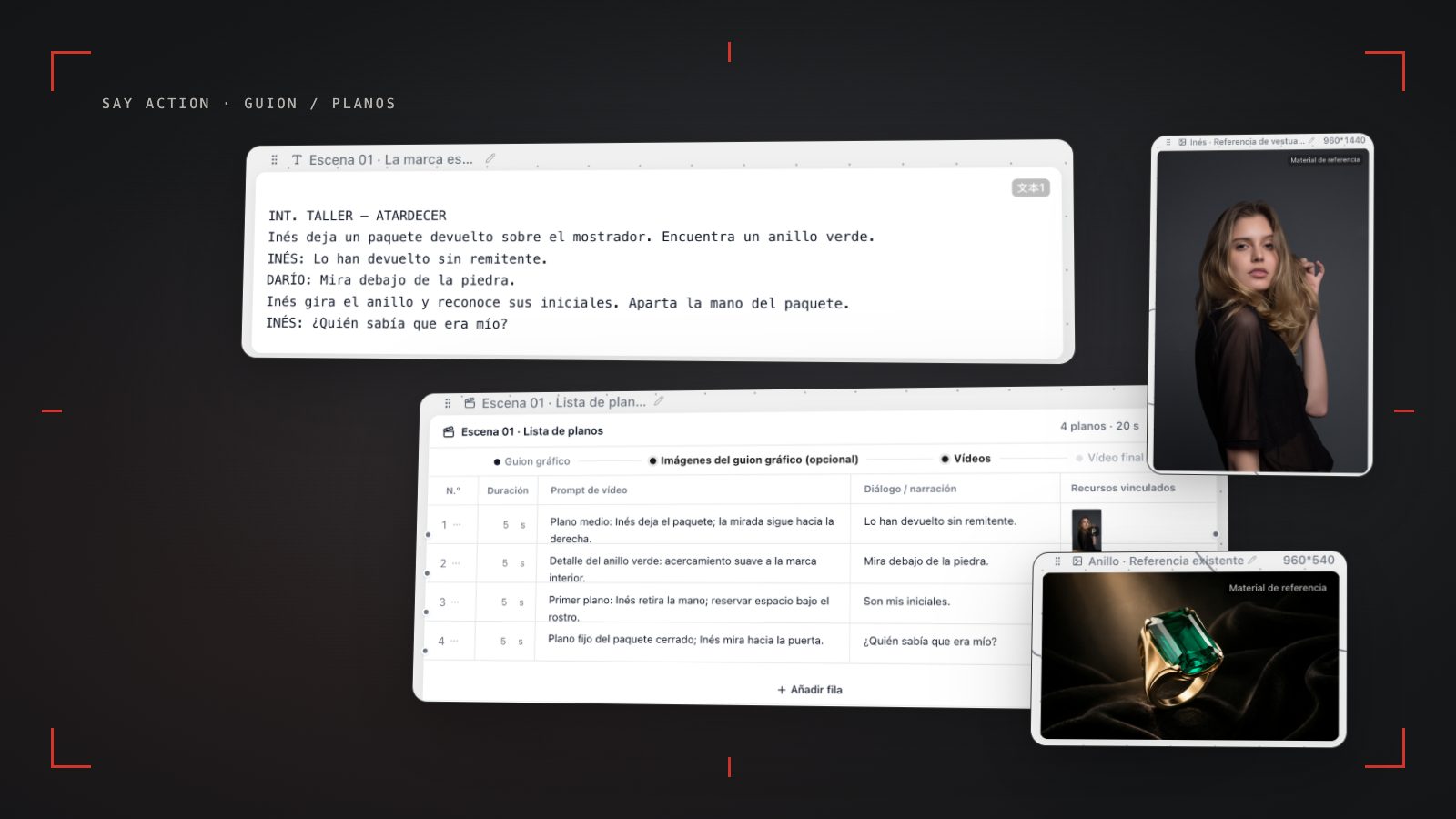
With the episode text in hand, distinguish scene description, action and dialogue, then break them into beats that can be filmed or generated. A shot usually carries one main action or reaction: establish the key, show Lía noticing its label, register the roommate's denial, then hold on their silence. A change of location, blocking or information may call for a new shot. Do not split every sentence into a row just to make the list look complete.
A shot list can track shot number, scene, framing, subject, action, dialogue, camera movement, intended duration and required references. Replace ‘she is nervous’ with something visible, such as ‘her fingers stop on the key teeth; she looks toward her roommate.’ Replace ‘make it cinematic’ with an actual framing or movement choice. Check that each row makes sense on its own and that the sequence preserves the timing of the reveal.
Next arrange a storyboard: choose sketches or reference frames for key actions and check eyelines, positions and prop states across neighboring shots. If the key sits on the left side of the table in one shot, say whether it moves in the next. If someone enters through the door, keep the axis and eyelines readable. AI can help organize text into shots or images, but the creator still decides what works.
Character references and vertical framing
A vertical frame makes it easy to center a person, phone screen or tabletop prop, but it can also crowd out the setting. Decide what viewers must see before placing characters and clues. In dialogue, foreground shoulders, depth or alternating singles can communicate a relationship. If a clue sits near the edge, check that the crop, subtitles and platform controls will not cover it. Safe areas depend on the destination, so review the actual publishing context.
A character reference helps describe hair, clothing, accessories and overall appearance, and some models accept it as an input. It does not guarantee identity across models or shots. Choose a clear reference and save another for important wardrobe changes; after generation, compare facial features, hair, collars, accessories and relative height shot by shot. If something drifts, note whether the reference, action, framing or model input made the image hard to read, then decide whether to adjust that shot or its neighbors.
Describe visible action and composition in each prompt rather than putting the whole episode into one request. Before asking for a first frame, last frame or multiple references, confirm which inputs the current model and channel support; they vary by configuration. Keep the reference link and reason in the shot list so you can revise a specific shot instead of making an unverifiable promise about character consistency.
Review, generation costs and editor handoff
Before generating, confirm the script version, purpose of the shot, aspect ratio, reference assets and model inputs for every row. Pick one or two representative shots to review the direction; do not present the exercise as a test result. During review, label story, framing, character-reference and technical issues separately. That makes the cause easier to address and avoids redoing work that has already been approved.
Generation cost depends on the model, task type and submitted inputs. If you use platform credits, review the current estimate before submitting. BYOK means connecting your own model provider: the Say Action service fee and the provider's model charges are separate concepts; check the product's current public terms.
See available models, resolutions, and estimated credits on the creation page. The final credit charge is shown before you submit.
When the upstream explicitly reports failure, reserved credits are refunded; tasks with unclear network status stay pending review to avoid double settlement.
BYOK supports a custom API endpoint, model key and headers. For OneAPI, NewAPI or another relay, select the OpenAI, Gemini or Claude protocol that matches its actual API, then check model IDs and image/video endpoint support. Not every relay or private protocol works automatically. BYOK model calls have no platform model markup or platform generation-credit deduction; workspace access and provider usage are still billed separately.
Hand off files organized by shot and scene, with the approved script, storyboard, reference sources, clip versions and open questions. Editing is where pacing, sound, subtitles, transitions and continuity come together; a generated shot is source material, not a finished episode. Review the full installment before release to confirm the reveal reads, the action connects and vertical framing does not hide a clue.
Connect your own API channels and third-party relays
In model-channel settings, enter the Base URL and API key, then configure the protocol, model IDs and required headers from your provider's documentation. Check the image and video modes you need before generating. Paths, resolutions and first/last-frame inputs depend on the connected channel. An adaptation request for an unsupported channel is not a compatibility guarantee.
BYOK supports a custom API endpoint, model key and headers. For OneAPI, NewAPI or another relay, select the OpenAI, Gemini or Claude protocol that matches its actual API, then check model IDs and image/video endpoint support. Not every relay or private protocol works automatically. BYOK model calls have no platform model markup or platform generation-credit deduction; workspace access and provider usage are still billed separately.
Connect only trusted providers and use HTTPS in production. Custom requests are forwarded through the authenticated backend; required prompts, reference assets and credentials take part in the request. Never put API keys, passwords or secret-bearing headers in public canvases, screenshots or support requests.
Frequently asked questions
How do I turn a novella script into an AI storyboard?
Separate scenes, actions and dialogue. Break each scene into shots with one main action, then note framing, movement and references. Review the storyboard shot by shot for continuity and pacing. A tool can help organize material, but you decide which images and cuts tell the story.
What changes when preparing a vertical melodrama for TikTok?
Plan for a 9:16 frame and check where faces, clues and subtitles land in the publishing interface. Keep the episode conflict clear and leave a specific story question for the next installment; vertical framing is not a dramatic structure by itself.
How can I keep a character's face consistent between shots?
Use clear references when the model accepts them, then review facial features, hair, clothing and accessories in each shot. Inputs vary by model and channel; a reference image does not guarantee an identical identity.
Can I make a microseries for free, or does generation cost money?
You can prepare a script and storyboard without generating images. If you generate, cost depends on the model, task and configuration; review current product information and the estimate before submitting each job.
Can I connect OneAPI, NewAPI and custom headers?
BYOK supports a custom API endpoint, model key and headers. For OneAPI, NewAPI or another relay, select the OpenAI, Gemini or Claude protocol that matches its actual API, then check model IDs and image/video endpoint support. Not every relay or private protocol works automatically. BYOK model calls have no platform model markup or platform generation-credit deduction; workspace access and provider usage are still billed separately.