
Tool Comparison
Higgsfield Alternative for AI Filmmaking: Flexible Storyboard Canvas vs Credit-Heavy Studios
Compare Say Action and Higgsfield AI for multi-shot short drama production. Analyze credit rollover policies, script-to-storyboard tables, character reference anchors, and model routing.
On this page
- Our Stance: When Great Camera Motion Needs Sustainable Project Scaffolding
- Feature Matrix, Pricing Boundaries, and Credit Rollover (October 2026)
- The Isolated Clip Problem vs The Structured Storyboard Table
- Actor Identity: Preset Sliders vs Canvas Visual Reference Anchors
- Cost per Episode and When Higgsfield Remains the Winner
- Connect your own API channels and third-party relays
Our Stance: When Great Camera Motion Needs Sustainable Project Scaffolding
This article was written by the Say Action team. The comparison reflects our workflow recommendations for multi-shot short drama production across canvas workspaces and routed models, not an independent lab benchmark.
Filmmakers and video creators exploring queries like 'Higgsfield alternative', 'Higgsfield AI alternative', and 'tools like Higgsfield for video' frequently arrive with praise for Higgsfield's camera motions. Higgsfield has established a distinct reputation for mobile-native camera simulation, fluid physical sweeps, and cinematic movement presets that turn simple text prompts into dynamic video snippets. If your creative objective is rendering a standalone 5-second teaser clip, an eye-catching social media bumper, or a single stylized visual effects shot, that direct prompt-to-clip pipeline offers immediate visual gratification.
However, when creators transition from producing isolated clips to directing serialized short dramas, vertical microseries, or narrative shorts requiring 30 to 50 continuous episodes, the production equation fundamentally breaks down. A standard 60-second vertical episode demands between 10 and 12 distinct camera setups—establishing wide shots, dialogue over-the-shoulders, reaction close-ups, and dramatic push-ins. Across a 30-episode series, a creator must generate, review, label, and sequence 300 to 400 separate video takes. On closed platforms where subscription credits reset at the end of each monthly billing cycle without rollover, repeated iterations on difficult motion shots can exhaust a monthly allowance before an episode is even cut.
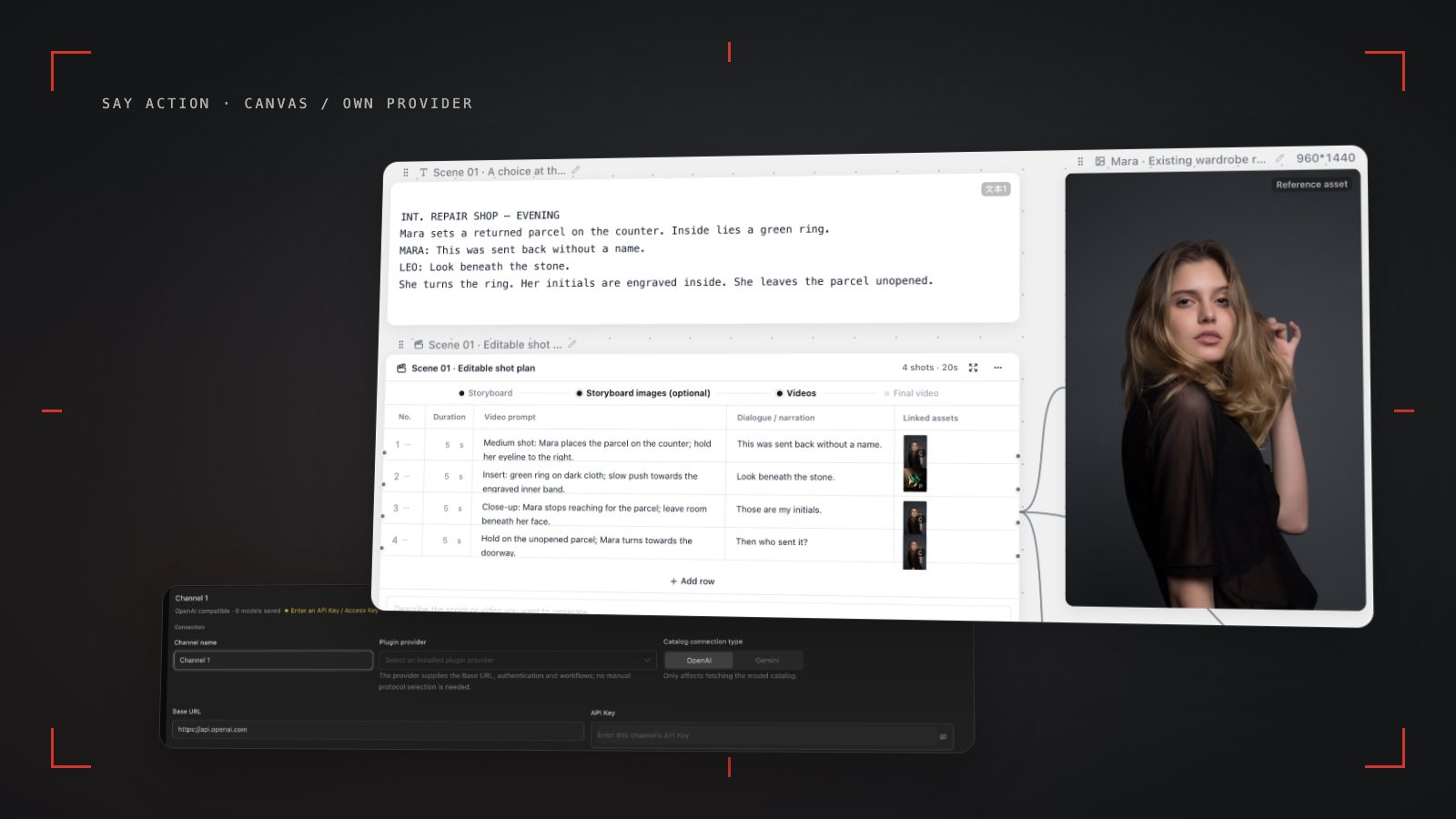
Say Action was engineered to eliminate this structural friction by placing the entire film production pipeline onto an infinite visual canvas. Rather than scattering video clips into a disconnected download queue, Say Action structures the narrative starting from an editable script node that parses directly into an interactive storyboard table. Each shot row maintains its own lens metadata, dialogue tags, character reference connections, and dedicated generation nodes. Creators can preview keyframes affordably before committing to video, route individual shots to specialized underlying models (including Seedance 2.0/2.5, MiniMax Hailuo, Kling v3, Kling v3 Turbo, or Wan 3.0), and regenerate a single flawed take without compromising the surrounding sequence.
Feature Matrix, Pricing Boundaries, and Credit Rollover (October 2026)
Evaluating generative video platforms for episodic production requires examining long-term project viability rather than single-shot highlight reels. The comparison below is grounded exclusively in verified product capabilities and official public statements as of October 11, 2026. Because competitor subscription rates and promotional tiers change over time, creators should consult the official Higgsfield pricing page for current monthly fees and credit packages rather than relying on stale estimates. Our focus centers on the structural rules that govern production budgets: credit expiration policies, multi-model routing flexibility, script structure, and asset sovereignty.
The most significant operational divergence lies in credit handling and compute control. Higgsfield packages its generative capabilities into monthly subscription tiers (Starter, Plus, and Ultra, alongside enterprise custom pricing), where credits expire at the end of each billing cycle without rollover. For independent filmmakers whose production schedules ebb and flow during scripting and casting, unused credits vanish; conversely, demanding complex camera motions incurs high credit multipliers that can abruptly stall an active shoot. Say Action resolves this dilemma through transparent upfront credit calculations displayed prior to every generation on the canvas. High-volume studios can also activate Bring Your Own Key (BYOK) relay mode, unbundling workspace scaffolding from model consumption and avoiding platform credit expiration.
For Say Action subscription tiers, credit allowances, and service boundaries, refer to our official documentation: Credits are estimated from channel pricing; final deduction follows the price tiers configured in the admin backend. Per-second video billing is pre-authorized by requested seconds; if upstream output exceeds the request, a small concession difference may occur. The service fee covers the workspace, not model usage. Provider API charges are separate. BYOK supports a custom API endpoint, model key and headers. For OneAPI, NewAPI or another relay, select the OpenAI, Gemini or Claude protocol that matches its actual API, then check model IDs and image/video endpoint support. Not every relay or private protocol works automatically. BYOK model calls have no platform model markup or platform generation-credit deduction; workspace access and provider usage are still billed separately.
| Production Dimension | Team Editorial PickSay Action | Higgsfield AI |
|---|---|---|
| Core Architecture | Infinite canvas linking scripts, shot tables, keyframes, and multi-model video nodes | Prompt-and-preset based standalone video clip generator |
| Credit Expiration Policy | Active subscription credits managed per plan; BYOK avoids platform credit expiration | Subscription credits reset every billing cycle with no rollover |
| Script-to-Shot Pipeline | Script nodes parse into structured shot rows with dialogue, lens size, and duration | Not stated on official site; requires external shot organization |
| Character Consistency | Multi-angle character reference sheets linked visually to any canvas shot row | Character customization features; requires continuous prompt tuning across scenes |
| Model Routing | Multi-model routing (Wan 3.0, Kling v3 / Turbo, Seedance 2.0/2.5, MiniMax Hailuo) | Proprietary generative video pipeline and camera motion models |
| Aspect Ratios & Framing | Native 9:16 vertical and 16:9 horizontal on canvas with composition overlays | Supports mobile vertical and standard landscape aspect ratios |
| Camera Movement Controls | Director-level text motion syntax and model-specific camera parameters | Pre-configured cinematic camera movement presets and motion sliders |
| Asset Storage & Export | Local-First saving to local disk via browser File System Access API with 15-day cloud notice | Cloud-hosted asset library; manual download per clip |
| Pricing & Transparency | Standard & Supreme plans or BYOK relay; credits estimated per shot before generation | Tiered plans (Starter, Plus, Ultra); current pricing on official site |
| Information Source | Say Action product codebase and official pricing documentation | Higgsfield official site and pricing documentation; checked October 11, 2026 |
Higgsfield information is based on public details on higgsfield.ai as of October 11, 2026. Vendor feature descriptions do not constitute independent benchmarks. Higgsfield pricing and plan terms are subject to its official site. Brand names are used for factual comparison with no endorsement implied.
The Isolated Clip Problem vs The Structured Storyboard Table
A recurring frustration among creators searching for alternatives to single-prompt video generators is file fragmentation. When video clips are generated one prompt at a time into an unstructured cloud media feed, the creator ends up with dozens of loose mp4 files tagged with arbitrary hash names like hg_9812_clip.mp4. In an editing timeline like CapCut or Premiere Pro, matching random filenames back to Scene 4, Shot 3 becomes an administrative nightmare. If a dialogue line is adjusted or a director requests a different camera angle on the reverse shot, the editor must guess which prompt produced the previous shot's lighting and framing, frequently introducing visual continuity errors.
Say Action replaces loose clip feeds with an interactive Storyboard Table anchored directly to the canvas workspace. When you paste an episode script into the canvas, it breaks down into structured rows representing individual camera setups. Each row tracks the scene number, shot index (e.g., Shot 01 to Shot 12), dialogue line, character assignment, lens size (Extreme Close-Up, Medium Close-Up, Over-the-Shoulder), and specific camera movement instructions. Because image keyframes and video generation cards remain physically wired to their corresponding table rows, every piece of generated footage maintains complete narrative context on screen.
To establish an efficient short drama production line, follow this practical 5-step storyboard execution workflow: Step 1: Paste your completed episode script into a Script Node on the Say Action canvas; Step 2: Generate or manually configure your 12-shot Storyboard Table, designating framing sizes (e.g., OTS over-the-shoulder, CU close-up) and dialogue beats; Step 3: Render initial keyframe stills using efficient image models (such as GPT Image or Nano Banana) to lock costumes, lighting, and spatial blocking before rendering video; Step 4: Create video nodes connected to approved keyframes, applying motion prompts (e.g., 'slow tracking push-in, shallow depth of field, steady focus on subject eyes') and routing to models like Seedance 2.0/2.5 or Kling v3; Step 5: Export approved takes using the browser File System Access API, which writes standardized filenames (e.g., Scene01_Shot04_OTS.mp4) directly into your local project drive for seamless NLE assembly.
Actor Identity: Preset Sliders vs Canvas Visual Reference Anchors
In dramatic filmmaking, facial drift destroys narrative immersion faster than almost any other technical flaw. While Higgsfield provides character creation utilities, managing a recurring cast across varied lighting environments, emotional exchanges, and multi-angle scenes remains difficult when relying primarily on text prompts and preset sliders. By the seventh shot of an intense confrontation, subtle shifts in jawline structure, hair volume, or eye color can turn your lead actor into an unrecognizable double, forcing costly re-generations.
Say Action tackles identity drift through visual reference nodes embedded directly on the canvas. Instead of attempting to describe an actor's facial geometry repeatedly in textual prompts, creators build a persistent Character Sheet node containing four synchronized reference angles: front portrait, three-quarter view, profile, and expression reference. Visual connection wires then link this central character node directly to every storyboard row where the character appears. When sending generations to video engines that support visual reference conditioning (such as Seedance 2.0/2.5 or MiniMax Hailuo), the canvas passes these reference anchors directly into the model's multi-input pipeline.
For high-stakes dialogue exchanges, pair visual reference nodes with a structured dual-anchor prompt formula. Example motion prompt formula: [Character: Sarah, bound to Reference Node A], [Framing: Over-the-shoulder medium close-up over Mark's shoulder], [Action: Sarah lowers her gaze slightly, then looks up with restrained tension], [Lighting: moody warm tungsten key light matching Scene 01 interior], [Camera: static camera with subtle handheld breathing, locked focus on eyes]. By pinning the visual identity at the canvas level rather than relying on lucky prompt seeds, productions maintain cast consistency from opening hook to final cliffhanger.
Cost per Episode and When Higgsfield Remains the Winner
A responsible production assessment must recognize where each platform excels. Higgsfield remains an exceptional tool for creators whose primary need is generating high-impact standalone video clips. If you are producing social media hooks, commercial concept snippets, or dynamic motion reels where camera simulation and dramatic movement presets take precedence over multi-scene continuity, Higgsfield's streamlined clip interface delivers rapid, visually arresting results without the setup overhead of a full cinematic storyboard pipeline.
Conversely, Say Action is purpose-built for creators, small studios, and production houses producing multi-shot vertical dramas for mobile entertainment platforms. When your production demands 30 to 50 episodes with 10 to 12 coherent shots each, managing actor continuity across shots, validating shot pacing with lightweight keyframes, and calculating exact credit consumption before rendering becomes essential. Say Action's modular shot architecture, multi-model routing across verified production models, and transparent credit refund safeguards protect your production budget from runaway iteration costs.
If you decide to migrate an active production to Say Action, execute this structured 5-step transition checklist: 1. Inventory and archive all approved script drafts, character visual references, and reusable video clips to your local hard drive; 2. Initialize an infinite canvas project in Say Action and establish Character Sheet nodes using your existing actor stills; 3. Organize your episode scene breakdown into the Storyboard Table, annotating lens framing, dialogue lines, and motion requirements; 4. Conduct draft validation passes using lightweight keyframe images before generating motion, routing dialogue shots to Seedance 2.0/2.5 or MiniMax Hailuo and kinetic action shots to Kling v3 or Wan 3.0; 5. Review platform billing, credit policies, and refund boundaries prior to bulk generation: When the upstream explicitly reports failure, reserved credits are refunded; tasks with unclear network status stay pending review to avoid double settlement. See available models, resolutions, and estimated credits on the creation page. The final credit charge is shown before you submit.
Connect your own API channels and third-party relays
In model-channel settings, enter the Base URL and API key, then configure the protocol, model IDs and required headers from your provider's documentation. Check the image and video modes you need before generating. Paths, resolutions and first/last-frame inputs depend on the connected channel. An adaptation request for an unsupported channel is not a compatibility guarantee.
BYOK supports a custom API endpoint, model key and headers. For OneAPI, NewAPI or another relay, select the OpenAI, Gemini or Claude protocol that matches its actual API, then check model IDs and image/video endpoint support. Not every relay or private protocol works automatically. BYOK model calls have no platform model markup or platform generation-credit deduction; workspace access and provider usage are still billed separately.
Connect only trusted providers and use HTTPS in production. Custom requests are forwarded through the authenticated backend; required prompts, reference assets and credentials take part in the request. Never put API keys, passwords or secret-bearing headers in public canvases, screenshots or support requests.
Frequently asked questions
Does Say Action support camera controls similar to Higgsfield?
Yes. Say Action supports cinematic camera movements—including pan, tilt, zoom, pedestal, roll, and tracking—through structured motion prompt syntax in the storyboard table and model routing across engines like Kling v3, Seedance 2.0/2.5, and Wan 3.0.
What happens to unused credits at the end of the billing cycle?
In Say Action, platform subscription credits operate according to active plan terms, and creators using BYOK (Bring Your Own Key) connect their own provider keys, avoiding unspent platform credits expiring. For Higgsfield, official terms state that subscription credits reset each cycle without rollover.
Can I manage a multi-character drama project on Higgsfield?
While Higgsfield supports generating multi-person scenes, it lacks a dedicated storyboard table to bind character sheets across sequential shots and over-the-shoulder dialogues. Say Action provides dedicated character reference nodes and shot rows to maintain visual continuity across opposing dialogue angles.
How does Say Action handle generated media storage compared to Higgsfield?
Higgsfield stores assets in a cloud-hosted library. Say Action adopts a local-first principle: you can authorize a local workspace folder via the browser File System Access API to save video files directly to your hard drive, while cloud-cached assets carry a 15-day expiration notice to keep storage clean.
Can I connect OneAPI, NewAPI and custom headers?
BYOK supports a custom API endpoint, model key and headers. For OneAPI, NewAPI or another relay, select the OpenAI, Gemini or Claude protocol that matches its actual API, then check model IDs and image/video endpoint support. Not every relay or private protocol works automatically. BYOK model calls have no platform model markup or platform generation-credit deduction; workspace access and provider usage are still billed separately.