
Tool recommendations
LTX Studio Alternative for Short Drama: Why Creators Move to Canvas-Based Production
Compare LTX Studio and Say Action for multi-shot vertical drama production, covering linear timelines versus infinite canvas shot tables, multi-model routing, commercial licensing, and migration steps.
On this page
- Our Stance: When All-in-One Boxes Limit Production Control
- Feature and Pricing Breakdown (Verified October 2026)
- Linear Generation vs Infinite Canvas Shot Management
- Proprietary Model Lock-in vs Routed Multi-Model Freedom
- Migration Checklist and When to Keep LTX Studio
- Connect your own API channels and third-party relays
Our Stance: When All-in-One Boxes Limit Production Control
This article was written by the Say Action team. The comparison reflects our workflow recommendations for multi-shot vertical drama production across canvas workspaces and routed models, not an independent lab benchmark.
When creators search for an LTX Studio alternative or evaluate alternative to LTX Studio options for episodic filmmaking, the initial appeal of an all-in-one studio is obvious: you paste a concept or script, and an automated pipeline drafts characters, scene shots, sound design, and an edited timeline. For quick 16:9 concept trailers or pitching an advertising idea, this automated velocity is impressive. But when a creative team moves from a 30-second teaser to a multi-episode vertical short drama series (30 to 50 episodes, each 60 to 90 seconds), all-in-one generation rapidly encounters structural friction. A slight character inconsistency on shot 4 often requires regenerating neighboring clips, the generation engine favors traditional landscape cinema framing, and commercial rights remain gated behind higher-tier subscription plans.
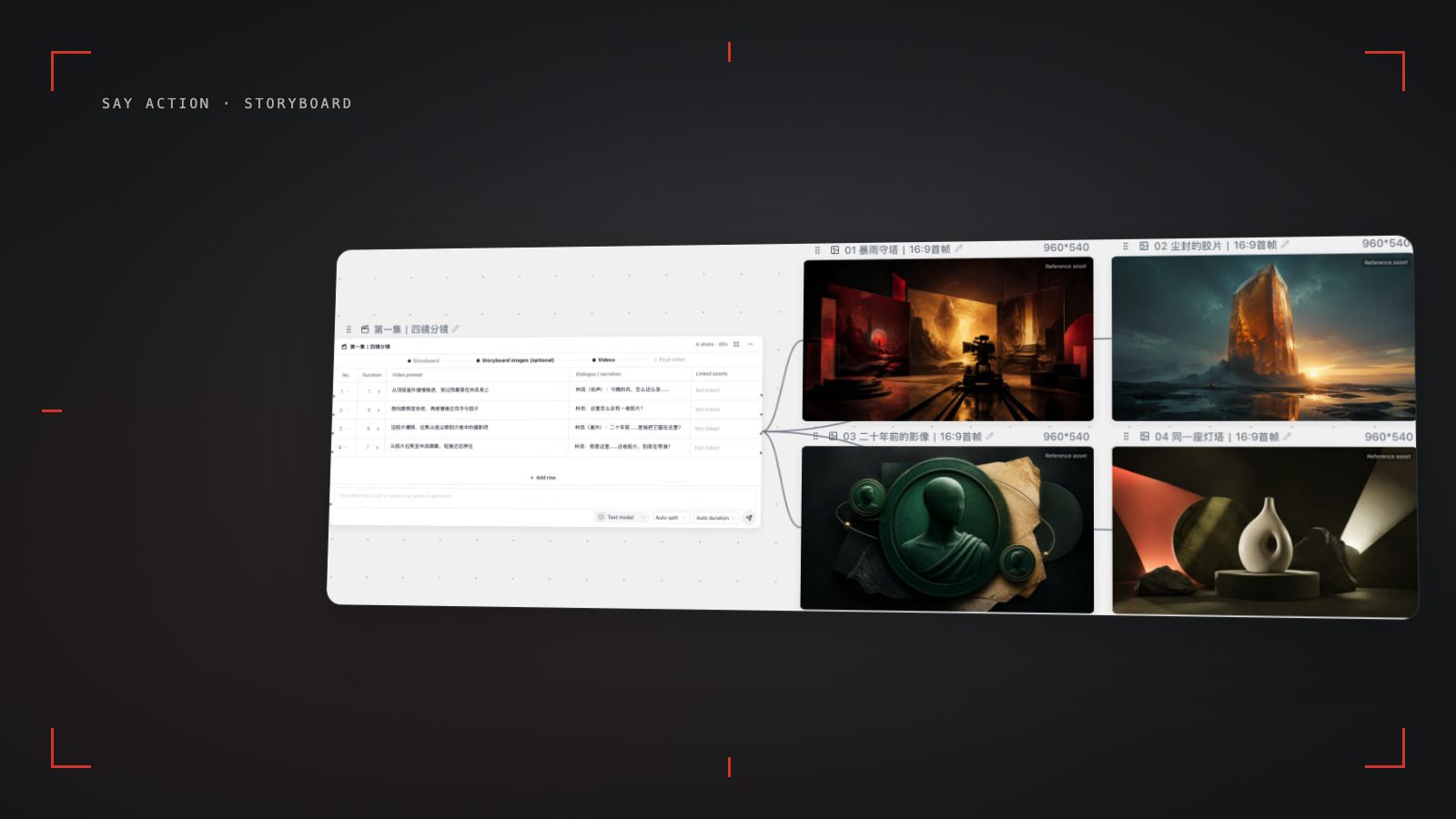
Say Action takes a distinctly modular architectural approach. Instead of locking the creator into a single linear timeline, it unrolls the production pipeline onto an infinite node canvas. Scripts are parsed into an editable shot list where each camera setup is an independent row. Character reference sheets, keyframe generation nodes, and video generation nodes are explicitly linked. If an actor's eye-line or wardrobe wavers on a single reverse angle, the director adjusts that specific prompt or swaps the underlying video model without disturbing the approved shots surrounding it. The comparison below examines how these contrasting philosophies impact real-world production velocity, licensing safety, and per-shot budget predictability.
Feature and Pricing Breakdown (Verified October 2026)
To help creators make an informed technical decision, the table below compiles verified features and licensing terms between Say Action and LTX Studio as of October 11, 2026. Information for LTX Studio is sourced directly from its public documentation (ltx.studio and ltx.io). Capabilities not explicitly documented on official vendor pages are noted accordingly. Because third-party subscription rates fluctuate over time, competitor tiers are described by their official plan names and licensing thresholds; creators should always verify live rates on the respective official portals.
The most critical operational contrast lies in commercial licensing and multi-model flexibility. LTX Studio reserves commercial licensing exclusively for its Standard plan and above; its Free (one-time credit pool) and Lite tiers remain restricted to personal experimentation. In contrast, Say Action grants full commercial utilization across active standard memberships as well as custom BYOK infrastructure runs. Furthermore, while LTX Studio relies strictly on its proprietary LTX foundation models, Say Action allows directors to route specific shots to specialized production models—such as Kling v3 for complex body choreography, MiniMax Hailuo for nuanced dramatic dialogue, Seedance 2.5 for continuity, or Wan 3.0 for cinematic text-to-video pacing.
| Dimension | Editorial PickSay Action | LTX Studio |
|---|---|---|
| Primary Architecture | Infinite node canvas: script nodes, storyboard table, character reference anchors, and video nodes | All-in-one linear timeline with automated scene synthesis and rough-cut assembly |
| Video Model Ecosystem | Multi-model routing: Wan 3.0, Kling v3 / v3 Turbo, Seedance 2.0 / 2.5, MiniMax Hailuo | Proprietary LTX-2.5 and LTX-2.3 generative video engines |
| Framing & Aspect Ratio | Native 9:16 vertical short drama framing alongside 16:9 widescreen and custom aspect ratios | Cinematic 16:9 widescreen orientation by default; vertical orientation available in editor |
| Shot-Level Rework | Surgical single-shot node regeneration without altering adjacent scenes or damaging context | Timeline-centric regeneration where adjusting one cut may affect surrounding scene cohesion |
| Commercial Licensing | Commercial rights included with active standard membership and verified BYOK execution | Commercial rights restricted: Free and Lite are personal only; Standard unlocks commercial use |
| Pricing & Credit Model | Standard monthly USD 29.90 (1100 credits included); BYOK Studio Pass USD 29.00 / 6 months (workspace access without bundled credits; connect your own endpoints) | Free, Lite, Standard, and Pro tiers; see official site for current pricing and credit bundles |
| Failed Generation Handling | Reserved credits automatically refunded on explicit upstream failure; pending review if disconnected | Platform credit deductions subject to vendor monthly quotas; see official site for usage policies |
| Official Source & Date | Say Action published pricing specifications and production codebase | LTX Studio official site (ltx.studio, ltx.io) and pricing portal; checked October 11, 2026 |
LTX Studio specifications reflect publicly available information on ltx.studio and ltx.io as of October 11, 2026. Vendor terms and pricing are subject to the official website. Brand names are referenced solely for comparative clarity with no partnership implied.
Linear Generation vs Infinite Canvas Shot Management
In an all-in-one generative studio like LTX Studio, the production flow proceeds along a pre-assembled timeline. While this creates an exciting 'first draft' within minutes, directing a 50-episode narrative demands precise editorial surgery. Consider an intense dialogue climax: Shot 3 is a medium two-shot establishing tension; Shot 4 cuts to an over-the-shoulder close-up of the protagonist dropping a forged document; Shot 5 reacts with an extreme close-up of the antagonist's widening pupils. In a timeline-locked system, altering the camera angle or hand motion in Shot 4 frequently forces a broader re-render that risks changing the lighting, costume textures, or spatial positioning established in Shots 3 and 5.
On Say Action's infinite canvas, the script is split into a discrete storyboard table where every shot occupies its own row with designated parameters: scene number, shot index, camera angle (Over-The-Shoulder, Close-Up, Dutch Angle), focal length, dialogue line, and motion directive. For example, a creator can prompt Shot 4 specifically: 'Over-the-shoulder close-up, dramatic side key lighting, Detective Vance dropping the encrypted drive, micro-tremor in fingers, 9:16 vertical ratio, 24fps cinematic atmosphere'. If the hand gesture in Shot 4 requires fine-tuning, the creator regenerates only Shot 4's video node. Shots 1, 2, 3, and 5 remain untouched, locked, and fully preserved on the canvas.
Mobile-first delivery introduces additional formatting demands. ReelShort, DramaBox, TikTok, and YouTube Shorts require vertical 9:16 framing where the top and bottom of the screen are often covered by platform UI; keep faces and key action in the central area. Say Action incorporates safe-zone framing overlays directly into its keyframe review nodes. Once rendering is complete, files export with structured, human-readable naming conventions (such as `Ep01_Sc02_Shot04_CU_MiniMax.mp4`) via the browser's File System Access API straight to your physical drive. Directors can immediately drag and drop these organized clips into CapCut, DaVinci Resolve, or Adobe Premiere without untangling cryptic cloud hashes.
Proprietary Model Lock-in vs Routed Multi-Model Freedom
A core engineering trade-off in LTX Studio is its reliance on proprietary foundation models (LTX-2.5 and LTX-2.3). While utilizing an in-house model provides tight integration within their proprietary editing suite, no single AI video model excels equally across all cinematic challenges. Some models maintain exceptional temporal continuity in wide-angle architectural pans but struggle with human facial micro-expressions. Others deliver hyper-realistic human skin textures during intimate speech but lack dynamic physical simulation for athletic martial arts or high-speed vehicle pursuits.
Say Action decouples the storyboard canvas from any single generative backend, giving creators a multi-model routing engine. Directors assign each shot to the model best suited for its visual demands: route high-octane physical stunts or dynamic camera tracking to Kling v3 or Kling v3 Turbo text-to-video; assign emotional dialogue close-ups with subtle lip-sync and believable gaze to MiniMax Hailuo; assign seamless shot-to-shot transitions to Seedance 2.5; and assign sweeping environmental reveals to Wan 3.0 text-to-video. By matching scene intent with model strength, teams dramatically cut down on wasteful generation retries.
Budget control and infrastructure ownership reinforce this architectural separation. Say Action provides transparent credit estimations prior to every render while ensuring full refund protections: When the upstream explicitly reports failure, reserved credits are refunded; tasks with unclear network status stay pending review to avoid double settlement. For high-volume production houses operating at enterprise scale, Say Action's Bring Your Own Key (BYOK) relay removes platform credit markups entirely: BYOK supports a custom API endpoint, model key and headers. For OneAPI, NewAPI or another relay, select the OpenAI, Gemini or Claude protocol that matches its actual API, then check model IDs and image/video endpoint support. Not every relay or private protocol works automatically. BYOK model calls have no platform model markup or platform generation-credit deduction; workspace access and provider usage are still billed separately. As detailed in our policy documentation: Credits are estimated from channel pricing; final deduction follows the price tiers configured in the admin backend. Per-second video billing is pre-authorized by requested seconds; if upstream output exceeds the request, a small concession difference may occur. The service fee covers the workspace, not model usage. Provider API charges are separate.
Migration Checklist and When to Keep LTX Studio
Choosing between Say Action and LTX Studio is not about declaring a universal winner; it is about matching your project's delivery format with the right toolchain. If your studio produces 16:9 cinematic concept teasers, single-narrator brand reels, or rapid advertising pitches where automated voiceovers and all-in-one rough cuts satisfy client approvals, LTX Studio remains a cohesive, streamlined solution. Its built-in sound effects and automated scene pacing allow solo directors to assemble proof-of-concept pitches with minimal manual timeline configuration.
Conversely, if your mandate is episodic vertical drama production where shot continuity, multi-character dialogue staging, granular frame-level revisions, and commercial licensing certainty are non-negotiable, migrating to Say Action's canvas workflow will substantially reduce production bottlenecks. You gain the ability to inspect camera angles individually, maintain dedicated character reference nodes across 50 episodes, and route video generations through leading production models like Kling v3, MiniMax Hailuo, Seedance 2.5, and Wan 3.0.
To migrate an ongoing production without asset loss, follow this practical checklist: 1) Export your master script and character portrait stills from your previous project; 2) Do not rely on unverified automated importers—create a fresh project in Say Action and paste your script into the script breakdown node; 3) Review the generated 10 to 12 shot rows, designating framing, camera motion, and dialogue tags; 4) Pin approved character reference images to character sheet nodes and connect them to relevant shot rows; 5) Generate keyframes with Nano Banana or GPT Image before dispatching video renders; 6) Authorize a local project folder for direct disk exports. Before kicking off batch renders, confirm your quota: When the upstream explicitly reports failure, reserved credits are refunded; tasks with unclear network status stay pending review to avoid double settlement. Connect only trusted providers and use HTTPS in production. Custom requests are forwarded through the authenticated backend; required prompts, reference assets and credentials take part in the request. Never put API keys, passwords or secret-bearing headers in public canvases, screenshots or support requests.
Connect your own API channels and third-party relays
In model-channel settings, enter the Base URL and API key, then configure the protocol, model IDs and required headers from your provider's documentation. Check the image and video modes you need before generating. Paths, resolutions and first/last-frame inputs depend on the connected channel. An adaptation request for an unsupported channel is not a compatibility guarantee.
BYOK supports a custom API endpoint, model key and headers. For OneAPI, NewAPI or another relay, select the OpenAI, Gemini or Claude protocol that matches its actual API, then check model IDs and image/video endpoint support. Not every relay or private protocol works automatically. BYOK model calls have no platform model markup or platform generation-credit deduction; workspace access and provider usage are still billed separately.
Connect only trusted providers and use HTTPS in production. Custom requests are forwarded through the authenticated backend; required prompts, reference assets and credentials take part in the request. Never put API keys, passwords or secret-bearing headers in public canvases, screenshots or support requests.
Frequently asked questions
Can I import an LTX Studio project file directly into Say Action?
Direct proprietary project file conversion is not supported between the two platforms. To transition seamlessly, export your raw script text and approved character stills, create a new project in Say Action, and populate the storyboard table through the script breakdown node. Rebuilding takes minutes and ensures clean node references across your canvas.
Is commercial usage allowed on Say Action's entry-level plan?
Yes. Active standard memberships on Say Action grant full commercial usage rights for your generated creations. Unlike LTX Studio, which restricts commercial licensing to its Standard plan and above while keeping Free and Lite tiers personal-use only, Say Action treats your commercial creative output as yours across standard subscriptions and BYOK passes.
Why does Say Action use multiple AI models instead of one single proprietary engine?
No single generative model leads across every cinematic requirement. Kling v3 excels in physical momentum and camera kinematics, MiniMax Hailuo delivers nuanced human facial fidelity during dialogue, Seedance 2.5 provides multi-frame continuity, and Wan 3.0 offers cinematic environmental pacing. Routing each shot to its best-fit engine dramatically increases final shot yield.
How does credit refunding differ between the two platforms?
When the upstream explicitly reports failure, reserved credits are refunded; tasks with unclear network status stay pending review to avoid double settlement.
Can I connect OneAPI, NewAPI and custom headers?
BYOK supports a custom API endpoint, model key and headers. For OneAPI, NewAPI or another relay, select the OpenAI, Gemini or Claude protocol that matches its actual API, then check model IDs and image/video endpoint support. Not every relay or private protocol works automatically. BYOK model calls have no platform model markup or platform generation-credit deduction; workspace access and provider usage are still billed separately.