
Halloween PFP: 12 AI Costume Prompts for Discord, TikTok, and Instagram

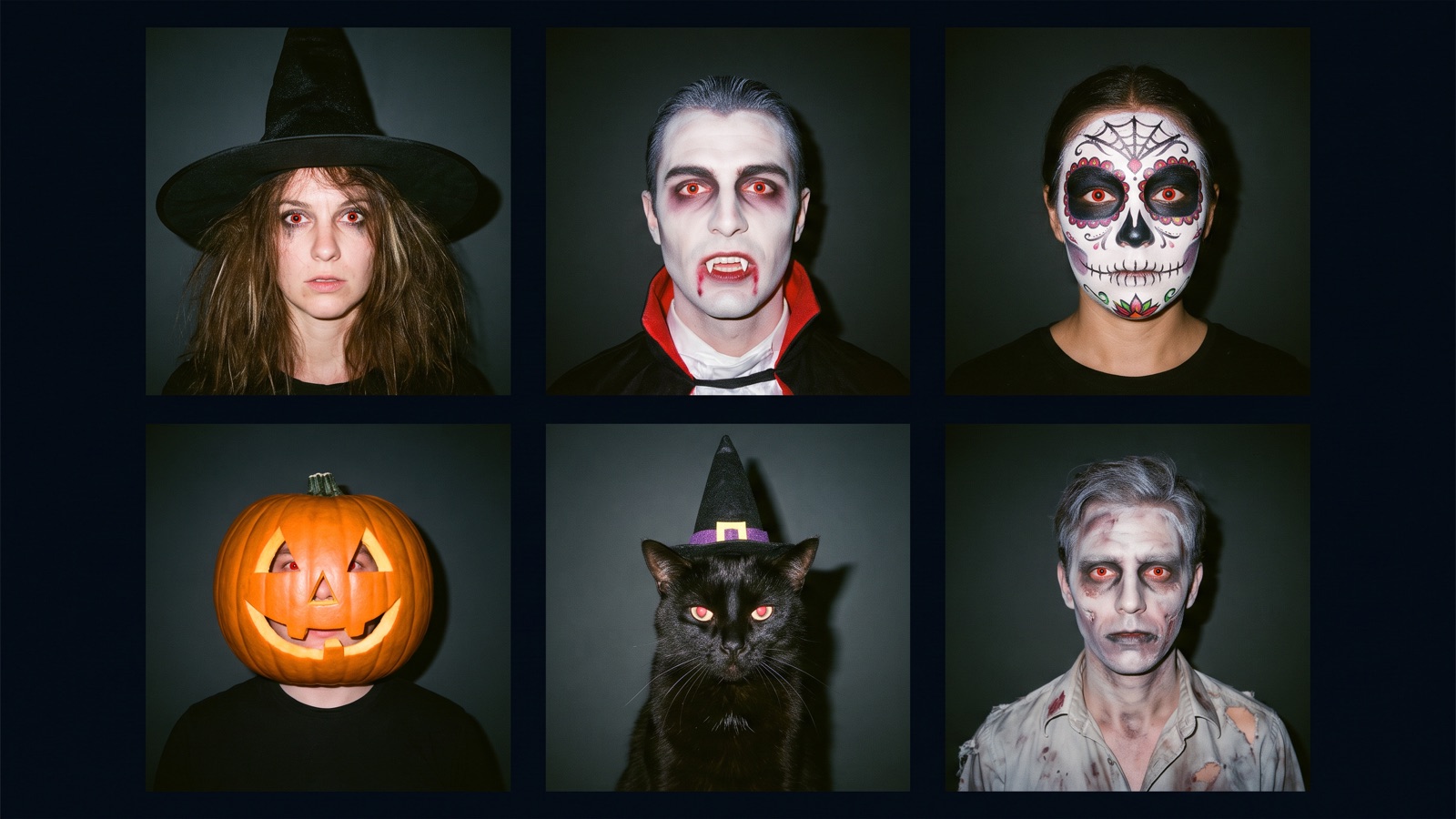
A great Halloween PFP (profile picture) needs three things: a 1:1 square crop, a centered face, and a clean background, so it stays recognizable at thumbnail size. You can turn a photo of yourself into a witch, a vampire, or a jack-o'-lantern, or put your cat or dog in a costume with a text prompt. Some of the 12 prompts need no photo at all. This guide includes 12 image prompts and one motion prompt, plus framing tips and canvas generation steps.
Making a flyer instead? See Halloween poster and flyer prompts.
Why do AI Halloween PFPs often look bad on social media?
Most holiday avatars fail because they're framed like regular portraits. Shrink one to a small circle on a phone and the details disappear.
1. The circular crop slices off corners
Social apps mask square pictures into circles, discarding all four corners. Keep your subject inside the middle 70% of the frame, with 15% outer padding, so hat brims and horns stay inside the circle.
2. Mobile feeds render avatars at tiny sizes
Before you post, shrink the image to about 40 pixels wide. If you can't tell what the costume is, simplify it. Tiny accessories turn to mud at that size, so favor bold silhouettes and strong contrast.
3. Busy backgrounds hide the subject
Dense graveyard scenes turn into clutter in a small circle. If you want a scene, blur it heavily (prompts 1 and 9). Otherwise use a solid dark backdrop. Either way, add a thin rim light so your hair and shoulders stay visible in dark mode.
4. A sideways gaze is harder to read
At icon size, a straight-on gaze reads as friendlier and holds up better in a busy chat list.
How do you structure a reliable Halloween avatar prompt?
A reliable prompt describes physical details rather than emotional mood. Mood words like "spooky" give the model little to go on; light, fabric, and framing do.
Separate your prompt into four parts: subject framing, costume materials, lighting contrast, and background simplicity.
[Framing & Subject] + [Costume & Makeup Details] + [Lighting Direction & Rim Light] + [Simple Background & 1:1 Aspect Ratio]| Avatar Element | Recommended Phrasing | Phrasing to Avoid | Pitfall to Watch For |
|---|---|---|---|
| Framing | "Centered close-up headshot, looking into lens, 1:1 aspect ratio" | "Epic wide shot, full body costume" | Wide shots shrink the head to a speck inside circular crops. |
| Wardrobe | "Pointed black wool witch hat, emerald velvet cloak" | "Scariest costume ever, ultra-detailed outfit" | Vague superlatives confuse models; tangible fabric names provide clear texture cues. |
| Makeup | "Matte porcelain foundation, deep burgundy lipstick" | "Terrifying face, extreme blood and gore" | Gore adjectives may get a request blocked; name cosmetic shades and textures instead. |
| Lighting | "Warm golden candlelight on cheek, cool blue rim light" | "Dark spooky lighting, eerie atmosphere" | Flat dark lighting blends dark hair and capes directly into dark app backgrounds. |
| Background | "Clean dark charcoal studio backdrop, subtle bokeh" | "Haunted graveyard with trees and mist" | Detailed backgrounds turn to clutter at thumbnail size. |
What Halloween PFP prompts work best for self-photo costume transformations?
These five prompts transform portrait photos into classic Halloween characters. Upload your portrait to an Image node on DramaCanvas, then wire its right output anchor to a second Image node where you paste your prompt. Never upload photos of other people without their permission.
1. Modern Forest Witch
Best for: Instagram profile pictures and seasonal community icons. A pointed black wool witch hat, an emerald velvet cloak, and warm golden rim lighting.
Use the connected photo as the face reference and keep the same face. A close-up headshot with space around the hat brim, of a person wearing a pointed black wool witch hat and deep emerald velvet cloak, facing forward. Warm golden rim lighting highlighting cheekbones, soft dark forest background with gentle bokeh, 1:1 square aspect ratio.Variations to try: Swap deep emerald velvet cloak for charcoal linen cowl, or change soft dark forest background to minimalist obsidian backdrop.
2. Victorian Aristocrat Vampire
Best for: Moody Discord avatars and dark aesthetic social accounts. Pale skin, a structured velvet collar, and warm candlelight.
Use the connected photo as the face reference and keep the same face. A close-up portrait of a person with porcelain pale skin and deep burgundy velvet collar, facing the camera. Subtle golden candlelight raking across one cheek, faint crimson rim light along dark hair, solid charcoal background, 1:1 square aspect ratio.Variations to try: Swap deep burgundy velvet collar for midnight black lace choker, or change porcelain pale skin to natural olive skin tone.
3. Sugar Skull Makeup
Best for: Vibrant festive profiles and cultural holiday celebrations. Black and white calavera face paint, accented by bright marigold flowers. Inspired by Day of the Dead face painting; use it with respect.
Use the connected photo as the face reference and keep the same face. A centered close-up portrait of a person with intricate black and white sugar skull face paint, wearing a crown of orange marigold flowers. Soft directional studio light, deep shadow accents, clean dark maroon background, 1:1 square aspect ratio.Variations to try: Swap crown of orange marigold flowers for circlet of dark purple roses, or change clean dark maroon background to soft out-of-focus candle bokeh.
4. Neon Streetwear Zombie
Best for: Gaming channels and streaming icons. Subtle zombie makeup, an everyday bomber jacket, and cyan and magenta edge lights.
Use the connected photo as the face reference and keep the same face. A centered headshot of a person with subtle pale skin texture and dark eye hollows, wearing a distressed olive bomber jacket. Dual lighting with cool cyan key light and sharp magenta edge light, simple dark wall background, 1:1 square aspect ratio.Variations to try: Swap distressed olive bomber jacket for faded black denim jacket, or change sharp magenta edge light to vibrant amber rim light.
5. Classic Glowing Jack-o'-Lantern Head
Best for: Anonymous creator profiles and accounts that want a recognizable mascot look. A real carved pumpkin worn over the head, warm interior candlelight, and your photo guiding your build and posture.
Use the connected photo for body build and posture. A centered portrait of a person wearing a real carved pumpkin over their head, with warm orange candlelight glowing through triangular carved eyes and mouth. Wearing a cozy brown plaid flannel shirt, muted twilight garden background, 1:1 square aspect ratio.Variations to try: Swap cozy brown plaid flannel shirt for black chunky knit turtleneck sweater, or change muted twilight garden background to simple dark wood paneled wall.
What Halloween PFP prompts work best for couples, pets, and anime styles?
Use these for matching profile sets, pet costumes, and anime-style avatars. Generate both couple portraits on the same canvas with the same model so the pair looks like a set. The backdrops differ (navy and charcoal) on purpose, so each half has its own mood while the style matches.
For prompts 8 and 9, upload your pet's photo to one Image node and wire it into a second Image node where you paste the prompt, as above. Prompts 6, 7, 11, and 12 work without a photo. To put your own face in 6 or 7, start the prompt with: Use the connected photo as the face reference and keep the same face. Prompt 10 is a drawn character, so skip the photo.
6. Matching Celestial Gothic Couple: Lunar Sorceress
Best for: Matching couple profile sets and partner Discord accounts. Cool silver tones, a crescent moon tiara, and deep navy velvet.
A centered portrait of a person wearing a silver crescent moon tiara and dark midnight blue velvet cloak, facing forward. Pale silver moonlight rim light separating hair from background, deep navy background with faint silver dust motes, 1:1 square aspect ratio.Variations to try: Swap silver crescent moon tiara for delicate obsidian floral circlet, or change dark midnight blue velvet cloak to black silk cowl.
7. Matching Celestial Gothic Couple: Solar Alchemist
Best for: Paired couple sets. It's the partner to the lunar sorceress portrait, with warm brass accents and rich charcoal wool.
A centered portrait of a person wearing an antique brass collar and tailored charcoal wool coat, looking directly at the camera. Warm amber lantern glow on one side, deep charcoal background with subtle warm ember motes, 1:1 square aspect ratio.Variations to try: Swap antique brass collar for weathered leather band, or change tailored charcoal wool coat to dark burgundy velvet vest.
8. Pointed Hat Spellcaster Cat
Best for: Pet creator profiles and festive animal accounts. A miniature satin witch hat on your cat, with a subtle purple rim light.
Use the connected photo of my pet as the reference and keep its fur color and markings. A centered close-up portrait of my cat wearing a miniature purple satin witch hat, looking at the camera. Soft warm studio lighting, subtle purple rim light along fur, clean dark violet background, 1:1 square aspect ratio.Variations to try: Swap miniature purple satin witch hat for tiny orange felt pumpkin hat, or change clean dark violet background to warm cream studio backdrop.
9. Pumpkin Vest Dog
Best for: Dog owner profiles and cheerful family accounts. A plush orange pumpkin vest on your dog, with soft autumn backlight.
Use the connected photo of my dog as the reference and keep its fur color and markings. A cheerful close-up portrait of my dog wearing a soft plush orange pumpkin vest with a green felt leaf collar. Bright natural afternoon backlight, soft warm highlights on the fur, soft blurred autumn foliage background, 1:1 square aspect ratio.Variations to try: Swap soft plush orange pumpkin vest for cozy knitted harvest sweater, or change soft blurred autumn foliage background to warm cream studio backdrop.
10. Cel-Shaded Halloween Anime Mage
Best for: VTuber accounts and gaming forum avatars. Clean 2D linework, bold cel shading, and a glowing potion flask on a flat background.
A clean cel-shaded anime illustration of a cheerful young mage with lavender hair and bat-wing hairpins, holding a small glowing orange potion flask. Sharp linework, bold cel shading, flat solid dark purple background, centered composition, 1:1 square aspect ratio.Variations to try: Swap lavender hair for silver bob cut, or change small glowing orange potion flask to floating carved mini pumpkin.
What Halloween PFP prompts work best for retro flash and gaming avatars?
These two prompts are for direct-flash snapshots and gaming avatars. Both rely on a bold silhouette and sharp lighting.
11. Y2K Direct-Flash Ceramic Mask Portrait
Best for: Retro fashion accounts and alternative social feeds. Harsh on-camera flash, a plain white ceramic mask, and a leather jacket.
A candid 35mm flash snapshot of a person wearing a plain white ceramic mask and oversized black leather jacket, looking into the lens. Harsh direct on-camera flash casting crisp hard shadow on the rear wall, authentic 2000s disposable camera grain, 1:1 square aspect ratio.Variations to try: Swap oversized black leather jacket for hooded black zip-up sweater, or change plain white ceramic mask to matte black stylized theater mask.
12. Cyber-Gothic Horned Gaming Avatar
Best for: Competitive gamers and Discord server moderators. Illuminated headset horns and symmetrical edge lighting against dark carbon texture.
A close-up portrait with space around the horns, of a futuristic character wearing an obsidian headset with illuminated crimson horns, looking forward. Symmetrical neon red rim lighting across jawline and cheekbones, matte black carbon background, centered framing, 1:1 square aspect ratio.Variations to try: Swap illuminated crimson horns for glowing emerald cat-ear antennas, or change matte black carbon background to dark hexagonal grid wall.
How do you generate a Halloween PFP on an infinite canvas?
Testing prompts side by side on an infinite canvas helps you compare variations quickly; see our infinite canvas beginner guide for connection basics.
Click "Add node" on the bottom toolbar, select "Image" under "Creative nodes", paste your prompt, pick Nano Banana 2 or GPT Image 2.5 from the node's model menu, set Aspect ratio to 1:1, and click the upward submission arrow.
To use your own photo, drag your portrait into an Image node, wire its right output anchor to a second Image node as an image reference, paste your costume prompt, and submit.
How do you animate your Halloween avatar into a short video?
You can animate your static Halloween avatar into a short video; check the destination platform's supported profile formats before uploading.
Click "Add node", create a "Video" node under "Creative nodes", and wire your Image node's right output to the Video node's left input. Under "Parameters", choose your image in "Start frame", pick Seedance 2.5 or Kling 3.0, and paste the motion prompt below. Still in Parameters, set Duration to about 5 seconds (check the range your model allows) and Aspect ratio to 1:1, then click the upward submission arrow. If your model doesn't list 1:1, pick the closest ratio and crop to a square afterward.
13. Subtle Atmospheric Avatar Motion
Best for: Short atmospheric clips and festive stream intros. A restrained camera push-in and a softly flickering rim light.
Slow forward camera push-in, subtle breathing motion, gently flickering rim light, floating dust particles.Variations to try: Swap Slow forward camera push-in for slow subtle head tilt, or change floating dust particles to faint drifting smoke wisps.
What are the limitations of AI Halloween avatars?
Results vary by model and prompt, so generate one test still before you run batches or video.
First, image models often get text wrong. Render a clean portrait first, then add username or text overlays using graphic software.
Second, describe the costume with physical details, like a white ceramic mask or a velvet cloak, instead of horror words. If a request is blocked, check the service's content rules and reword it.
Third, complex hand gestures near the face often render with distorted fingers. Keep framing focused on head and shoulders, or use "Inpaint" to correct flawed details.
Finally, fast camera moves are harder to get right; keep motion slow and small.
Frequently asked questions
Will my Halloween avatar get cut off by circular profile crops?
Yes, if the subject is too wide. Keep the face and any hat brim or horns inside the middle 70% of the 1:1 image, with about 15% padding around them.
Can I turn my own selfie into a Halloween PFP without losing my face?
Mostly. Upload your portrait to one Image node, wire it into a second Image node running Nano Banana 2 or GPT Image 2.5, and paste a costume prompt there, then check the result before you use it. Never upload photos of other people without their permission.
What should I do if my prompt gets blocked by safety filters?
Replace horror words with physical descriptions like "deep burgundy velvet" or "white ceramic mask" and try again. If it's still blocked, check the service's content rules.
Why does my animated avatar look distorted when I make a video?
Keep motion slow and small. If your video shows shifting eyes or stretched faces, simplify your motion prompt to a slow forward push-in or gentle rim-light flicker.
Which AI image model is best for 1:1 Halloween avatars?
There's no single winner. Run the same prompt in Nano Banana 2, Nano Banana Pro, and GPT Image 2.5, then keep the one whose face and costume still read at thumbnail size. **Next step:** Open an Image node on your canvas, paste your favorite costume prompt from above, and set the aspect ratio to 1:1 to generate your first holiday avatar; for more seasonal scene ideas and motion prompts, see Halloween AI prompts.