
Halloween AI Prompts: Costume Photos, Business Posters, and Short Videos

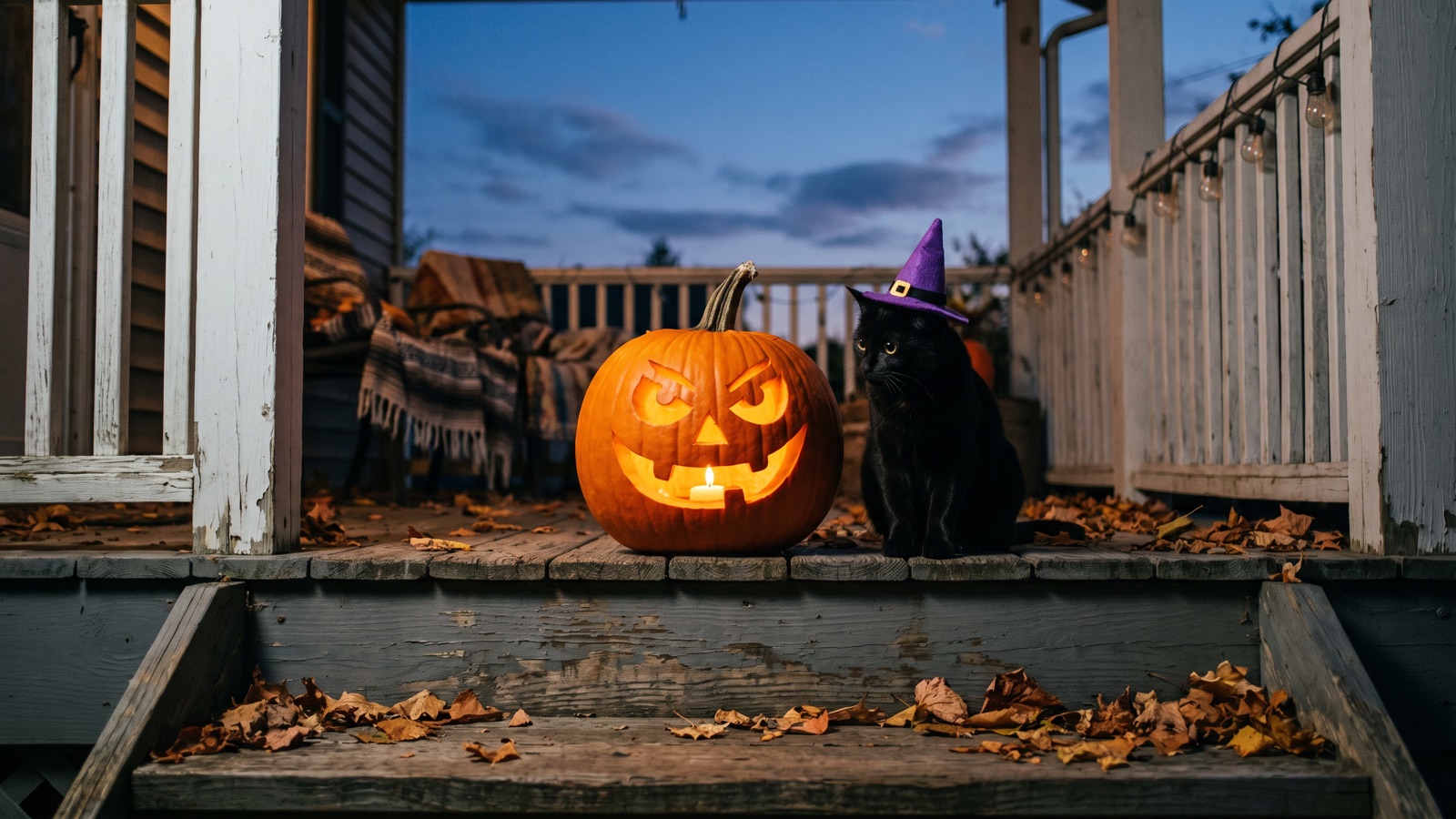
Here are 16 Halloween AI prompts you can paste straight into the canvas: costume photos, shop posters, and short video clips. You don't need prompt theory. Drop a template into an Image or Video node and change a few words. There's also a quick comparison of four video models and a checklist of Halloween elements.
How do you make fun Halloween costume photos with AI?
The first three prompts turn a portrait or a pet photo into a costume shot, and the fourth is a gag photo that needs no upload. For 12 more avatar ideas, see Halloween PFP ideas.
To use your own photo, click "Add node" on the bottom toolbar to create an Image node and upload your portrait. Next, create a second Image node and paste prompt 1, 2, or 3. Finally, drag a wire from the first node's output port to the second node's input port. The model uses your connected photo as reference while changing the wardrobe and lighting.
1. Personal costume portrait (white ceramic mask style)
Best for: Social media avatars, personal portraits, and party invite cards.
Use the connected photo as the face reference and keep the same face. A 35mm flash photo of a person wearing a plain white ceramic mask and an oversized black leather jacket, standing against a dark wood wall. Crisp on-camera direct flash, sharp cast shadow behind the subject, saturated colors, grainy disposable camera snapshot.The mask hides most of the face, so for a recognizable result try the witch-hat variation.
Variations to try: Swap white ceramic mask for pointed black witch hat, or change black leather jacket to dark velvet hooded cloak.
2. Pet Halloween costume
Best for: Festive phone wallpapers and pet social media posts.
Use the connected photo of my pet and keep its fur color and markings. Eye-level studio portrait of a golden retriever wearing small felt black bat wings and an orange collar, sitting next to a hollowed carved pumpkin. Warm soft key light from the front, subtle dark purple studio backdrop, crisp fur texture, clean indoor lighting.Variations to try: Replace golden retriever with your pet's own breed or species, or change small felt black bat wings to tiny knitted witch hat.
3. Couple and family holiday portraits
Best for: Couple keepsakes, family greeting cards, and autumn photo sets.
Upload one photo that shows everyone.
Use the connected photo as the face reference and keep the same face. A cozy medium shot of two people sitting on a rustic wooden porch covered in carved glowing pumpkins and dried corn stalks at dusk. Both wearing knitted vintage Halloween sweaters with pumpkin patterns, holding mugs of warm cider. Warm amber porch light, dim navy blue sky in the background, soft outdoor depth of field.Variations to try: Swap two people for a family of three, or change rustic wooden porch to hay bales in a pumpkin patch.
4. Funny gag photos
Best for: Holiday memes and humorous social media posts.
A humorous candid photo of a life-sized skeleton dressed in a gray office cardigan and reading glasses, sitting at a cafe table typing on a laptop next to a pumpkin spice latte. Daytime window sunlight, realistic cafe interior, depth of field, casual smartphone snapshot aesthetic.Variations to try: Swap life-sized skeleton for a person wearing a giant carved pumpkin over their head, or change the cafe to a cluttered modern office cubicle.
How can small businesses create Halloween promotional posters and product photos?
For flyer layouts and more poster prompts, see Halloween poster and flyer prompts.
A flyer needs empty space for text, so plan it into the picture. Before you generate, open Parameters and set Aspect ratio to 9:16 for flyers or 16:9 for banners. Once the model outputs a clean background, add your brand name, discount figures, and event dates in graphic design tools. Image models often misspell words, so don't ask them to write your text.
5. Cafe Halloween promotional poster background
Best for: Cafes and bakeries promoting seasonal drinks. Leave the upper half empty for text.
Commercial poster background for a coffee shop, featuring a rustic wooden counter decorated with small pumpkins, cinnamon sticks, and dried autumn leaves along the bottom edge. Warm directional side lighting, soft steam rising, dark slate wall in the upper half leaving clean negative copy space for text, high detail commercial photography.Variations to try: Swap the pumpkins and cinnamon on the counter for Halloween cupcakes with ghost icing, or change the dark slate wall to a warm white brick wall.
6. Party and event invitation flyer background
Best for: Bars, bookstores, salons, and community organizers printing flyers or digital invites.
Vertical invitation flyer background featuring a spooky Victorian doorway framed by glowing jack-o'-lanterns, spiderwebs, and twisted bare tree branches along the borders. Center area is an empty dark fog zone reserved for text layout, cold cyan rim light, warm amber lanterns at the sides, atmospheric holiday composition.Variations to try: Swap spooky Victorian doorway for vintage theater archway, or change cold cyan rim light to deep violet backlight.
7. Social media horizontal banner
Best for: Online shops, personal homepages, and brand profile headers in a 16:9 ratio.
A wide horizontal panoramic banner of an autumn table flat lay, with dark purple velvet cloth, scattered miniature pumpkins, black tapered candles, and dried twigs along the edges. Wide empty central area with soft overhead studio lighting, moody festive atmosphere, clean top-down flat lay photography.Variations to try: Swap dark purple velvet cloth for rough linen runner, or replace black candles with small brass candy jars.
8. Product holiday display hero image
Best for: Scented candles, handmade soaps, jewelry, and cosmetics brands presenting holiday items.
Commercial product display podium on a dark granite surface, surrounded by subtle dried moss, tiny black pumpkins, and delicate spiderwebs on one side. Soft spotlight on the empty podium surface, right side has clean dark space for product information, refined studio lighting, sharp focus.Variations to try: Swap dark granite surface for a light natural wood pedestal, or replace dried moss with scattered foil-wrapped holiday candies.
How do you turn a Halloween still into a 5-second video on the canvas?
On the infinite canvas, you can wire a still image into a Video node and get a 5-second vertical clip.
Here is the step-by-step workflow:
Make a still image
Click "Add node" on the bottom toolbar and choose "Image" under "Creative nodes". Paste any still prompt above, select Nano Banana 2 or GPT Image 2.5, and click the upward arrow on the prompt panel.
Connect a video node
Click "Add node" on the bottom toolbar and select "Video" under "Creative nodes". Click and drag a wire from the right output port of your Image node to the left input port of your Video node.
Configure start frame and ratio
Select your Video node, expand "Parameters", and choose the connected still under "Start frame". Choose Seedance 2.5 or Kling 3.0, set Aspect ratio to
9:16, and set the duration to5seconds.Enter camera prompt and submit
Paste the camera motion prompt below into the Video node text box and click the upward submission arrow.
9. 5-second vertical suspense camera motion
Best for: Turning a still with pumpkins or candles into a 5-second vertical clip for social stories or wallpapers. For other stills, change the pumpkin and mist details to match your image.
Slow forward camera push-in, gentle flickering of the pumpkin candlelight creating drifting soft shadows, faint mist swirling slowly across the bottom edge, steady 9:16 vertical motion, smooth movement, static main subject.Variations to try: Swap slow forward camera push-in for slow horizontal pan to the right, or change ground mist to subtle floating dust particles in ambient light.
Which video model should you use for a Halloween clip?
Here are four video models and what each does best: Seedance 2.5, Kling 3.0, MiniMax H3, and Veo 3.1. The seven prompts below (10 to 16) are an opening-still and motion pair for Seedance, Kling, and MiniMax, plus one text-only Veo prompt.
Seedance 2.5: Atmospheric scenes with synchronized audio
Use it for holiday scenes that need environmental sound effects and footsteps. It supports 480p, 720p, and 1080p resolutions, accepts a start frame image, and generates synchronized audio. Choose Seedance 2.5, then see which durations Parameters offers. To explore camera moves, check our Seedance 2.0 and 2.5 guide.
Opening still prompt:
A carved glowing jack-o'-lantern sitting on a dark wooden porch step at twilight, warm orange candle glowing inside through carved eyes and mouth, damp autumn leaves scattered around, sharp focus, 35mm film still.Video motion prompt:
Slow camera push-in toward the pumpkin, internal candle flame suddenly flares brighter as the carved pumpkin eyes subtly wink once, gentle night wind rustling leaves, synchronized eerie ambient night sound.Node settings: Wire your Image node into the Video node, open "Parameters", select the image under "Start frame", pick Seedance 2.5, set Aspect ratio to 9:16, duration to 5 seconds, and enable "Generate audio".
Variations to try: Swap dark wooden porch step for weathered stone windowsill, or change the winking eyes to thin white smoke slowly drifting from the carved mouth.
Kling 3.0: A sudden head turn
Kling 3.0 is the pick for a single quick action, such as a cat snapping its head toward the camera. It supports 720p, 1080p, and up to 2160p (4K), and takes a single start frame image. Set the clip length under Parameters.
Opening still prompt:
Medium eye-level shot of a sleek black cat wearing a tiny pointed purple witch hat, sitting quietly next to a glowing carved pumpkin on a wooden floor, soft warm rim light, dark room background.Video motion prompt:
The black cat suddenly turns its head fast toward the camera with wide alert glowing eyes, whiskers twitching slightly, steady camera frame, sharp foreground motion, smooth body movement.Node settings: Wire your Image node into the Video node, open "Parameters", select the image under "Start frame", choose Kling 3.0, set Aspect ratio to 9:16, and pick a duration of 5 seconds.
Variations to try: Swap sleek black cat for shiba inu, or change the quick head turn to playfully pats the glowing pumpkin with one paw.
MiniMax H3: Expressive close-ups and subtle vampire reactions
It handles close-up portraits and small facial reactions well. It supports 768p, a fixed 4-second duration, and 16:9 only. It accepts up to 2 reference images and doesn't generate audio. It doesn't fit the 5-second vertical workflow above, so for vertical clips use Kling 3.0 or Seedance 2.5. For longer clips, MiniMax H3 Max supports 768p or 2K and 4–15 seconds.
Opening still prompt:
A 16:9 landscape close-up portrait of a person wearing subtle vampire makeup with pale skin and dark plum lips, dimly lit by warm side candlelight, dark moody background, soft shadow transitions, high facial detail.Video motion prompt:
Subtle facial motion, the person slowly raises an eyebrow and turns a faint sly smile toward the viewer, gentle slow breathing, eyes shifting slightly, stable face.Node settings: Connect the Image node to the Video node, open "Parameters", pick the portrait under "Reference images", and choose MiniMax H3. Duration is fixed at 4 seconds.
Variations to try: Swap subtle vampire makeup for pale skin with subtle stitch marks, or change the sly smile to gently blows out a tiny spark on fingertips.
Veo 3.1: Lighting shifts and creeping hallway suspense
Reach for it when the scene is about slow light changes, dolly moves, or a tense empty space. Veo 3.1 works from text only, so skip the Image node. It supports 720p and 1080p and doesn't generate audio. Pick 4, 6, or 8 seconds in Parameters.
Video prompt:
Wide shot of a dim vintage hotel hallway with patterned wallpaper and antique sconce lamps along both walls, faint blue fog drifting near the floor. Slow camera dolly forward down the corridor as wall sconce lights flicker and shut off one by one from far to near, shadows creeping forward along the walls, smooth steady movement.Node settings: Click "Add node" on the bottom toolbar and choose "Video" under "Creative nodes". Select Veo 3.1, set Aspect ratio to 9:16, pick your duration in Parameters (4, 6, or 8 seconds), paste the prompt above, and click the upward arrow to submit.
Variations to try: Swap dim vintage hotel hallway for creaky wooden staircase in an abandoned house, or replace the shutting lamps with distant lightning flash outside the arched window casting sharp moving shadows.
Which Halloween elements can you mix and match in prompts?
Most Halloween visuals combine five parts: props, environments, wardrobe, colors, and lighting. Combine them to fit your project.
The table below breaks down practical holiday elements and pairing tips:
| Category | Common Elements | Pairing Suggestion | Pitfall to Watch For |
|---|---|---|---|
| Props | Carved jack-o'-lanterns, candy baskets, decorative skeletons, artificial cobwebs, glass potion vials | Put them near the edges so they frame the scene without blocking the subject. | Say the candle is lit inside the pumpkin, or the model may draw an unlit one. |
| Environments | Victorian porch steps, misty autumn woods, cozy cafe counter, clean product podium | Use single-wall or flat surface backdrops for store flyers to leave room for text. | Avoid overly complex wide panoramas that wash out foreground subjects. |
| Wardrobe | White ceramic mask and oversized black leather jacket, vampire cape, pointed witch hat, subtle zombie makeup | Name the garment, its color, and its material, for example "black leather jacket, oversized". | Avoid naming protected film characters; describe concrete textures and shapes instead. |
| Colors | Pumpkin orange and midnight black, deep purple and charcoal black, apple green and cold blue | Pick one dark foundation tone and accent it with one saturated holiday hue. | Avoid mixing more than three neon tones at once, which clutters the frame. |
| Lighting | Warm flickering candlelight, on-camera direct flash, cold cyan rim light, pale green ground fog | Direct flash gives vintage snapshot grain, while side candlelight suits still lifes. | When specifying flash, describe a sharp shadow on the wall behind the subject. |
Use this simple formula to build new scene prompts:
[Subject & Purpose] + [Wardrobe or Core Product] + [Environment & Copy Space] + [Lighting & Color Palette] + [Camera Medium & Texture]What are the common mistakes when making Halloween visuals?
Three mistakes spoil many Halloween images and clips: asking the model to spell text, naming film characters, and asking for big, fast motion.
The table below shows recommended phrasing versus common errors:
| Scene Focus | Recommended Phrasing | Phrasing to Avoid | Why |
|---|---|---|---|
| Store Promotional Poster | Dark slate wall, upper negative copy space for text, warm side lighting | "Halloween big sale flyer with 50 percent off text" | Image models misspell words; reserve blank space and add copy in post-production. |
| Personal Costume Photo | Plain white ceramic mask, oversized black leather jacket, direct flash shadow | "Dress me as a famous movie slasher, terrifying demon look" | Naming a film character gives the model no clothing details to work from, and it can trip moderation filters. |
| 5-Second Short Video | Slow camera push-in, subtle candle flicker, static subject | "Wild sprint battle, massive morphing transformation" | Large, fast action is where video models slip most; keep the move to one small action, such as a slow push-in or one head turn. |
What are the limitations of these Halloween AI prompts?
These templates are built for single still frames, backgrounds with copy space, and steady short clips, not high-speed combat or long complex drama scenes. When you need to build a continuous short drama story, use the Storyboard script node to break scenes into individual shots.
If a prompt triggers moderation filters, replace ambiguous horror words with neutral clothing and lighting nouns.
Frequently asked questions
Can I make a costume avatar from my own photo?
Yes. Upload your portrait to one Image node, then drag a wire from it to a second Image node and paste the costume prompt there. Never upload photos of other people without their permission.
Can AI write promotional slogans and discounts directly on posters?
No. Leave the space blank and add your text in a design app, as in prompts 5 to 8.
Why does my video stay stationary after connecting the node?
Check that your prompt contains a motion verb first. Video models need explicit movement instructions like "slow camera push-in" or "cat turns head", or they may keep the frame still.
How do I fix distorted face or hand details on a costume still?
Click "Inpaint" on the floating image toolbar first. Brush over the flawed region, write a brief instruction describing the fix, and submit the task again. **Next step:** Click "Add node" on the bottom toolbar, create an "Image" node, and paste any prompt above to render your first Halloween still. To connect multiple shots into a sequence, continue to our infinite canvas beginner guide.