How to Use GPT Image 2.5 in 2026: GPT Image 2 vs 2.5 (8 Prompts and Pricing)

GPT Image is OpenAI's image generation model, and DramaCanvas offers two versions: GPT Image 2 and GPT Image 2.5. Both work from text or reference images, both offer aspect ratios and 1K/2K/4K resolution, and both cost the same. The difference: GPT Image 2.5 takes up to 8 reference images and can generate transparent backgrounds, while GPT Image 2 takes up to 3 and can't. Below: how to choose, a step-by-step guide to your first image on the canvas, and 8 prompts ready to copy.
DramaCanvas connects to GPT Image through the API and is not an official OpenAI product. New to the canvas? Start with the infinite canvas guide.
What's the difference between GPT Image 2 and GPT Image 2.5?
The main differences are how many reference images each takes and transparent backgrounds; the price is the same. The table shows DramaCanvas's live settings and prices on 2026-10-29:
| GPT Image 2 | GPT Image 2.5 | |
|---|---|---|
| How it generates | From text, or from reference images | From text, or from reference images |
| Reference images | Up to 3 | Up to 8 |
| Aspect ratios | 1:1, 4:5, 3:4, 2:3, 9:16, 16:9, 21:9 and more | 1:1, 4:5, 3:4, 2:3, 9:16, 16:9, 21:9 and more |
| Resolution and credits per image | 1K 2; 2K 3; 4K 4 | 1K 2; 2K 3; 4K 4 |
| Transparent background | Not supported | Supported |
| Best for | Few references, no cut-outs needed | Several references to keep a look, cut-out assets |
How do you make your first GPT Image picture on DramaCanvas?
Add an image node, choose GPT Image 2.5, set the ratio and resolution, write a prompt and generate.
Step 1: Add an image node and choose GPT Image 2.5
Click Add node in the toolbar at the bottom of the canvas and choose Image. In the model picker under the node, choose GPT Image 2.5.
Step 2: Pick the ratio and resolution in Image settings
Open Image settings and choose the ratio under Size or aspect ratio: 1:1 for avatars and product main images, 4:5 or 3:4 for Instagram posts, 9:16 for vertical covers, 16:9 for banners. Start with Resolution at 1K. If you need a cut-out asset, turn on Transparent background.
Step 3 (optional): Connect reference images
To keep a particular person, product or style, add the reference image to the canvas and drag a line from the connection point on the right of its node to your new image node. In the prompt, type @ and pick Image 1 from the menu, then say how the model should use it. You can connect up to 8 images.
Step 4: Write the prompt, check the credits, generate
Paste one of the prompts below into the input box and adapt it. The generate button shows how many credits this image will cost; check it, then click. When it's done, save it with the download button on the node.
8 copy-ready GPT Image prompts
GPT Image prompts work best as subject + setting + composition + light and style + what to leave out. Prompts 1–6 use GPT Image 2.5; 7 and 8 work with either version. In prompts that use a reference, replace [Image 1] with the image you pick from the @ menu.
01 · Product on white (1:1)
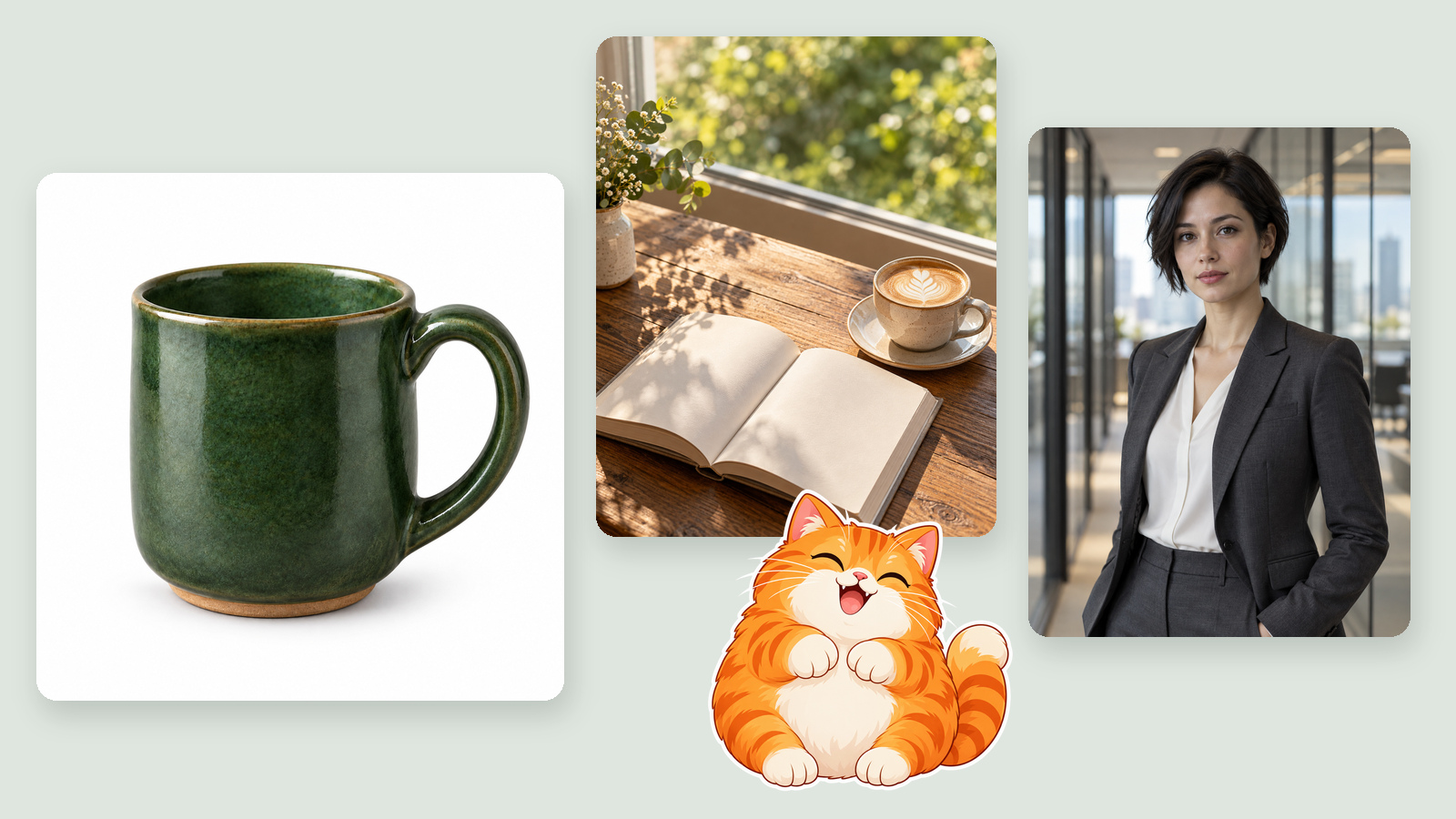
[Image 1] is the only product reference. Create a square white-background product image with the whole product centred and even space on all sides, keeping its shape, colours and details identical to the reference. Soft studio light with a natural contact shadow underneath. No text, logos, watermark or other objects.02 · Lifestyle portrait image (4:5)
A latte and an open book on a wooden table by the window, afternoon sun coming in at an angle, blurred greenery outside. Shot from 45 degrees above, warm and clean, with empty space at the top. Realistic photo style, no text.03 · Character look test for a short drama (3:4)
A lawyer in her early thirties with short black hair and a dark grey suit, standing in an office corridor lined with glass walls, calm expression, looking at the camera. Half-body framing, natural light, blurred background. Realistic film still style, no text or watermark.04 · Same character, new scene (9:16)
Connect the previous character image as a reference first.
[Image 1] is the character reference; keep her face, hairstyle and outfit the same. Place her on a city street on a rainy night, holding a black umbrella, with blurred neon signs behind her. Vertical full-body framing, cool tones, cinematic, no text.05 · Banner background (16:9, space on the right)
A set of skincare bottles on a light beige stone plinth, grouped in the left third of the frame, with a large clean empty area on the right for a headline. Soft side light, premium minimalist style. No text, prices or logos.06 · Transparent sticker (1:1, Transparent background on)
A round, chubby orange cat cartoon sticker in flat illustration style with a thick white outline and a happy face. Draw only the cat; the background is fully transparent. No shadow, text or anything outside the outline.07 · Avatar (GPT Image 2 or 2.5, 1:1)
A flat illustrated avatar of a young man wearing headphones, facing forward, on a plain light blue background, simple colours and clean lines, suitable for a round profile-picture crop. No text.08 · Icon draft (GPT Image 2 or 2.5, 1:1)
A film clapperboard icon on a rounded square with a purple gradient background, white line artwork, simple flat style, centred, no text.How do you write GPT Image prompts that behave?
Be specific about what you want, and explicit about what you don't.
| Prompt | Problem | Result |
|---|---|---|
| "A beautiful, premium, atmospheric poster" | No subject, setting or composition | Different every time, hard to fix |
| "Skincare bottles in the left third, empty space on the right, soft side light, no text" | Subject, position, light and limits are all defined | Much more likely to land close to what you want |
When you use reference images, say what each one is for, for example "[Image 1] is the character reference; keep her face and outfit the same". If you need exact text in the image, generate it without text first and add the words in a design tool.
How many credits does a GPT Image picture cost?
Images are charged per image; both versions cost the same, and the cheapest option is 1K at 2 credits. Prices below are live on 2026-10-29:
| Model and resolution | Per image | 10 images |
|---|---|---|
| GPT Image 2 1K | 2 credits | 20 credits |
| GPT Image 2 2K | 3 credits | 30 credits |
| GPT Image 2 4K | 4 credits | 40 credits |
| GPT Image 2.5 1K | 2 credits | 20 credits |
| GPT Image 2.5 2K | 3 credits | 30 credits |
| GPT Image 2.5 4K | 4 credits | 40 credits |
Each image is charged separately. Before generating, go by the number shown on the button.
What are GPT Image's limits?
- Long text and small type can go wrong: proofread poster headlines, prices and captions, or add them afterwards.
- A reference isn't a perfect copy: details of people and products can drift, so compare important product images with the real item.
- Each image is charged: for several versions, generate several images; each one costs credits.
- Reference images have a cap: up to 8 on GPT Image 2.5 and 3 on GPT Image 2; extra connections aren't used.
Frequently asked questions
Should I use GPT Image 2 or GPT Image 2.5?
In most cases, GPT Image 2.5: up to 8 reference images and transparent backgrounds. GPT Image 2 takes up to 3 references and can't make transparent backgrounds. Both cost the same: 2 credits at 1K, 3 at 2K and 4 at 4K.
Is GPT Image free?
On DramaCanvas, each image costs credits. GPT Image 2 is 2 credits per image; GPT Image 2.5 is 2 credits at 1K, 3 at 2K and 4 at 4K. New accounts get 25 credits, enough for 12 GPT Image 2.5 images at 1K.
Can I use my own photo as a reference?
Yes. Connect the image node to a new image node and reference it in the prompt with @. GPT Image 2.5 takes up to 8 images, GPT Image 2 up to 3.
Is DramaCanvas an official OpenAI product?
No. GPT Image is an image model made by OpenAI. DramaCanvas connects to it through the API so you can use it on the same canvas as other image and video models.
For your first image, choose GPT Image 2.5 at 1K and start with the product-on-white or character look-test prompt. When you like the result, switch to 2K or 4K for the final version.
GPT Image and OpenAI are trademarks of their respective owners.