Christmas PFP 2026: Turn Your Own Photo Into an AI Christmas Profile Picture (12 Prompts)

You don't need a template or drawing skills to get a Christmas profile picture. Upload one photo of yourself as a reference and let the AI put you in a Santa hat, a red sweater or a snowy scene, with your own face. Below: how to do it on the DramaCanvas canvas, 12 prompts ready to copy, and how to crop it so it still looks right on social media.
Made a Halloween PFP? The process is the same as our Halloween PFP guide. For group shots, see how to use multiple reference photos.
Why do so many Christmas PFPs look wrong once you upload them?
Because a profile picture is a tiny circle in a list: the corners get cut off and details disappear.
- The circle crop removes the corners: a hat tip, ears or shoulders placed in the corners vanish.
- Small sizes hide detail: snowflakes, lights and presents everywhere turn into a blur when shrunk.
- Busy or bright backgrounds: when the background colour is close to the person's, the face gets lost.
- Side profiles or looking down: nobody recognises you in a thumbnail.
So the prompt should say: facing forward or slightly turned, face slightly above centre, simple background, empty corners.
How do you turn your photo into a Christmas PFP?
Upload the photo, connect it to a new image node, pick 1:1, write the prompt and generate.
Step 1: Upload your photo and connect it
Click Add node in the toolbar at the bottom of the canvas, choose Upload file, pick a front-facing, evenly lit photo with your face clearly visible and click Add to canvas (1). Add an Image node and drag a line from the connection point on the right of the photo's node to it. In the prompt, type @ and pick Image 1 from the menu to reference the photo. In the prompts below, replace [Image 1] with that reference.
Step 2: Pick the model and ratio
Choose GPT Image 2.5 under the node, open Image settings, set Size or aspect ratio to 1:1 and Resolution to 1K. A profile picture doesn't need a bigger image.
Step 3: Write the prompt, check the credits, generate
Paste one of the prompts below. The generate button shows the credits for this image; check it, then click. Compare the result with your photo: has the face, hairstyle or any feature changed, and is anything important sitting in the corners? Save the one you like with the download button on the node.
Step 4: Check it as a circle
Before uploading, preview it in the platform's circle crop: is the top of the head, the hat tip or an ear cut off, and can you still recognise yourself at thumbnail size?
Your own photo: 5 Christmas portrait PFP prompts
These 5 need your photo connected first; [Image 1] is that photo.
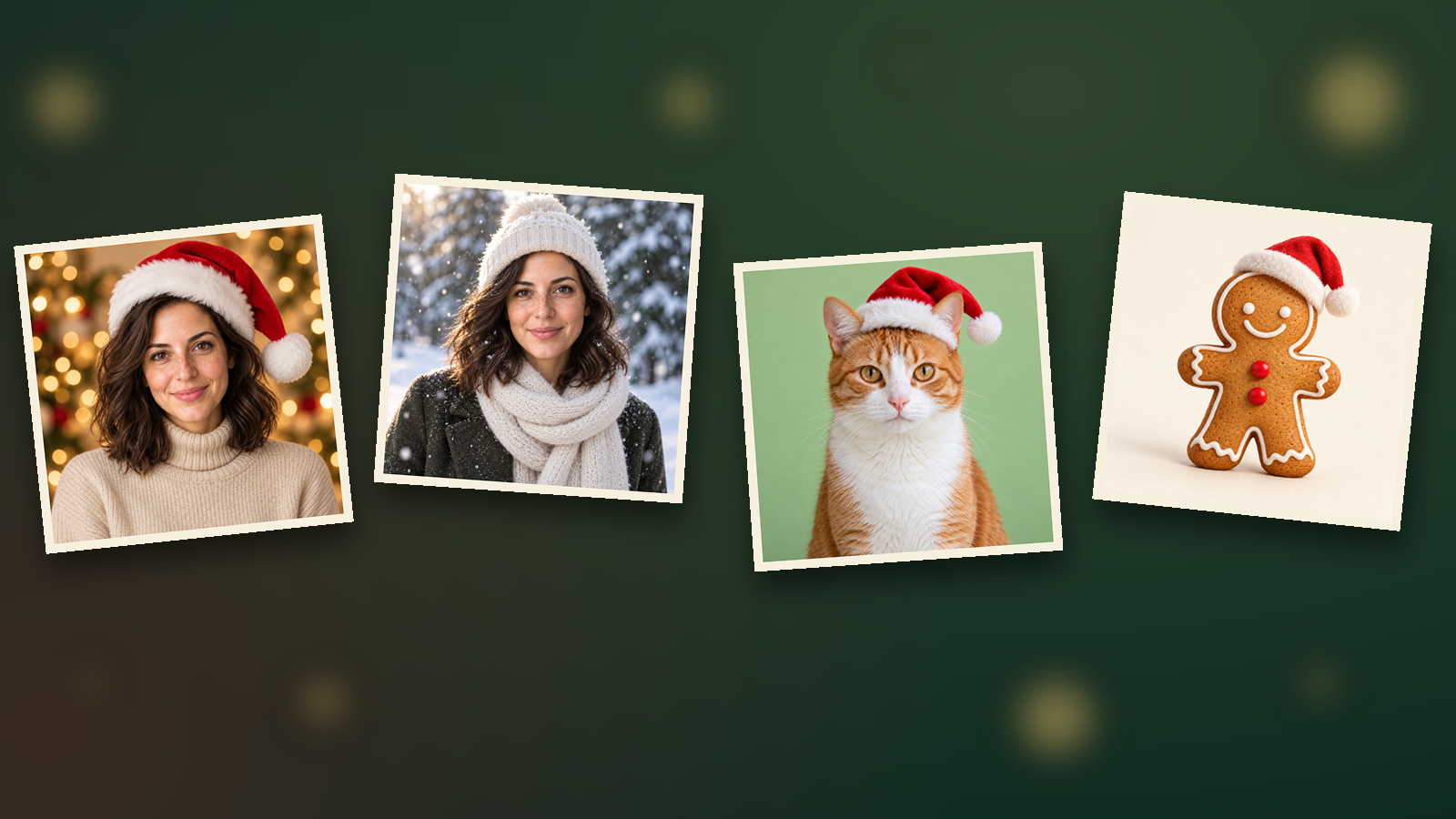
01 · Classic Santa hat
[Image 1] is the person reference; keep the face, hairstyle, features and skin tone unchanged. Create a 1:1 square profile picture: the person smiling and facing forward, wearing a red and white Santa hat and a beige turtleneck sweater, face slightly above centre with empty corners. Background of soft, blurred warm string-light bokeh. Realistic photo style, no text or watermark.02 · Red Christmas sweater
[Image 1] is the person reference; keep the face, hairstyle, features and skin tone unchanged. A 1:1 profile picture of the person in a red and green patterned Christmas sweater, looking at the camera, framed from the chest up with the face slightly above centre. Plain dark green background with nothing else in it. Soft front light, realistic style, no text.03 · Me in the snow
[Image 1] is the person reference; keep the face, hairstyle and features unchanged. A 1:1 profile picture of the person in an off-white knit beanie and scarf, outdoors in falling snow with a few flakes on their hair, blurred snowy ground and pine trees behind. Face slightly above centre, empty corners, cool tones with a touch of warm light. Realistic photo style, no text.04 · Reindeer antler headband
[Image 1] is the person reference; keep the face, hairstyle and features unchanged. A 1:1 profile picture of the person wearing a plush reindeer antler headband with a little red on the tip of the nose, laughing, facing forward, with the top of the head and the antlers fully inside the frame and away from the edges. Plain light beige background. Bright, soft light, realistic style, no text.05 · Warm fireplace glow
[Image 1] is the person reference; keep the face, hairstyle and features unchanged. A 1:1 profile picture of the person in a dark sweater holding a mug of hot cocoa, sitting by a fireplace with warm orange firelight on their face and blurred Christmas tree lights behind. Face slightly above centre, empty corners. Cinematic warm tones, no text or watermark.Couples and pets: 4 Christmas PFP prompts
For a couple, generate one picture from each person's own photo with the same background and colours, and they'll read as a pair.
06 · Couple PFP (left)
[Image 1] is the person reference; keep the face, hairstyle and features unchanged. A 1:1 profile picture of the person in a red Santa hat, body turned slightly to the right of the frame, smiling at the camera, face slightly above centre. Plain burgundy background with a few gold snowflakes drifting on the right. Realistic style, no text.07 · Couple PFP (right)
[Image 1] is the person reference; keep the face, hairstyle and features unchanged. A 1:1 profile picture of the person in a red Santa hat, body turned slightly to the left of the frame, smiling at the camera, face slightly above centre. Plain burgundy background with a few gold snowflakes drifting on the left. Realistic style, no text.08 · Cat in a Santa hat
[Image 1] is the pet reference; keep the cat's coat colour, markings, eye colour and face shape unchanged. A 1:1 profile picture of the cat wearing a small red and white Santa hat, looking at the camera, head slightly above centre with the whole hat tip inside the frame. Plain light green background. Soft light, realistic style, no text.09 · Dog in a scarf
[Image 1] is the pet reference; keep the dog's breed features, coat colour and face shape unchanged. A 1:1 profile picture of the dog wearing a red and green plaid scarf, sitting in the snow with its tongue slightly out, facing forward, head slightly above centre. Blurred snowy scene and warm string lights behind. Realistic style, no text.No photo needed: 3 illustrated Christmas PFP prompts
These 3 need no reference image; they work from text alone, which suits anyone who'd rather not show their face.
10 · Flat-illustration snowman
A 1:1 flat-illustration profile picture of a small snowman in a red knit hat and blue scarf, carrot nose, happy expression, centred and facing forward. Plain light blue background, clean lines, simple colours, suitable for a circle crop. No text.11 · Anime-style Christmas girl
A 1:1 anime-style profile picture of a girl with short hair wearing fluffy earmuffs and a red scarf, holding a small gift box, smiling and facing forward, face slightly above centre. Soft warm bokeh background. Cel-shaded colouring with clean lines, no text or watermark.12 · Gingerbread man
A cute 3D-style 1:1 profile picture of a gingerbread man with white icing outlines and a tiny Santa hat, standing and facing forward, centred. Plain cream background, soft studio light, texture like a real cookie. Empty corners, no text.How do you write Christmas PFP prompts that behave?
Say what must stay the same, where the face goes and how simple the background is.
| Prompt | Problem | Result |
|---|---|---|
| "Make me a nice Christmas profile picture, festive, with lots of elements" | No framing, nothing to keep | The face may drift and the frame is too busy to read when small |
| "Keep the face and hairstyle unchanged, Santa hat, face slightly above centre, empty corners, plain background" | What to keep, framing and background are all defined | Closer to you, and it survives the circle crop |
If the face doesn't look like you, use a clearer front-facing photo or repeat "keep the features unchanged". If the hat tip gets cut off, add "whole hat tip inside the frame, away from the edges".
How many credits does a Christmas PFP cost?
GPT Image 2.5 at 1K is 2 credits per image. Prices below are live on 2026-10-29:
| Resolution | Per image | 12 images |
|---|---|---|
| GPT Image 2.5 1K | 2 credits | 24 credits |
| GPT Image 2.5 2K | 3 credits | 36 credits |
1K is sharp enough for a profile picture. Each retake is charged again; go by the number on the button before generating.
What are the limits of AI Christmas PFPs?
- The face can shift slightly: the clearer the reference photo, the better; compare the result with it.
- Text often comes out wrong: add "Merry Christmas" lettering afterwards if you want it.
- Only use your own photo or one you have permission for: don't use other people's or celebrities' photos.
- Pet markings can get simplified: describe unusual coat colours and patterns in the prompt.
Frequently asked questions
Will my face change if I use my own photo?
It can shift slightly. Connecting your photo as a reference and writing "keep the face, hairstyle and features unchanged" in the prompt keeps it much closer. Compare the result with your photo before you use it.
What aspect ratio should a profile picture use?
1:1. Every social platform shows profile pictures as squares or circles, so 1:1 is the easiest to crop. Keep the face slightly above centre and leave the corners empty so a circle crop doesn't cut off the top of the head or the ears.
Can I make couple and pet PFPs too?
Yes. For a couple, generate one picture from each person's photo with the same background and colours. For a pet, connect its photo as a reference and describe its coat and breed features in the prompt.
How many credits does a Christmas PFP cost?
GPT Image 2.5 at 1K is 2 credits per image. Trying all 12 prompts once costs 24 credits, and new accounts get 25 credits, enough to try them all. Go by the number shown on the generate button.
Pick a clear front-facing photo, start with prompt 01 for the classic Santa hat, check it in a circle crop, and set it as your new profile picture.