New Year Goals 2027: Make a Personal AI Vision Board (8 Prompts)

A New Year resolution poster works best when it functions as a clear visual anchor rather than a cramped checklist. Instead of wrestling with pre-made templates or asking an AI to render blurry, uneditable text, generate a clean background illustration with deliberate negative space on the canvas, then typeset your goals in your design tool. Below, you will learn how to turn vague wishes into weekly actions, which aspect ratios fit your desk or phone, 8 copy-ready prompts, and how to build a 2027 vision board in under twenty minutes.
New to node-based workflows? Review our Infinite Canvas beginner's guide for layout essentials. For parameter details across resolutions, visit our GPT Image guide.
How many goals should you put on a New Year resolution poster?
Put no more than three core goals on a single poster.
A vision board is meant to be scanned in a single glance while you sit at your desk or check your phone. When a poster attempts to track twelve life transformations at once, the text shrinks to an unreadable size and the artwork loses its calming presence. Three commitments leave enough breathing room for legible typography, specific weekly actions, and deliberate negative space.
Treat the poster as a high-level beacon rather than a day-to-day planner. If you have extra projects, track them in a dedicated notebook or digital spreadsheet.
How do you turn a vague wish into a concrete weekly action?
Pair every goal with one physical action you can complete next week and a fixed review date.
Broad desires like "get healthy" or "save more money" fail because they do not tell your brain what to do on Monday morning. Breaking a broad aspiration into a physical habit and a scheduled checkpoint transforms an abstract wish into an achievable routine.
| Goal intention | Vague wish | Concrete weekly action | Review date | Watch out for |
|---|---|---|---|---|
| Health | "Get fit in 2027" | Walk 30 minutes every Tuesday and Thursday morning | Last Sunday of each month | Setting extreme workout targets that cause burnout |
| Reading | "Read more books" | Read 15 pages at bedtime with phone in another room | Quarterly milestone check | Specifying book titles that AI will misspell on the image |
| Savings | "Build an emergency fund" | Transfer $50 into savings every Friday afternoon | Bi-weekly pay day | Generating fake currency symbols or unrealistic return numbers |
| Study | "Learn conversational Spanish" | Practice speaking exercises for 20 minutes daily | First day of every month | Buying textbooks without scheduling regular daily practice |
| Connection | "Stay close with friends" | Schedule one phone call or shared meal every weekend | Monthly calendar review | Relying on social media likes instead of direct conversations |
How do you generate a poster background on the canvas?
Upload your reference item if you have one, connect an image node, choose your ratio, and generate a text-free background.
Step 1: Upload a personal reference and connect the node
Click Add node in the toolbar at the bottom of the canvas, select Upload file, choose your photo, and click Add to canvas (1). Add an Image node to the board, then drag a line from the connector on the right of the uploaded file node directly into the new image node. In your prompt, type @ and pick Image 1 from the pop-up menu to anchor the style or palette.
Step 2: Set the aspect ratio and resolution in Image settings
Select GPT Image 2.5 beneath the node. Click the settings summary below the prompt (for example 1:1 · 1K) to open Image settings, locate Size or aspect ratio, and select 4:5 for vertical desk prints, 9:16 for mobile wallpapers, or 16:9 for landscape desktop screens. Set Resolution to 1K to run your initial composition tests.
Step 3: Enter the prompt, verify credit cost, and generate
Paste one of the prompts below into the prompt box, keeping all text-exclusion clauses intact. Check the credit cost displayed directly on the generate button, then click it to generate. Inspect the resulting image to ensure the reserved text area is smooth, uncluttered, and completely free of letters or numbers.
Step 4: Download the background and typeset your text
Click the download icon on the top corner of the node to save the image. Open your graphic design tool, import the background, and use a clean sans-serif or serif typeface to add your year, three goals, and weekly actions inside the empty zone.
Which aspect ratio fits your daily routine?
Match your poster's aspect ratio to the physical spot where you look every day.
| Placement | Ratio | Where the text goes | Watch out for |
|---|---|---|---|
| Framed desk print | 4:5 | Top two-thirds | Leave at least 15% margin around edges for the physical frame lip |
| Smartphone lock screen | 9:16 | Lower half | Keep the top third completely empty so the lock screen clock does not cover your text |
| Desktop landscape monitor | 16:9 | Centre or right two-thirds | Desktop icons often occupy the left column; bias empty space toward the right or centre |
| Bulletin board square | 1:1 | Top half | Ensure the illustration stays anchored near the bottom edge |
| Wide master board | 16:9 | Three distinct columns | Keep corner illustrations small so three textual columns fit comfortably |
8 copy-ready prompts for your 2027 resolution poster
All prompts use GPT Image 2.5. Select the ratio under Size or aspect ratio in Image settings; the ratio listed in each prompt serves as a composition cue. When using prompt 07, connect your reference photo first and select it from the @ menu.
01 · Health and daily movement (4:5)
A 4:5 vertical poster background with clean walking shoes and a simple reusable water bottle arranged neatly in the bottom quarter. Flat, warm off-white textured paper across the top three-quarters with ample clean negative space reserved for typography. Soft morning side light, natural shadows, minimal still life. No text, letters, numbers, shoe logos, brand labels, or watermark.02 · Consistent reading habit (4:5)
A 4:5 vertical poster background with a single blank hardcover notebook and a small brass desk lamp sitting in the bottom-right corner. The entire left half and upper area consist of a smooth, flat cream-colored wall with generous empty space for notes. Gentle warm lamp glow, soft gradient, quiet study mood. No text, words, book titles, page printing, or watermark.03 · Intentional savings and budget (1:1)
A 1:1 square background with three plain blank linen envelopes resting along the bottom edge on a pale natural wood tabletop. The upper half is completely flat, empty warm beige space with no decor or props, reserved for typography. Crisp morning light, clean lines, serene financial clarity. No currency symbols, dollar signs, coins, bank cards, numbers, text, or watermark.04 · Focused learning and study desk (4:5)
A 4:5 vertical background featuring a wooden desk surface at the bottom, holding a single ceramic pen cup with wooden pencils and an open blank journal. The center and upper regions provide large, flat, unobstructed warm-grey space for layout. Natural window light from the side, clean tabletop scene. No text, handwriting, calendar grids, computer monitors, or watermark.05 · Meaningful connection and family (1:1)
A 1:1 square background showing two simple ceramic coffee mugs sitting beside an empty wooden chair on a sunlit balcony corner at the bottom. The top two-thirds offer clean, flat, light-terracotta negative space ready for text placement. Warm golden hour illumination, peaceful atmosphere. No human portraits, faces, silhouettes, letters, words, or watermark.06 · Outdoor trail phone wallpaper (9:16)
A 9:16 vertical phone wallpaper background with an abstract winding gravel trail and quiet pine trees confined strictly to the bottom third. The upper two-thirds consist of a soft, flat pale-sky gradient with no clouds, branches, or stars, designed to avoid phone lock screen clocks and widgets. Minimalist nature aesthetic, gentle daylight. No text, symbols, trail signs, or watermark.07 · Personal object and style palette (4:5)
[Image 1] is the personal reference for color palette and object texture. A 4:5 vertical poster background with a small still life inspired by the reference arranged only in the bottom-left corner on a matte wooden ledge. The right side and upper two-quarters remain entirely flat, plain parchment-textured space with zero objects. Soft diffuse studio light, authentic materials. No text, logos, face comparisons, before-and-after graphics, or watermark.08 · Three-goal master vision board (16:9)
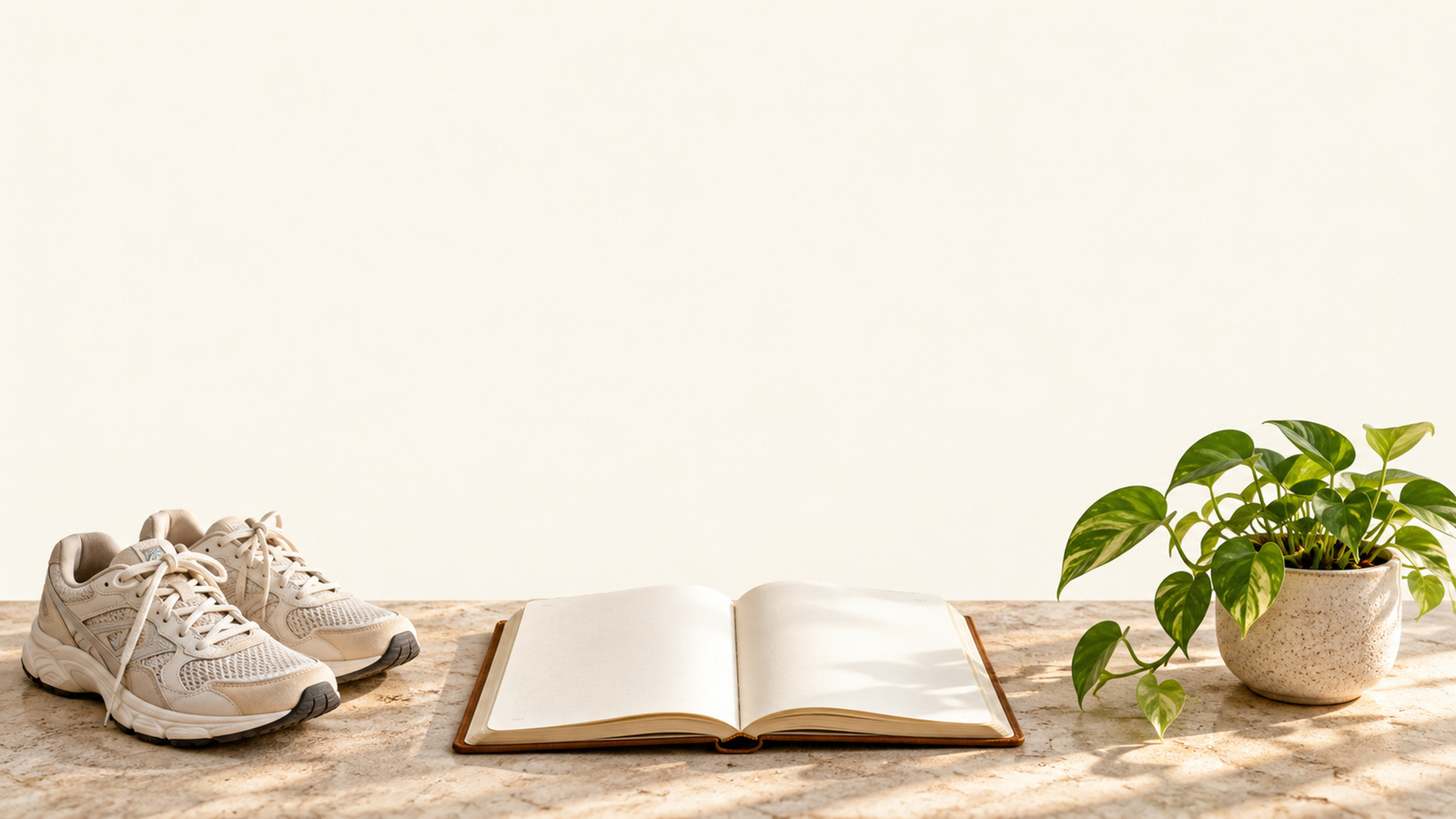
A 16:9 widescreen poster background with three small, distinct, isolated vignette illustrations along the bottom edge: walking shoes on the left, an open blank journal in the center, and a small potted green plant on the right. The entire upper half is completely flat, untextured off-white space divided visually into three clear layout zones for text. Soft ambient lighting, cohesive color palette. No text, columns, fake UI grids, checklist boxes, or watermark.How do you write prompts that keep the empty space clean?
Specify the exact quadrant for the illustration, name the empty area, and explicitly forbid words and numbers.
| Prompt approach | Problem | Result |
|---|---|---|
| "Make an inspiring 2027 New Year resolution vision board with goals for health, reading, and wealth" | Asks AI to compose text, charts, and concepts simultaneously | Crowded canvas, garbled pseudo-English, and zero space for real planning |
| "Minimal still life in the bottom third, flat warm-grey paper in the top two-thirds, no text or symbols" | Defines exact subject placement, names the negative space, and bans text | Clean background ready for precise typographic layout |
If unwanted texture, leaves, or floating particles appear in your reserved area, add "upper section completely flat with no gradient or grain" to your prompt and generate again. If objects cross into the center, explicitly state "all items restricted strictly to the bottom quarter".
How do you lay out your goals, actions, and review dates?
Structure your text with clear visual hierarchy: year at the top, three goals in the body, and weekly actions underneath.
- Header: Place "2027" in a modest font size at the top or bottom corner. Avoid gigantic year numbers that overpower your actual life commitments.
- Goal headlines: Set each of your three goals in bold, readable text. Use high-contrast colors against your generated background, such as charcoal on cream or white on deep forest tones.
- Weekly actions: Add one concise line beneath each goal detailing the specific recurring action. Keep font weight medium and phrasing brief.
- Review dates: Include a small footnote beneath each action stating when you will evaluate progress, such as "Review: Last Sunday of each month".
How many credits does a resolution poster set cost?
Generating a single 1K poster background with GPT Image 2.5 costs 2 credits. Live pricing as of 2026-10-29 is detailed below:
| Resolution | Cost per image | 8 test images |
|---|---|---|
| GPT Image 2.5 1K | 2 credits | 16 credits |
| GPT Image 2.5 2K | 3 credits | 24 credits |
| GPT Image 2.5 4K | 4 credits | 32 credits |
Testing each of the 8 prompts once at 1K resolution costs 16 credits. Once you select your favorite composition, generating a fresh 4K version costs 4 credits. Running a 1K preview followed by a 4K final generation costs 6 credits in total (2 credits plus 4 credits), rather than a differential upgrade. Always verify the exact credit amount displayed on the generate button before initiating a run.
What are the limits of an AI vision board?
- Backgrounds are static raster images: Generated images contain no editable text layers. You must place and adjust your typography inside an external design tool.
- AI lettering remains unreliable: Image models frequently warp character shapes and numbers. Never rely on the generator to typeset calendar dates, currency targets, or quotes.
- Phone lock screens introduce visual clutter: System clocks, notifications, and lock screen widgets will cover the upper third of vertical images. Always test your wallpaper on your actual device before finalizing your typography.
- Physical prints require print-ready file checks: An image generated at 4K resolution does not automatically match physical paper aspect ratios. Check your printer's bleed dimensions, color profile requirements, and pixel density before ordering a wall print.
- Visual reminders do not automate habit formation: A wall poster provides direction and clarity, but completing goals requires consistent weekly action and scheduled reviews.
Frequently asked questions
Can you put twelve goals on one poster?
You can, but it crowds the layout and dilutes your focus. Pick three meaningful goals for the year, pair each with one weekly action, and keep the negative space open so you can read it from across the room.
Can the AI lay out the text and goals for you?
No. AI image models frequently misspell words, scramble calendar dates, and generate uneditable text. Generate a clean background illustration with empty space, then typeset your exact goals in your design tool.
Can you edit an individual goal after generating?
Yes, as long as you add your text in an external design tool. Keeping your text on editable layers over the downloaded background lets you update dates or tweak actions without regenerating the image.
Can you use the same image for both phone wallpaper and a wall print?
Start with separate crops. Phone wallpapers need a 9:16 vertical ratio with empty space away from the lock screen clock, while wall prints work best at 4:5 or 16:9 and require specific print bleed margins.
How many credits does a resolution poster background cost?
Each image costs 2 credits at 1K resolution, 3 credits at 2K, and 4 credits at 4K using GPT Image 2.5. Testing all 8 prompts once at 1K costs 16 credits. Always check the number displayed on the generate button.
Select your top three intentions for 2027 and pair each with a single weekly action on paper. Connect your nodes on the canvas, pick prompt 01 or 08 at 1K resolution to verify your negative space, and render your final print at 4K before typesetting your text.