Scariest Halloween Costume Ideas 2026: AI Generator + 12 Prompts

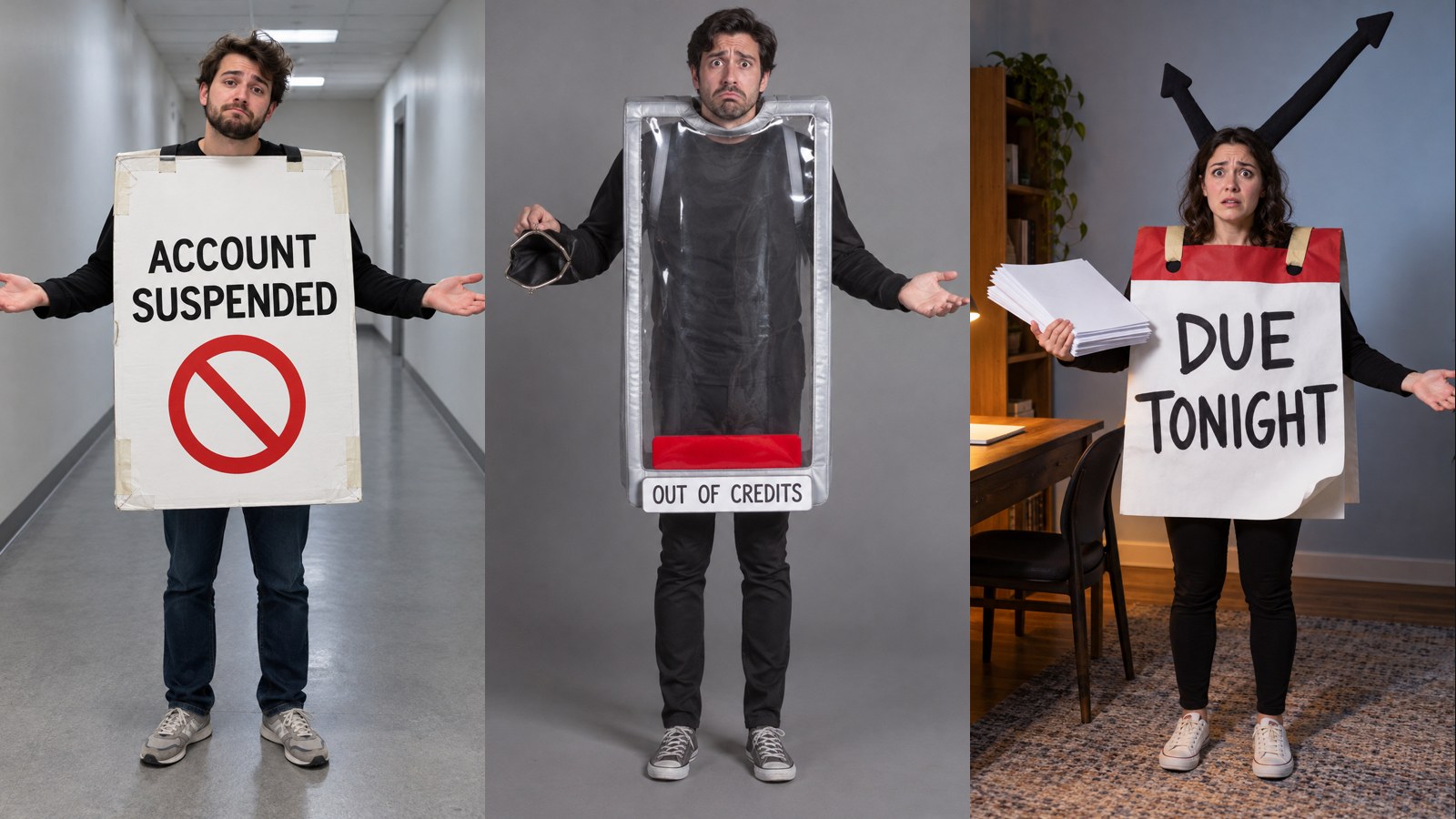
You can create the scariest Halloween costumes on DramaCanvas without purchasing physical props or sewing cardboard cutouts by turning everyday digital anxieties into funny, wearable outfits. Dressing up as an account suspension notice, an empty credit bar, or an infinite loading circle turns relatable frustration into funny, recognizable social posts alongside classic monster silhouettes. In about eight minutes, you will learn the exact prompt formula, social framing guidelines, and credit verification steps before generating your first image.
What makes everyday tech phobias the scariest Halloween costumes?
Everyday creative roadblocks—sudden account suspensions, depleted credits, and corrupted saves—strike more fear into modern creators than traditional monsters. Wearing these dreads as exaggerated foam boards, oversized cardboard notification dialogs, and paper calendar wraps creates relatable humor that provides a distinct comedic theme for your holiday posts.
Traditional costume parties demand hours of shopping, sewing, or makeup preparation. Prompting AI costume concepts lets you stage satirical holiday scenes for social feeds without buying garments you will never wear again.
If you only need a festive avatar for TikTok, Instagram, or X rather than a full outfit concept, see our guide on Halloween profile pictures. If you are preparing seasonal event announcements or flyers, explore our collection of Halloween poster prompts.
What aspect ratio and model should you select before generating?
Choose your model before adjusting dimensions, because switching image models resets your canvas parameters and determines which aspect ratios are available. DramaCanvas dynamically builds the aspect ratio menu from the active model's capabilities, meaning options differ across engines and resolution tiers.
| Aspect Ratio | Best Used For | DramaCanvas Menu Behavior | Pitfall to Watch For |
|---|---|---|---|
| 1:1 Square | Instagram, X feed posts, single 9-grid tiles | Standard option across image models | Props that extend too wide can touch the frame edge. |
| 4:5 Vertical | Instagram portrait feed, mobile card views | Available on select resolution presets (such as 1792×2240) | If absent, pad a 1:1 image and crop in external software. |
| 9:16 Vertical | TikTok, Instagram Stories, YouTube Shorts | Standard vertical option across most models | Full-length outfits risk losing foot margins without padding prompts. |
For starting tests, select Nano Banana 2 at 1K resolution. It includes standard square and vertical framing options and costs fewer credits than higher resolution tiers, making it straightforward to test prompt composition before generating at larger sizes. If your target platform requires 4:5 and the active preset only displays 1:1 or 9:16, keep wide padding around the character and crop the downloaded image using an external photo editor.
How do you generate and download a costume photo on DramaCanvas?
Generating an outfit photo involves placing an image node, selecting a model, setting dimensions, verifying credit costs, and downloading the finished file.
1. Open the creative menu and create an Image node
Click "Add node" on the bottom canvas toolbar, navigate to the "Creative nodes" section, and select "Image". An empty image node will appear directly on your canvas workspace.
2. Select your model and configure dimensions
Open the prompt panel at the bottom of the node and pick your starting engine from the model menu. Click the parameter summary to open the image settings popover, locate "Size or aspect ratio", and select 1:1, 4:5, or 9:16 according to your intended destination.
3. Enter your costume prompt and check the credit cost
Paste your structured prompt into the input field showing "Describe the image to generate". Before generating, check the submit button at the bottom of the panel—it displays how many credits this generation will cost at current prices (such as "Cost for this request: 4 credits").
4. Submit the request and download the resulting image
Click the submit button to begin rendering your image node. When processing finishes, inspect the subject's hands, costume edges, and text, then click "Download image" on the node header to save the file locally.
Which Halloween costume prompts work best for square feeds, stories, and carousels?
Clear costume prompts combine physical wardrobe textures, concrete wearable props, and intentional framing margins rather than generic spooky adjectives. Specifying tangible materials like foam board, packing tape, and defined prop edges makes it easier to inspect whether the output captured your intended shape.
Use this structural formula to set up your prompt details before generating:
[Adult Subject] + [Wearable Physical Prop] + [Visual Gag] + [Pose & Expression] + [Lighting & Environment] + [Padding for Cropping] + [Negative Constraints]| Prompt Element | Recommended Phrasing | Phrasing to Avoid | Pitfall to Watch For |
|---|---|---|---|
| Wearable Prop | "Oversized white notification-card costume made of foam board with visible taped edges" | "Terrifying banned account horror suit" | Emotional words make it harder to predict the costume shape than naming concrete materials. |
| Text Element | "Card containing only the short black words 'ACCOUNT SUSPENDED'" | "Detailed system dialog with usernames, error codes, and server logs" | Long paragraphs result in garbled characters and distorted letterforms. |
| Framing | "Full-body front-facing photo with room around the person and prop for cropping" | "Extreme close-up epic shot" | Tight framing slices off cardboard signs, capes, and feet. |
| Negative Rules | "No brand names, trademarks, logos, watermarks, or real account information" | "Do not make it look fake" | Vague phrasing makes it harder to control unwanted artifacts; explicitly forbid commercial marks. |
01 · Account suspended notice
- Recommended model: Nano Banana 2 (1K)
- Target aspect ratio: 4:5
- Best for: Instagram portrait feed, vertical cards
An adult in a plain hallway wearing an oversized white notification-card costume. The card contains only the short black words “ACCOUNT SUSPENDED” and a red circular prohibition symbol. Open palms and a resigned expression. Visible foam-board edges and handmade tape. Full-body front-facing photo, cool overhead light, simple background, absurd and non-graphic, with room around the person and prop for cropping. No brand names, trademarks, logos, watermarks, or real account information.02 · Out of credits
- Recommended model: Nano Banana 2 (1K)
- Target aspect ratio: 1:1
- Best for: Square feed posts on Instagram or X, single 9-grid tiles
An adult wearing a giant empty credit-meter costume: a clear rectangular frame with one tiny red block at the bottom, a small tag reading “OUT OF CREDITS,” and an empty coin pouch in one hand. Full-body front view, soft flash, grey background, real fabric folds, exaggerated worried expression, square composition with clear space around the costume. No brand names, trademarks, logos, watermarks, or real account information.03 · Generation failed
- Recommended model: Nano Banana 2 (1K)
- Target aspect ratio: 9:16
- Best for: Full-screen Instagram Stories, TikTok, YouTube Shorts
An adult wearing a square error-card costume made of foam board. Its front shows only a broken ring and the words “GENERATION FAILED.” Two long fabric sleeves hang loosely. Blank studio backdrop, vertical full-body photo, direct flash, red and white palette, comically stiff pose, no computer interface or real notification. No brand names, trademarks, logos, watermarks, or real account information.04 · The deadline
- Recommended model: Nano Banana 2 (1K)
- Target aspect ratio: 4:5
- Best for: Instagram portrait feed, vertical cards
An adult wrapped in an oversized paper calendar-page costume reading only “DUE TONIGHT,” with two soft clock hands rising above the shoulders. Holding a stack of blank papers, eyes wide, beside an ordinary desk. Full-body front view, warm desk light against a cool background, naturally curled paper edges, humorous tension, space above the head and below the feet. No brand names, trademarks, logos, watermarks, or real account information.05 · Endless loading
- Recommended model: Nano Banana 2 (1K)
- Target aspect ratio: 1:1
- Best for: Square feed posts on Instagram or X, single 9-grid tiles
An adult wearing a grey padded fabric ring divided into eight segments, with one white segment. Their face appears through the centre, their body frozen in a waiting pose, holding a cup of cold tea. Square eye-level full-body photo, plain background, soft shadows, visible fabric and hand stitching, no text. No brand names, trademarks, logos, watermarks, or real account information.06 · Save failed
- Recommended model: Nano Banana 2 (1K)
- Target aspect ratio: 9:16
- Best for: Full-screen Instagram Stories, TikTok, YouTube Shorts
An adult wearing a transparent document-pouch costume with an open bottom and blank sheets scattered at their feet. A small chest sign reads only “SAVE FAILED.” They look down at the papers while a long fabric zip hangs to the floor. Vertical full-body photo in an ordinary office hallway, low soft light, no real document contents. No brand names, trademarks, logos, watermarks, or real account information.07 · Another final version
- Recommended model: Nano Banana 2 (1K)
- Target aspect ratio: 4:5
- Best for: Instagram portrait feed, vertical cards
An adult wearing three stacked folder-shaped costume layers. The outer layer reads “FINAL VERSION,” the two inner layers are blank, and they hold one more blank folder prop. A tired smile, full-body front view, simple studio background, blue-grey cardboard and white fabric, everyday photographic texture, room for cropping. No brand names, trademarks, logos, watermarks, or real account information.08 · Connection lost
- Recommended model: Nano Banana 2 (1K)
- Target aspect ratio: 1:1
- Best for: Square feed posts on Instagram or X, partner pair posts
Two adults standing side by side, each wearing one half of a disconnected plug-shaped foam costume, with a clear gap between them. One holds a blank phone-shaped prop while the other shrugs. Square full-body group photo at eye level, bright ordinary living room, blue and white costumes, no text or logos. No brand names, trademarks, logos, watermarks, or real account information.09 · Sheet ghost
- Recommended model: Nano Banana 2 (1K)
- Target aspect ratio: 1:1
- Best for: Minimalist square feeds on Instagram or X, seasonal greeting tiles
An adult in an ankle-length white sheet-ghost costume with two clear eye holes and ordinary trainers visible below, holding an orange pumpkin without a carved face. Empty porch, square full-body flash photo against a dark night background, natural fabric folds, mildly eerie and everyday, no text. No brand names, trademarks, logos, watermarks, or real account information.10 · Classic vampire
- Recommended model: Nano Banana 2 (1K)
- Target aspect ratio: 4:5
- Best for: Moody Instagram portrait feed, gothic fashion posts
An adult in a classic vampire costume with a long black cape, burgundy lining and a tall structured collar. Holding both edges of the cape, natural skin, closed-mouth smile, no blood. Narrow old stairwell, vertical full-body photograph, warm side light, dark but readable background, entire cape visible, no text. No brand names, trademarks, logos, watermarks, or real account information.11 · Scarecrow
- Recommended model: Nano Banana 2 (1K)
- Target aspect ratio: 9:16
- Best for: Full-screen Instagram Stories, TikTok, YouTube Shorts
An adult in a patchwork scarecrow costume: old checked shirt, loose trousers, soft hat, and a little straw emerging from cuffs and pockets. A few stitched lines drawn on the face with washable paint. Beside a plain wooden fence, vertical full-body photo, soft dusk light, a few dry leaves at the feet, handmade fabric texture, no weapons or text. No brand names, trademarks, logos, watermarks, or real account information.12 · Headless portrait illusion
- Recommended model: Nano Banana 2 (1K)
- Target aspect ratio: 9:16
- Best for: Full-screen Instagram Stories, TikTok, YouTube Shorts
An adult wearing a high-shouldered long coat with an empty collar above. Their real head appears through a tailored opening at chest height, both hands holding the opening edges. Clearly a stage-illusion costume, with no injury. Front-facing vertical full-body photo in an ordinary entrance hall, warm wall light, both feet visible, no blood, wounds, weapons or text. No brand names, trademarks, logos, watermarks, or real account information.If you want more seasonal concepts including festive landscape scenes, review our curated list of Halloween AI prompts. For illustrated stickers and clip-art rather than photographic portraits, consult our walkthrough on Halloween AI illustrations.
How do you fix misspelled text, blocked faces, or cropped capes?
Address visual flaws by isolating whether the error stems from excessive text length, poor prop placement, or camera distance before re-running your prompt.
Misspelled or garbled sign lettering
Shorten your text to two or three bold words, such as "OUT OF CREDITS" or "DUE TONIGHT". Complex sentences cause image generators to scramble letterforms into nonsensical glyphs. If lettering continues to fail, replace the phrase with a recognizable symbol (like a broken power plug or battery outline), or prompt for a clean, blank foam board and add crisp typography afterward using an external photo editor.
Cardboard props blocking facial features
Specify clear openings and visible hands in your prompt phrasing. State that the subject's face appears through a central circular hole or above the prop's upper rim. Adding phrases like "hands holding the outer foam edges" prevents the model from generating arms trapped behind large front panels.
Cropped cape hems and missing shoes
Add explicit framing directives and negative constraints to pull the camera back. Include "full-body front-facing photo with generous empty margins above the head and beneath the shoes". Avoid terms like "dramatic wide angle" or "cinematic", which often tilt the camera perspective and cut off character extremities.
How many credits does a costume photo cost?
At current prices, generating a 1K image on Nano Banana 2 costs 4 credits. The submit button always displays how many credits this generation will cost before you click, so you can confirm the price before running any request.
| Model | Resolution Preset | Credits at Current Prices | Pricing Notes |
|---|---|---|---|
| Nano Banana 2 | 1K / 2K / 4K | 4 / 5 / 6 | Base starting recommendation for costume stills. |
| Nano Banana Pro | 1K / 2K / 4K | 5 / 6 / 7 | Higher resolution tier; the button displays how many credits will be used before generating. |
| GPT Image 2 | 1K Base | 2 | At current prices; check the button to see the exact credit cost for higher resolutions before clicking. |
Credit costs depend on your chosen model and resolution tier rather than prompt complexity. The submit button always displays how many credits the generation will cost before you click, making it easy to confirm the price before generating.
What if you want to use your own photo for the costume?
The prompts in this guide generate fictional characters from text descriptions alone rather than using your own face. If you want the costume photo to feature yourself, you can add your own photo as a reference image inside the Image node on DramaCanvas. For step-by-step guidance on setting up reference images, see our guide on Halloween profile pictures. Keep in mind that generating images with a reference image does not guarantee an exact likeness to your real face, as the model blends your facial features with the costume, props, and lighting specified in the prompt.
When should you switch to a different tool or workflow?
Switch to specialized workflows when your project demands real-life sewing patterns, exact personal face-swapping, or automated multi-image social scheduling.
- Physical garment construction: These AI prompts generate fictional conceptual photography for social sharing, not tailorable clothing patterns or fabric measurements.
- Personal facial identity preservation: The prompts above describe fictional adult figures from text prompts without maintaining your specific facial likeness.
- Automated 9-grid publishing: DramaCanvas generates individual image files rather than automated social grids. For 9-grid layouts, render nine independent 1:1 images, download each file, and arrange them manually in your publishing tool for Instagram or X.
Frequently asked questions
Why does the 4:5 aspect ratio not appear in my image settings?
Aspect ratio options depend on the active model and resolution tier you select. If 4:5 is not present in your current model's settings menu, select 1:1 or 9:16 with generous empty padding around the subject and crop the downloaded file to 4:5 in an external editor.
Can I generate a 9-grid post in a single step?
No, DramaCanvas does not automatically generate or slice 9-grid layouts from a single prompt. Generate nine separate square images at 1:1 aspect ratio on your canvas, download them individually, and upload them as a multi-photo post to Instagram or X.
What should I do if the AI misspells words on the costume sign?
Shorten the phrase to two or three words, remove the sign text entirely in favor of a universal visual symbol, or generate a blank sign and add exact lettering using graphic design software.
Can I guarantee my own face appears on the costume?
No, text-only prompts create fictional adult characters rather than matching your personal likeness.
Where do I check the exact credit cost before generating?
Check the submit button at the bottom of the prompt panel. It displays how many credits this generation will cost before you click.
Start by picking a relatable creator fear and confirming whether your chosen model supports your target aspect ratio. Verify the credit cost displayed on the submit button before generating your photo. Once downloaded, review the framing, adjust margins if needed, and assemble your holiday post.
Next step: Open an Image node on your [DramaCanvas workspace](https://dramacanva.com), paste your favorite costume prompt from above, and test your first seasonal concept.