Christmas Family Photos 2026: 8 AI Prompts for Couples, Kids, and Pets

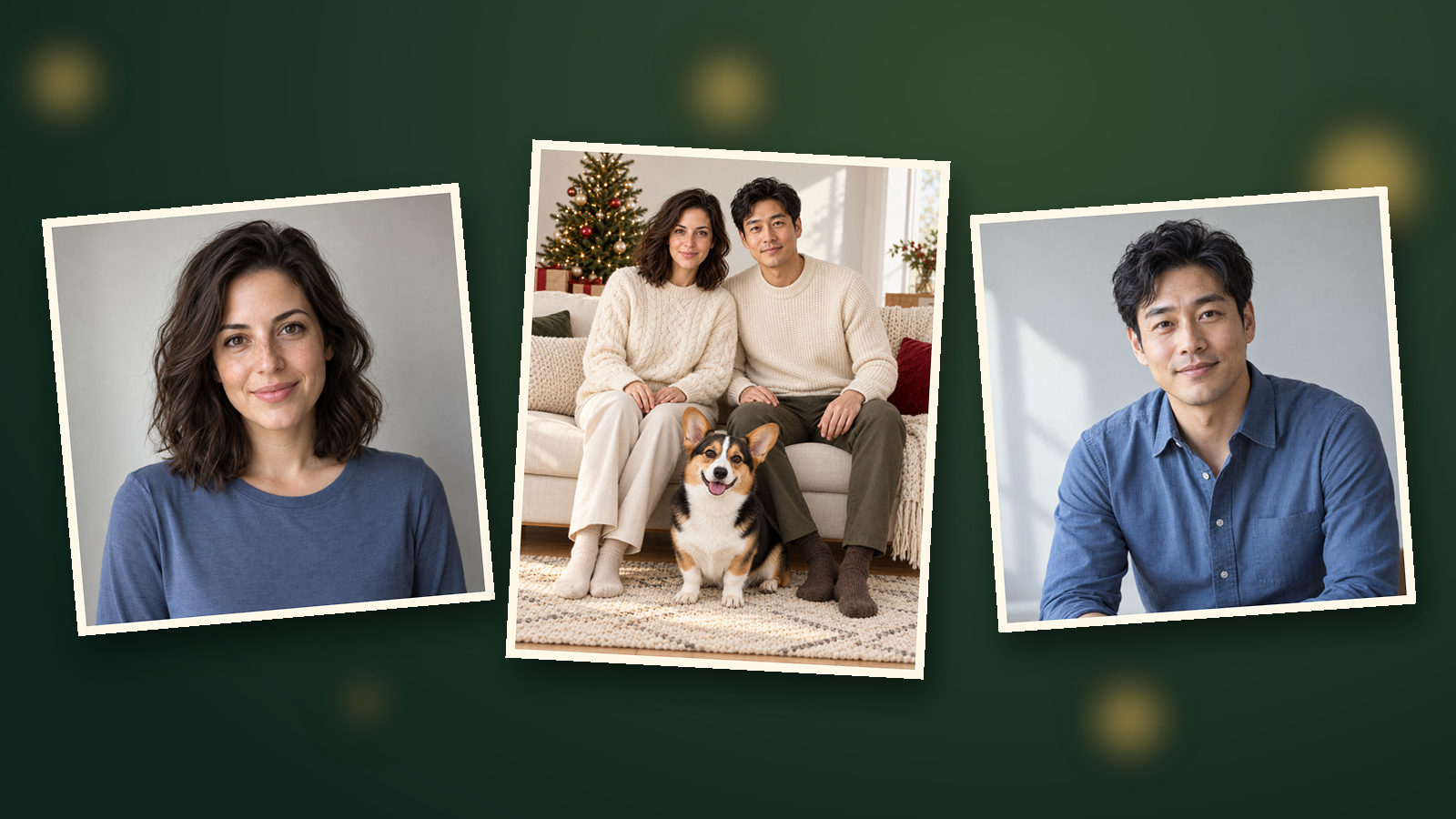
You can make an AI Christmas family photo even when the pictures of your family were taken in different places. Start with clear source photos, give each person a position, and add the holiday setting around them.
Maybe you want a matching-pajama portrait without another photo session, or the dog was missing from the picture you loved. These eight prompts cover couples, three generations, kids, pets, and a snowy outdoor scene, starting at 2 credits for one 1K image.
Which photos should you gather?
Choose one clear individual photo per person and a separate photo for each pet.
| Subject | Look for | Skip when possible |
|---|---|---|
| Adults | Visible face, hair, and shoulders in even light | Sunglasses, heavy filters, tiny faces |
| Grandparents | Clear expression and natural age features | Strong beauty filters or deep hat shadows |
| Children | A recent photo with a natural expression | Blurry screenshots or hands covering the face |
| Dogs and cats | Visible ears, nose, eyes, and distinctive markings | Costumes covering the coat or a turned-away face |
GPT Image 2.5 accepts up to eight reference images; the largest setup below uses five. Ask family members before uploading their photos, and have a parent or guardian decide about a child's picture.
Similar lighting gives you easier details to compare. The source outfits do not need to match—you can describe the holiday wardrobe in the prompt.
How do you combine the references?
Connect all sources to one new Image node, then assign each through the @ menu.
1. Upload the photos. Click Add node → Upload file, select two adult photos and one dog photo, then click Add to canvas (3). Identify each subject on the canvas before assigning numbers.
2. Create the target. Use Add node → Image to create a new Image node. Drag a connection from each of the three sources into that target.
3. Insert each reference. Type @ in the target prompt and select the correct thumbnail. Replace placeholders such as [Image 1] below with those actual selections; typing the placeholder alone does not attach a photo.
| Example reference | Supplies | Position |
|---|---|---|
| [Image 1] | Adult A's appearance | Left side of the sofa |
| [Image 2] | Adult B's appearance | Right side of the sofa |
| [Image 3] | The dog's appearance | Rug in front |
Recheck thumbnails after replacing or reconnecting a source. Your menu order may differ from this example.
4. Choose the settings. Select GPT Image 2.5 and open Image settings from the settings summary below the prompt (for example 1:1 · 1K). For prompt 3, set Size or aspect ratio to 4:5, and Resolution to 1K.
5. Generate and compare. Paste prompt 3, check the 2-credit quote, then click the ↑ button. Count the subjects, compare faces and limbs with the originals, and use Download when you're happy with the result.
Change the ratio setting when you choose a different prompt below. The canvas guide covers connections, and the group-photo guide offers more reference-assignment examples.
Eight Christmas family photo prompts
Choose the household setup that matches your sources, then adjust the clothes and setting.
Keep a separate reference role for every person and pet. If you remove someone, delete that role and update the total count before generating.
01 · A couple's first Christmas card | 4:5, two references
A seated portrait keeps the focus on both faces.
Portrait 4:5 Christmas couple photo. [Image 1] is adult A on the left; [Image 2] is adult B on the right. Preserve their separate face shapes, hairstyles, age features, and body proportions. Seat them close together on a light sofa, shoulders gently touching, hands resting on their own laps. Cream knit sweaters, a small Christmas tree to one side, soft window light, relaxed home-photography style. Exactly two adults. No face swapping, text, or watermark.02 · Three generations together | 16:9, five references
Give the grandparents the center seats and keep every face unobstructed.
Landscape 16:9 Christmas family portrait. [Image 1] is grandparent A seated center left; [Image 2] is grandparent B seated center right. [Image 3] is adult C standing behind on the left; [Image 4] is adult D standing behind on the right. [Image 5] is child E seated on a separate low stool in front. Preserve each person's distinct face, hair, age features, and body proportions, including the grandparents' natural age. Exactly five people, all faces visible. Evergreen garland along the mantel, a small tree at the edge, consistent soft window light. No pets, lettering, or watermark.03 · Two adults and the family dog | 4:5, three references
This is the setup used in the walkthrough; the dog gets its own spot on the rug.
Portrait 4:5 Christmas family photo. [Image 1] is adult A seated left; [Image 2] is adult B seated right. [Image 3] is the only dog, sitting separately on the rug in front. Preserve both adults' distinct faces, hairstyles, age features, and proportions, plus the dog's ears, coat colors, and facial markings. Light sofa, small Christmas tree, warm natural light. Hands rest on each adult's own lap; nobody holds the dog. Exactly two adults and one dog. No text or watermark.For a cat, change the animal description and give it a separate cushion or seat.
04 · Just the pets | 1:1, two references
Leave a visible gap between them so you can check each body and tail.
Square 1:1 Christmas pet portrait. [Image 1] is the only dog on the left; [Image 2] is the only cat on the right. Preserve each pet's ear shape, nose color, coat pattern, and facial markings. Both sit naturally on a cream rug with a visible gap between their bodies. A short strand of warm lights and pine greenery in the background, eye-level view, full bodies visible. No costumes or hats. Exactly one dog and one cat, no people, text, or watermark.05 · Matching family pajamas | 16:9, four references
Keep everyone's hands free instead of adding mugs, presents, and ornaments to hold.
Landscape 16:9 Christmas morning family portrait. [Image 1] is adult A at the far left; [Image 2] is adult B at the far right. [Image 3] is child C at center left; [Image 4] is child D at center right. Preserve each person's distinct face, hairstyle, age features, and body proportions. All four sit on a wide sofa in matching red-and-green plaid long-sleeved pajamas with full-length pants. Hands on their own laps, faces unobstructed, softly glowing tree behind them. Exactly four people. No pets, text, or watermark.06 · A snowy outdoor portrait | 16:9, three references
Put the snowfall behind the family so it doesn't hide their faces.
Landscape 16:9 outdoor Christmas family photo. [Image 1] is adult A on the left; [Image 2] is adult B on the right; [Image 3] is child C in the middle. Preserve each person's distinct face, hair, age, and body proportions. They stand still on level snow in forest-green, cream, and cranberry winter coats, arms relaxed. Snow-covered evergreens behind them, sparse falling snow in the background only. Soft overcast daylight, full bodies and boots visible, unobstructed faces. Exactly three people, no text or watermark.07 · One parent and one child | 4:5, two references
A quiet bench beside the tree works without a complicated pose.
Portrait 4:5 Christmas photo. [Image 1] is the parent seated left; [Image 2] is the child seated right. Preserve both subjects' distinct faces, hairstyles, age features, and body proportions. They sit together on a low bench in cream knit sweaters, hands on their own laps, turned slightly toward a Christmas tree while keeping both faces clearly visible. Soft window light, warm background lights, relaxed expressions. Exactly one adult and one child, no text or watermark.08 · Adult siblings back home | 16:9, three references
A little film grain gives this one the feel of a familiar family-album picture.
Landscape 16:9 Christmas portrait of adult siblings. [Image 1] is adult A seated left; [Image 2] is adult B in the middle; [Image 3] is adult C on the right. Preserve their separate face shapes, hair, age features, and body proportions. All three sit on a wood bench in different winter sweaters, hands on their own laps. A small decorated tree and warm brown curtains behind them, gentle direct-flash look with subtle film grain. Exactly three adults, no children or pets, no text, date stamp, or watermark.What should you change when the result looks wrong?
Check the source assignments before changing resolution or adding more description.
| Problem | First change to try |
|---|---|
| Two people have nearly the same face | Check for a repeated @ selection and assign left/right separately |
| An extra person or missing pet | Remove leftover roles and state the exact total |
| Hands merge with the pet | Seat the pet separately and put hands on laps |
| A grandparent looks younger | Remove beautification language and preserve natural age features |
| A coat pattern changes | Use a source showing that marking and remove obstructing accessories |
Change one clear problem at a time. For a crowded scene, try two or three subjects first, then build up once the reference assignments are working.
How much does a family portrait cost?
One GPT Image 2.5 output at 1K costs 2 credits, even when it uses several reference photos.
| Output plan | Calculation | Total |
|---|---|---|
| One 1K portrait using three references | 1 × 2 | 2 credits |
| One 2K portrait | 1 × 3 | 3 credits |
| One 4K portrait | 1 × 4 | 4 credits |
| One 1K image from each of eight prompts | 8 × 2 | 16 credits |
| Those eight images, then a new 4K generation | 16 + 4 | 20 credits |
Additional generations cost extra. Check the button quote before submitting; the GPT Image guide explains resolution choices.
Limitations: when is an original photo a better choice?
Use original photos, a collage, or a retoucher when exact likeness or a record of a real gathering matters.
Generated faces and pet markings can differ slightly from the sources, so compare everyone individually. Eight references is an input limit; a larger group still needs the same careful review of each person.
More resolution won't correct the wrong identity, and a new 4K generation may change details. Before ordering printed cards, check finished dimensions, cropping, bleed, and color with your printer.
Let family members review the finished portrait and describe it as an AI composite when sharing. Keep the original pictures too—they hold the moments that actually happened.
Frequently asked questions
Do three reference photos mean three image charges?
One 1K portrait costs 2 credits. The three photos are references for that output, so you do not multiply its price by three; check the button quote before submitting.
How many reference photos can I use?
GPT Image 2.5 accepts up to eight reference images. Assign each a person or pet, then compare every subject with the originals.
Can I include kids and pets in the same portrait?
Yes. Get permission from family members and a child's parent or guardian, give the pet its own space, and check age features, hands, paws, and coat markings before sharing.
Will 4K fix a face that looks wrong?
Fix the references and subject assignments first. A 4K output does not correct identity; clearer source photos and a simpler arrangement are better first steps.
Pick the prompt closest to your household and make one 1K version first. Once you've chosen a portrait, the Christmas ecard guide walks you through adding a personal greeting.